Top AI Apps in 2026: The Best Tools for Chat, Content, Coding, and Automation
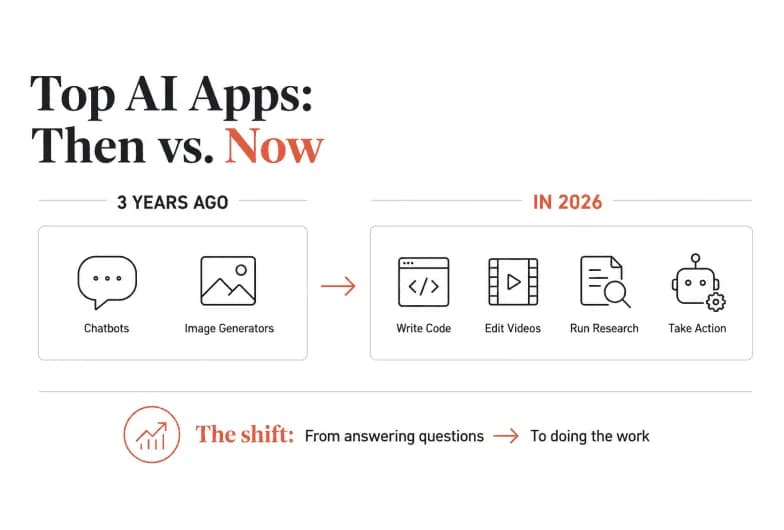
Three years ago, a list of the top AI apps would have been mostly chatbots and image generators. In 2026, it's a different world. The best AI apps now write your code, edit your videos, run your research, and - increasingly - take real action across your business tools without waiting for you to press a button.
The market has grown up fast. ChatGPT alone now crosses hundreds of millions of weekly active users, but the fastest-growing category isn't general-purpose chat anymore. It's agentic AI: tools that don't just answer questions but actually do the work. That shift is the single most important thing to understand before you pick your stack for the year ahead.
This guide breaks down the top AI apps by what they're actually good at, who each one is for, and where a single chat assistant stops being enough - and a shared, always-on execution layer like Pushable starts to matter.
Quick answer: what are the top AI apps in 2026?
If you just want the shortlist, here are the leaders by category:
- Best AI chatbot (general use)ChatGPT
- Best for writing and long-document analysisClaude
- Best for Google Workspace usersGemini
- Best AI research enginePerplexity
- Best AI coding assistantGitHub Copilot
- Best AI image generatorMidjourney
- Best AI video generatorGoogle Veo
- Best design and presentationsCanva
- Best AI voice generationElevenLabs
- Best shared AI workspace for teams (agents + automation)Pushable
No single app wins every category. The smartest approach in 2026 is to run two or three tools that match your workflow - and one automation layer that ties them together so the work actually flows.
How we picked the top AI apps
We evaluated the leading AI apps on four things that matter in real use: capability (does it do the job well?), usability (can a non-expert get value fast?), integration (does it connect to the tools you already use?), and value (free tier, pricing, and how the cost scales). We also weighted a fifth factor heavily this year - whether the app can take action, not just generate text - because that's the frontier separating 2026's winners from last year's novelties.
Everything below reflects that lens. Where an app is a strong single-player tool, we say so. Where teams outgrow it, we say that too.
Best AI chatbots
Chatbots are still the front door to AI for most people. They handle reasoning, writing, code, and quick answers in a natural, conversational way.
ChatGPT
ChatGPT remains the most widely used AI app in the world and the best starting point for most people. It's flexible, easy to use, and now handles text, voice, images, and files natively. For brainstorming, drafting, coding help, and everyday questions, it's the default for a reason.
Best for: General-purpose use, first-time AI users, quick creative and analytical tasks.
Claude
Anthropic's Claude stands out for thoughtful, careful reasoning and excels at writing and long-document analysis. Its Artifacts feature lets it build interactive interfaces, draft documents in a separate workspace, and reason through complex material with a large context window. If your work involves nuanced writing or digesting long reports, Claude is hard to beat.
Best for: Writers, researchers, and anyone working with long or sensitive documents.
Gemini
Google's Gemini is the natural pick if you live in Google Workspace. It's woven directly into Search, Gmail, and Docs, giving you context-aware help that ties into the tools you already use every day.
Best for: Google Workspace users who want AI inside their existing apps.
Best AI research and search engines
Perplexity
Perplexity dominates AI-powered research. It delivers direct answers with citations to live web sources, so you can verify what it tells you - a real advantage over chatbots that occasionally invent facts. Its deep research mode can synthesize multi-step reports, making it a genuine alternative to hours of manual searching.
Best for: Research, competitive analysis, fact-checking, and staying current on niche topics.
Best AI coding assistants
GitHub Copilot
GitHub Copilot is the top choice for developers. It autocompletes code, suggests functions, and increasingly handles multi-step engineering tasks. With a free tier and affordable paid plans, it's become a standard part of the modern developer's toolkit.
Best for: Software developers and engineering teams.
Vibe-coding tools (Lovable, Bolt)
You don't need to be a developer to ship software anymore. Tools like Lovable and Bolt turn plain-language prompts into working apps and websites. Lovable is the smoothest on-ramp; Bolt gives you more control and integrations when you're ready to go to production.
Best for: Founders, designers, and non-engineers building prototypes and MVPs.
Best AI apps for creative work
Midjourney (image generation)
Midjourney produces the highest-quality AI images available, with photorealistic detail and strong aesthetic consistency. Its browser interface removed the old Discord-only barrier, making it far more accessible.
Best for: Designers, marketers, and agencies who need premium visuals.
Google Veo (video generation)
Google Veo turns a simple text prompt into a cinematic, fully rendered video - complete with camera movement, lighting, and even generated audio. It's the current leader in AI video, and the realism is good enough that most viewers can't tell it's AI.
Best for: Content creators and marketers producing short-form video.
Canva (design and presentations)
Canva is the Swiss Army knife of design. Its AI suite generates fully formatted presentations from a prompt, creates images and video, and offers in-context design feedback - all with drag-and-drop simplicity that non-designers love.
Best for: Anyone who needs polished visuals or slide decks without design skills.
ElevenLabs (voice generation)
ElevenLabs sets the standard for AI voice, with hundreds of natural-sounding voices and a sound-effect generator. When you need clear narration without hiring a voice actor, it's the go-to.
Best for: Creators, podcasters, and video producers needing voiceover.
Best AI productivity and automation apps
Here's where the story gets interesting - and where most "top AI apps" lists quietly reveal the biggest gap in how people actually use AI.
Every app above is brilliant at one thing. But the real magic happens when your tools work together. If your stack already looks like a drawer full of half-used gadgets, you're in good company: more than 4 in 10 enterprises run multiple AI vendors at once, and nearly 80% struggle to integrate AI with their existing tech stack. Individual chatbots don't solve that problem. They make it worse, because now every person on your team has their own private AI session that nobody else can see, build on, or govern.
That's the problem the automation layer solves.
Zapier
Zapier is the veteran here, connecting thousands of apps and letting you build automated workflows with AI in the loop. Its Copilot and MCP features let you describe automations in natural language and trigger AI actions across your stack. If you want a mature, deeply integrated automation platform and don't mind building the plumbing yourself, it's a solid choice.
Best for: Teams that want maximum app coverage and are comfortable building workflows.
Pushable - the shared AI workspace built for teams
Most AI tools - including nearly every app on this list - are built for one person at a time. You type, you get a response, and when you close the tab, the work stops. There's no shared memory, no team context, and no way for AI to keep running when you're offline.
Pushable is built for the opposite reality: how teams actually work. It's a shared AI workspace where you deploy agents that run workflows around the clock, grounded in your real business context - your files, databases, knowledge base, and connected tools - all in one place. Here's what makes it different from a chat assistant:
- Team-native by default. One shared workspace with shared memory, files, and role-based permissions. Everyone works from the same context instead of a dozen private chat sessions that never talk to each other.
- A real execution layer, not just chat. Pushable runs multi-step workflows with orchestration, scheduling, triggers, approvals, and team handoffs - the things a single chatbot simply can't do.
- Always on. Agents run continuously in the cloud via schedules and event triggers, even when nobody has the app open. A new lead arrives at 2 a.m.? It gets qualified, enriched, and routed before you wake up.
- Human-in-the-loop control. Approval gates pause agents mid-task, and Telegram-based notify-and-approve flows let a human sign off on any action from their phone in one tap. Automation stays safe enough for real business use.
- 100+ native integrations. Agents read and write to your CRM, inbox, spreadsheets, and databases - HubSpot, Slack, Gmail, Notion, Salesforce, Google Sheets, and dozens more - plus custom MCP connectors.
- You pay for results, not seats. Credits are only spent when an agent actually completes a task. No per-seat fees that grow with headcount, and a free tier to start.
The practical difference is this: a chatbot helps one person draft a follow-up email. Pushable qualifies the lead, enriches it, routes it to the right rep, drafts the first touch, waits for your one-tap approval, and logs everything in your CRM - automatically, for the whole team, around the clock.
Best for: Teams that want AI to execute work - sales, marketing, HR, finance, ops, and support - not just answer questions in a chat window.
Stop Chatting About Work. Start Getting It Done.
Pushable is the shared AI workspace where your whole team deploys agents that run workflows around the clock - with connected tools, shared context, and one-tap human approvals. Start automating free.
Free vs. paid: what you actually get
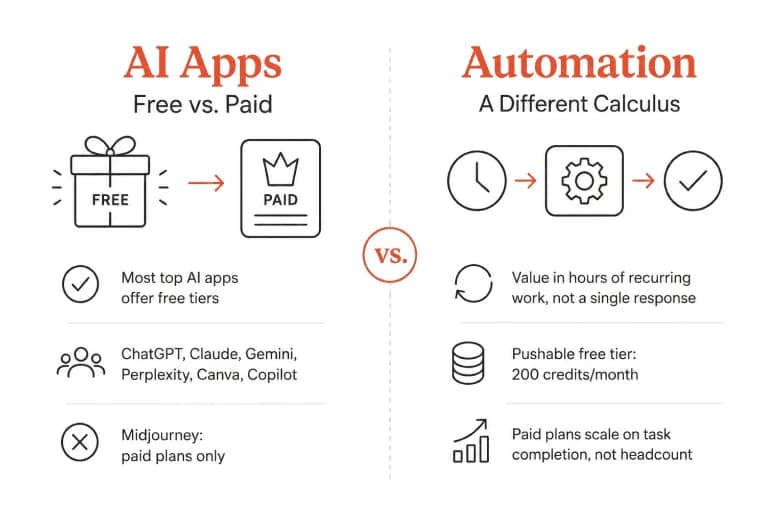
Most of the top AI apps offer a free tier with genuine functionality. ChatGPT, Claude, Gemini, Perplexity, Canva, and GitHub Copilot all let you start for free. Midjourney is the notable exception, with paid plans only.
For automation, the calculus is different. The value of a tool like Pushable isn't in a single response - it's in hours of recurring work executed without anyone touching it. Pushable's free tier gives you 200 credits a month to test real agents, with paid plans that scale on task completion rather than headcount, so the bill reflects work done, not seats filled.
How to choose the right AI apps for you
Start with the problem, not the tool. It's easy to end up with an "AI tools graveyard" - a dozen subscriptions you tried once and forgot. Avoid it with a simple rule:
- For thinking, writing, and one-off tasks, pick one chatbot (ChatGPT, Claude, or Gemini) and one research engine (Perplexity).
- For creative output, add the specialist that matches your medium - Midjourney, Veo, Canva, or ElevenLabs.
- For recurring team work that spans multiple tools, add an execution layer. This is the piece most people miss, and it's where the biggest time savings live. If you're a solo user stitching together a few apps, Zapier works. If you're a team that needs shared context, always-on agents, and human approval gates, Pushable is purpose-built for it.
The bottom line
The top AI apps in 2026 are no longer just clever chat windows. The leaders - ChatGPT, Claude, Gemini, Perplexity, Copilot, Midjourney, Veo, Canva, and ElevenLabs - each dominate a category. But the biggest shift this year is from answering to doing.
That's why the most important app in your stack might not be a chatbot at all. It might be the layer that ties everything together and actually runs the work. For teams, that layer is a shared AI workspace - and Pushable is built for exactly that: agents, approvals, and connected business context in one place, so your people can focus on what only humans can do.
Ready to move from chatting about work to getting it done? Start automating free with Pushable →
Note: AI apps and their capabilities change quickly. Verify current pricing, model versions, and features on each provider's official site before making a decision.