Accounting Automation Software: How AI Agents Are Rewriting the Finance Playbook
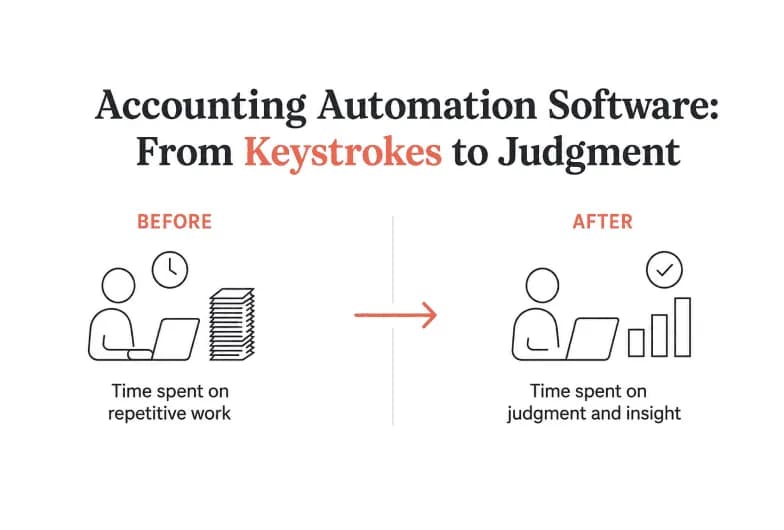
Short answer: Accounting automation software uses technology to take over the repetitive, rule-based work in your finance function - data entry, reconciliations, invoice processing, expense coding, reporting, and the month-end close - so your team spends its time on judgment instead of keystrokes. The category is now splitting in two: legacy point tools that automate one narrow slice, and AI-agent platforms that run entire finance workflows across the tools you already use, with a human approving every meaningful action. This guide covers both, and shows where an agentic platform like Pushable fits.
What is accounting automation software?
Accounting automation software is any system that replaces manual financial tasks with automated workflows. Instead of an accountant re-keying invoice data, chasing receipts, or building the same monthly report by hand, the software captures the data at the source, applies your rules, and completes the task - flagging only the exceptions that genuinely need a person.
The best way to understand it is by the work it removes:
- Manual data entry - transactions are captured and coded automatically rather than typed in.
- Reconciliation - balances between your ledger, bank feeds, and subledgers are matched and tied out.
- Exception handling - the system surfaces the handful of items that break the rules, instead of making you inspect all of them.
- Reporting - recurring statements and summaries are generated on a schedule from live data.
The payoff is consistent across every credible study and vendor: fewer errors, a faster close, a cleaner audit trail, and a finance team that finally has time for analysis and forecasting instead of record-keeping.
What accounting tasks can you actually automate?
Almost every high-volume, rule-driven finance process is a candidate. Here's how the work maps to automation:
Finance process | What manual looks like | What automation does |
|---|---|---|
Accounts payable (AP) | Keying invoices, routing approvals by email, cutting payments | Captures invoice data, routes for approval, schedules payment |
Accounts receivable (AR) | Manually invoicing, then chasing overdue customers | Generates invoices and sends payment reminders on a cadence |
Bank & account reconciliation | Matching lines across spreadsheets | Auto-matches transactions and flags only the mismatches |
Transaction coding | Tagging each expense to the right category | Codes transactions from history and context |
Month-end close | Weeks of checklists and spreadsheet wrangling | Runs a continuous, always-current close with variance alerts |
Financial reporting | Rebuilding the same report every month | Produces recurring reports from live data automatically |
Anomaly & spend monitoring | Spotting problems after the fact | Flags unusual spend or missing data in real time |
You don't have to automate all of it at once. Most teams start with the single most painful, repetitive process - usually reconciliation, AP, or the close - and expand from there.
The three generations of accounting automation
Understanding where the category has been makes it obvious where it's going.
1. Legacy ERP modules
The first wave lived inside big ERPs. Powerful, but rigid, expensive, and slow to change. Automation meant hard-coded rules that a consultant had to configure, and anything outside those rules fell back to a human.
2. Point-solution SaaS
The second wave broke finance into specialized tools: a corporate-card app for expenses, a close-management tool for month-end, an AP tool for bill pay. Each is genuinely good at its slice. The problem is that a real finance workflow crosses all of them - and the seams between tools become the new manual work. You also pay per seat for each one, whether or not the whole team uses it.
3. Agentic AI
The third wave is here now. Instead of a rule engine bolted to one process, an AI agent understands a goal, reads and writes across your existing tools, executes multi-step workflows, and pauses for a human when a decision carries risk. It isn't a single-purpose app - it's an execution layer that sits on top of the stack you already run.
This is the shift that matters in 2026. AI didn't just make the old tools smarter; it changed what a "tool" is. The question is no longer "which app automates my close?" but "which agent can run my finance workflows end to end while keeping me in control?"
Why the old model breaks down
If you've bought accounting automation software before, these frustrations will be familiar:
- Siloed automation. Each point tool automates its own box. The work of moving data between boxes - the copying, the reconciling, the re-keying - lands right back on your team.
- Per-seat pricing. You pay for every user whether they log in daily or twice a quarter. Costs grow with headcount, not with the value you get.
- Session-bound tools. A generic AI chat assistant only works while someone is typing. Close the tab and the automation stops. Finance work doesn't stop at 6 p.m.
- No native controls. Bolt-on AI features often act first and explain later. In finance, where every posting needs an owner and an audit trail, "act first" is a non-starter.
An agent platform is designed to close exactly these gaps.
What makes AI-agent accounting automation different
A modern agentic platform changes four things at once:
- It works across your existing tools. Rather than replacing QuickBooks, Xero, your spreadsheets, or your inbox, the agent connects to them and acts inside them. Pushable ships with 100+ native integrations - Google Sheets, Stripe, Gmail, Slack, HubSpot, and more - so agents read and write to the systems your team already trusts.
- It runs continuously, not just when you're online. Cloud-native agents execute on schedules and triggers around the clock. A new invoice arriving at 2 a.m. gets matched and queued; a month-end report is waiting in your inbox before you sit down.
- It keeps a human in the loop by design. This is the part finance leaders care about most. On Pushable, every action that matters pauses for approval - the team is notified on Telegram and signs off in one tap from a laptop or phone. Automation stays fast, but nothing hits your books without a person saying yes.
- It's team-native, with shared context. Instead of automation trapped in one person's chat history, the whole finance team works in one shared workspace with shared memory, files, and permissions. Every agent is grounded in your actual business context, and roles decide who can view, act, and approve.
How Pushable automates the finance function
Pushable is a shared AI workspace where you deploy agents to run the routine work and keep your people on the decisions. For a finance team, that looks like:
- Invoice reconciliation - the agent matches incoming invoices to vendors and prepares them for payment, so your books stay current without manual rollups.
- Chasing overdue payments - AR follow-ups go out on schedule instead of slipping through the cracks.
- Monthly reporting - recurring financial reports are drafted from live data and delivered on time, every time.
- Spend anomaly flagging - unusual or out-of-policy spend gets surfaced as it happens, not at quarter-end.
Two design choices make this safe enough for real accounting use:
- Approval gates on every meaningful action. When the Finance agent prepares a payment or posts a summary, it stops and waits. You get a Telegram notification - vendor, amount, context - and approve or reject in a tap. That's a built-in control and an audit trail, not an afterthought.
- Pay for results, not seats. Pushable runs on credits: a credit is spent only when an agent actually completes a task - a report filed, a payment queued, a workflow triggered. Nothing is deducted for a user simply having an account, and the bill doesn't balloon as you add people. A free tier lets you deploy agents and test workflows before you commit.
The distinction worth holding onto: Pushable doesn't replace your general ledger or ERP. It's the agentic layer that orchestrates finance workflows across the tools you already run - the connective tissue that the point-tool era was missing.
The benefits, concretely
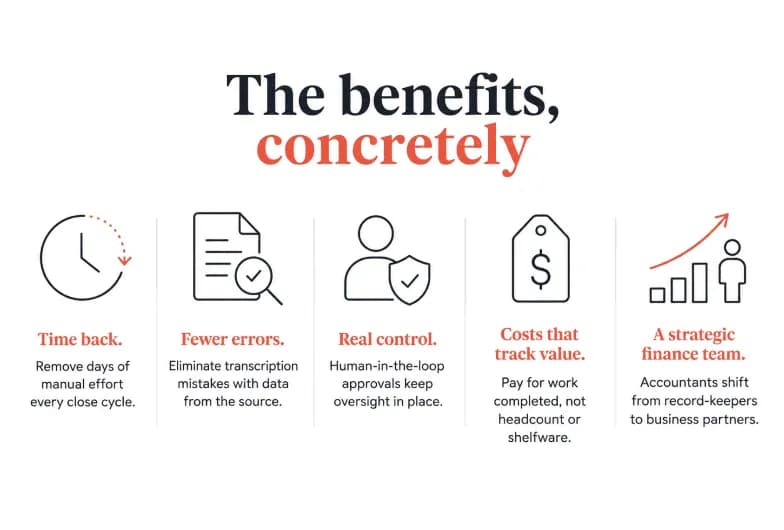
- Time back. Automating reconciliation, coding, and reporting removes days of manual effort from every close cycle.
- Fewer errors. Pulling data straight from the source and applying consistent rules eliminates the transcription mistakes that manual entry guarantees.
- Real control. Human-in-the-loop approvals mean automation never outruns oversight - every action has an owner and a record.
- Costs that track value. A pay-per-task model means you spend on work completed, not on headcount or shelfware.
- A strategic finance team. When agents handle the mechanics, your accountants move from record-keepers to business partners - forecasting, planning, and advising.
How to choose accounting automation software
Use these criteria to evaluate any option, agentic or traditional:
Criterion | What to ask |
|---|---|
Coverage | Does it automate one slice, or run workflows end to end across my stack? |
Integrations | Does it connect natively to the tools I already use (ledger, banks, spreadsheets, inbox)? |
Human control | Can I require sign-off before anything touches my books, with a clear audit trail? |
Pricing model | Am I paying per seat, or for work actually completed? |
Continuity | Does automation run on a schedule, or only when someone is logged in? |
Scalability | Does the cost and capability grow sensibly as my team and volume grow? |
Security | Are there role-based permissions, access controls, and a defensible data-handling policy? |
A finance-specific tip: weight human control and integration depth highest. An agent that acts across your real tools and waits for approval gives you the speed of automation without surrendering the oversight that accounting demands.
Getting started without boiling the ocean
You don't need a six-month implementation to see value.
- Pick one painful workflow - the reconciliation, AP queue, or monthly report that eats the most time.
- Connect the tools that workflow touches - your spreadsheet, inbox, or payment system.
- Deploy an agent with the right permissions - decide who can act and who must approve.
- Keep a human on the approvals - let the agent do the work; you sign off on the decisions.
- Expand once you trust it - add the next workflow, then the next.
With a shared workspace like Pushable, a team can be live in minutes rather than months, and scale credits up or down as the workload changes.
The bottom line
Accounting automation software has graduated from rigid ERP modules and single-purpose apps to AI agents that run finance workflows end to end - always on, connected to your existing stack, and paused for a human whenever a decision carries weight. That combination of speed and control is what finance teams have wanted all along.
If you want to see it on your own workflows, Pushable lets you deploy finance agents in minutes, keep every action behind a one-tap approval, and pay only for the work that actually gets done.