Time Sheet Template: Free Formats, Fields & the AI-Powered Alternative
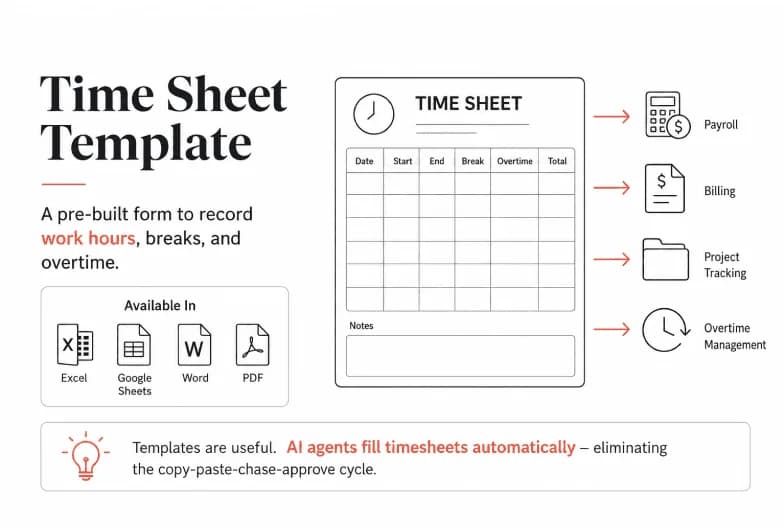
A time sheet template is a pre-built form - in Excel, Google Sheets, Word, or PDF - that you use to record employee work hours, breaks, and overtime for payroll, billing, and project tracking. You can grab a free one below, learn exactly which fields matter, and see why more teams are replacing the copy-paste-chase-approve cycle with AI agents that fill timesheets automatically.
If you're reading this, you already know the drill: download a template, email it around, wait for people to forget, chase them on Friday, fix the broken formulas, then re-key everything into payroll. The template isn't the problem. The manual process wrapped around it is. We'll cover both - the best free time sheet templates available today, and how to remove the busywork entirely.
What Is a Time Sheet Template?
A timesheet template is a reusable layout for logging the hours a person works over a set period. Instead of building a spreadsheet from scratch every pay cycle, you fill in a ready-made structure that already has the right columns, totals, and formatting.
A good template captures:
- Employee name, ID, and role
- Manager/supervisor and approval line
- Pay period (the week, two weeks, or month being tracked)
- Date and day for each entry
- Clock in / clock out times
- Break or lunch duration
- Regular hours, overtime, PTO, sick, and holiday hours
- Hourly rate and calculated pay (optional)
- Notes, project, or task codes for billing
- Signature and date for sign-off
Templates are used by small businesses for payroll, by agencies and law firms for client billing, by contractors tracking on-site hours, and by nonprofits logging volunteer time. The format you choose depends on how you pay people and how much you need to bill back to clients.
The Best Free Time Sheet Templates by Type
There's no single "right" timesheet - the correct one matches your pay period. Here's how the common types break down.
Weekly time sheet template
Tracks one employee's hours across a single seven-day workweek. Best for hourly staff, weekly payroll, and quick approvals. This is the most-downloaded format and the default starting point for most teams.
Bi-weekly time sheet template
Covers two weeks on one sheet, matching the most common U.S. pay schedule. Fewer approvals per month, but each sheet holds more data - so formula errors compound faster.
Monthly time sheet template
Logs a full month of hours, ideal for salaried staff, retainer clients, and lightweight tracking where daily precision matters less than the monthly total.
Daily time sheet template
Records start/end times for a single day, often per worksite or per crew. Popular in construction, field services, and healthcare where multiple people clock in at one location.
Project (billable) time sheet template
Adds columns for project name, task, case number, and billable rate. Built for agencies, consultants, attorneys, and freelancers who invoice clients by the hour. This is where accuracy pays for itself - every un-logged hour is revenue you never bill.
Where to find free downloads
You can pull free, ready-to-use time sheet templates from Microsoft Excel/Microsoft 365, QuickBooks Time, Canva, Smartsheet, and printable-PDF collections on Pinterest, among others. They're genuinely useful for getting started. The catch isn't the file - it's everything that happens after you download it.
A Simple Weekly Time Sheet Template You Can Copy
Paste this into Excel or Google Sheets and you're ready in under a minute:
Day | Date | Time In | Time Out | Break (hrs) | Regular Hrs | Overtime Hrs | Total |
|---|---|---|---|---|---|---|---|
Monday | |||||||
Tuesday | |||||||
Wednesday | |||||||
Thursday | |||||||
Friday | |||||||
Saturday | |||||||
Sunday | |||||||
Weekly Total |
Header fields to add above the table: Employee Name · Employee ID · Manager · Week Starting · Hourly Rate · Signature · Date.
Auto-total formula (Google Sheets / Excel): in the Total column, use =(Time Out - Time In - Break)*24 to convert the result into decimal hours, then =SUM() the column for your weekly total.
That's a functional timesheet. It also perfectly illustrates the ceiling of what a template can do - which brings us to the real problem.
The Hidden Cost of Manual Time Sheet Templates
Templates solve formatting. They do nothing about the workflow, and that's where the hours (and money) leak out.
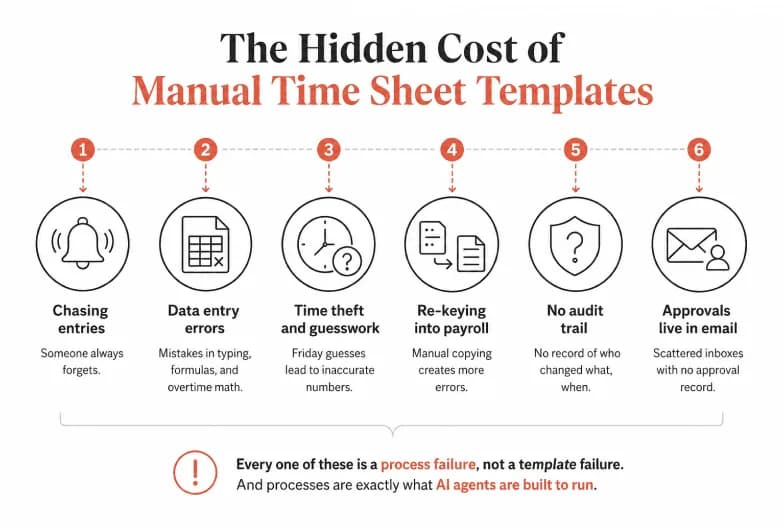
- Chasing entries. Someone always forgets. Managers spend Friday afternoons pinging people for missing hours instead of doing actual work.
- Data entry errors. Manually typed times, mis-copied formulas, and wrong overtime math are the norm, not the exception. Studies of manual timekeeping consistently find payroll error rates high enough to matter at any scale.
- Time theft and guesswork. When people fill timesheets from memory on Friday, the numbers are estimates. Estimates cost you on payroll and lose you money on client billing.
- Re-keying into payroll. The template doesn't talk to your payroll or invoicing system, so someone copies numbers by hand - a second chance to introduce errors.
- No audit trail. A spreadsheet cell doesn't remember who changed what, when. That's a compliance problem for overtime and labor regulations.
- Approvals live in email. Sign-off happens in scattered inboxes with no record of what was approved.
Every one of these is a process failure, not a template failure. And processes are exactly what AI agents are built to run.
The AI Alternative: Automate Time Tracking Instead of Filling It In
Here's the shift: instead of a static file that waits for a human to update it, imagine an AI agent that collects the hours, fills the sheet, flags the gaps, and routes it for approval - on its own, every pay period, in the background.
That's the category Pushable.ai is built for. Pushable is a shared AI-agent workspace - an execution layer where teams deploy agents that run multi-step workflows on a schedule or trigger, keep a human in the loop for sign-off, and read and write directly to the tools you already use.
Applied to timesheets, that means the template stops being something a person maintains and becomes something an agent operates.
How an AI agent replaces the manual timesheet workflow
- Collect hours automatically. Instead of asking people to remember, a Pushable agent can pull activity signals from the tools where work already happens - your project system, calendar, tickets, or shared logs - via its 100+ native integrations and custom connectors.
- Populate the sheet. The agent writes the hours straight into your Google Sheet or Excel timesheet, applies your overtime rules, and calculates totals - no formulas to break.
- Chase the gaps for you. Missing an entry? The agent nudges the right person automatically, so managers stop being the collections department.
- Keep a human in control. Pushable's approval gates pause the agent mid-task and route the completed timesheet to a manager for one-tap sign-off (including Telegram-based notify/approve flows), so nothing hits payroll without a human's OK.
- Run continuously. Because agents run on schedules and event triggers in the cloud - even when no one has the app open - the whole cycle repeats every pay period without anyone kicking it off.
- Feed payroll and billing. Approved hours flow into your downstream systems through the same integration layer, killing the copy-paste re-keying step entirely.
The result: you keep the clean, familiar timesheet output - but the labor of producing it disappears.
Templates vs. Spreadsheet Software vs. AI Automation
Capability | Free Template (PDF/Excel) | Spreadsheet + Formulas | AI Automation (Pushable.ai) |
|---|---|---|---|
Cost to start | Free | Free | Paid, low setup effort |
Auto-calculates totals | No (PDF) / Yes (Excel) | Yes | Yes |
Collects hours for you | No | No | Yes |
Chases missing entries | No | No | Yes |
Approval workflow | Manual (email) | Manual | Built-in, human-in-loop |
Syncs to payroll/billing | No | No | Yes |
Audit trail | No | Limited | Yes |
Runs on its own | No | No | Yes, scheduled/triggered |
Templates win on "free and instant." AI automation wins on everything that costs you time after the download.
When a Template Is Enough (and When It Isn't)
Be honest about your stage - this matters more than any tool pitch.
A template is genuinely fine if: you have a handful of employees, a simple weekly or monthly pay cycle, no client billing, and the whole thing takes ten minutes a period. Download one from Excel, Smartsheet, or QuickBooks and move on.
It's time to automate when: you're chasing people every pay period, billing clients by the hour, managing multiple sites or projects, seeing payroll errors, or spending real hours re-keying data between systems. At that point the "free" template is the most expensive option you have, because it's paid for in your team's time.
The Bottom Line
A time sheet template is the right place to start, and the free options from Excel, QuickBooks, Canva, and Smartsheet will get you tracking hours today. But a template only formats the work - it never does it. The moment chasing entries, fixing formulas, and re-keying into payroll starts eating real hours, the smarter move is to let an AI agent run the whole cycle for you.
That's what Pushable.ai does: turn timesheets from a task your team maintains into a workflow that maintains itself.