One Pager Template: Free Examples, Layouts & How to Make One (2026 Guide)
Last updated: August 2026
A one pager template is a pre-built, single-page layout you fill in with your own text and visuals to summarize a product, pitch, project, or topic clearly enough to grasp in under two minutes. Whether you need a business one-pager to win an investor, a sales sheet to close a deal, or a student one-pager to show what a class learned from a novel, the right template removes the "blank page" problem and gives you a professional structure to build on.
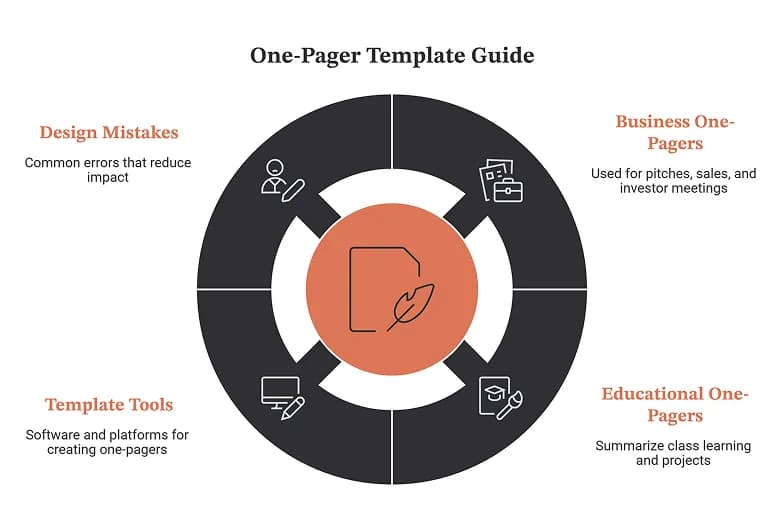
This guide covers what a one pager is, the two main types (business and educational), exactly what to include in each, step-by-step instructions to make one, the best free template tools, and the design mistakes that quietly kill a one-pager's impact.
Quick Answer: What Is a One Pager Template?
A one pager template is a ready-made single-page document layout with placeholder sections (usually a headline, key points, visuals, and a call to action) that you customize for your own content. The two most common uses are:
- Business one-pagers: investor pitches, sales sheets, executive summaries, product overviews, event or nonprofit summaries, and visual resumes.
- Educational one-pagers: a creative assignment where students distill their takeaways from a book, article, unit, poem, or experiment onto a single page.
Both share the same core principle: distill the message to one page, make it visual, and cut everything unnecessary.
What Is a One-Pager?
A one-pager is a single-page document that presents the most important information about a topic so a reader can understand it quickly. It works as a written elevator pitch: short enough to skim in seconds, complete enough to prompt a next step.
The format is deliberately constrained, and that constraint is the point. If you can't fit your idea on one page with clarity, you probably don't understand it well enough yet. One page of sharp thinking beats ten pages of vague intentions.
One-Pager Dimensions
Because a one-pager is meant to print cleanly and share easily, it almost always uses a standard page size:
Format | Size |
|---|---|
US Letter | 8.5 × 11 inches (612 × 792 px at screen resolution) |
A4 | 210 × 297 mm |
Print-ready Letter | ~2550 × 3300 px at 300 DPI |
If you plan to print, design at 300 DPI and export as a PDF to keep the layout locked and the resolution crisp.
The Two Types of One Pager Templates
Search for "one pager template" and you'll find two very different results side by side. Picking the right type first saves you from downloading a slick sales template when what you actually need is a classroom activity sheet.
Business One-Pager | Educational One-Pager | |
|---|---|---|
Goal | Persuade and prompt action | Teach, reflect, and demonstrate understanding |
Audience | Investors, clients, partners, stakeholders | Students, teachers, learners |
Typical length | ~250 words, heavily visual | One page, mix of text and hand-drawn or digital visuals |
Core sections | Headline, problem, solution, benefits, proof, CTA | Main idea, key concepts, quotes, visuals, personal response |
Common uses | Pitch, sales sheet, product brief, resume | Book report, unit summary, "about me," concept map |
Made with | Canva, Visme, Piktochart, PowerPoint | Printable PDF, Canva, or hand-drawn |
Business One-Pager Template: What to Include
A business one-pager works like a snapshot of your company, product, or proposal. Recipients who see dozens of pitches a week favor this format because it strips away filler and surfaces the numbers.
Use this fill-in structure as your template:
- Headline (the hook). One clear line that states who you are and why you matter. Make it the largest element on the page.
- Executive summary or overview. Two to three sentences summarizing your company, product, or offer and what you want from the reader.
- Problem statement. Name the pain point you solve, with just enough context that the reader nods along. Be specific and concrete.
- Solution. Explain how your product or service fixes that problem. Focus on outcomes, not feature lists.
- Key benefits or value proposition. Three to five short, scannable points. Bullet them.
- Proof. Data, traction metrics, testimonials, logos, or a simple chart. This is what turns interest into trust.
- Call to action (CTA). Tell the reader exactly what to do next: book a call, visit a URL, scan a QR code. A one-pager without a CTA leaves your reader with nowhere to go.
Rule of thumb: aim for roughly 250 words of copy. If your draft runs long, you're writing a brochure, not a one-pager.
Popular business one-pager variations
- Startup pitch one-pager: problem, solution, market size, traction, funding ask.
- Sales one-pager: product value, differentiators, pricing, CTA.
- Executive summary: the highlights of a longer business plan.
- Event one-pager: purpose, agenda, speakers, registration QR code.
- Nonprofit one-pager: mission, impact numbers, and a donation or partnership ask.
- Visual resume / portfolio: contact info, experience, skills, with design flair.
Educational One-Pager Template: What to Include
The educational one-pager is a different animal. Popularized by the AVID college-readiness program and now a staple in English Language Arts classrooms, it asks students to convey their key takeaways from something they've read, watched, or studied, all on a single, creative page. It's easily adapted to any subject.
Unlike a sales one-pager, the goal isn't to persuade. It's understanding and retention. A good template gives students a roadmap so they aren't paralyzed by a blank page, while still leaving room for creative expression.
Use this fill-in structure for a student one-pager:
- Title / topic. The book, article, unit, poem, or concept being explored.
- Main idea or thesis. The central takeaway, written in a sentence or represented visually.
- Key concepts, events, or vocabulary. The most important ideas, rules, characters, or terms.
- Meaningful quotes or evidence. Two to three quotes or facts that support the main idea, with brief notes on why they matter.
- Visuals. Drawings, icons, symbols, or cut-outs that represent the content. Visual thinking is the heart of the exercise.
- Personal response or connection. The student's reaction, an opinion, or a link between the material and the modern world or their own life.
Teacher tips for one-pager assignments
- Show examples first. Sample one-pagers clarify expectations and spark ideas.
- Provide a template with mapped areas for students who feel wary, and let confident students go off-template.
- Give a simple rubric covering content accuracy, required elements, and effort, not artistic skill.
- Let students flip the page over and design from blank space if they want more freedom.
Common classroom one-pagers include novel and poem responses, nonfiction article summaries, "all about me" or name-tent activities for the first week, historical timelines, and science-experiment recaps.
How to Make a One Pager in 6 Steps
The process is nearly identical whether you're building a business or educational one-pager.
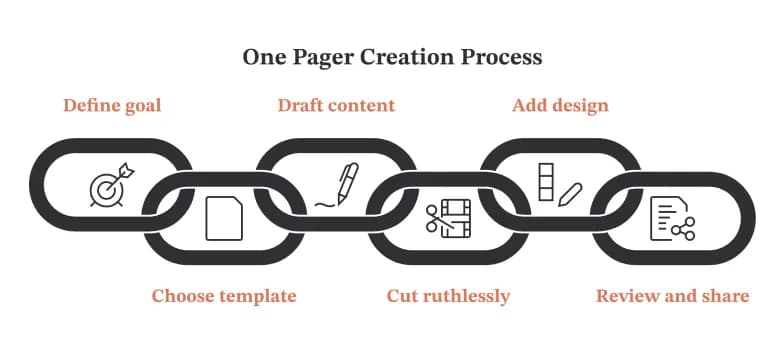
- Define the goal and audience. What single action or understanding do you want from the reader? Everything on the page serves that.
- Choose a template or page size. Start from a template that matches your type, or open a blank Letter/A4 canvas.
- Draft the content in sections. Write the headline, key points, proof, and CTA (or main idea, concepts, quotes, and response) before you design.
- Cut ruthlessly. Remove anything that doesn't earn its space. Aim for one page with breathing room, not a page crammed to the margins.
- Add visual hierarchy and design. Make the headline biggest, use consistent fonts and brand colors, and add icons, a chart, or images to guide the eye.
- Review, export, and share. Get feedback, then export as a PDF to lock the layout for both print and digital sharing.
Best Free One Pager Template Tools
You don't need design software to make a professional one-pager. These platforms all offer free one pager templates you can customize in a browser.
Tool | Best for | Why use it |
|---|---|---|
Canva | Design-led business & school one-pagers | Huge free template library, drag-and-drop editor, easy PDF export |
Visme | Data-rich business one-pagers | Built-in charts, infographics, and proposal templates |
Piktochart | Classroom & infographic one-pagers | Education-focused templates and simple visuals |
PowerPoint / Google Slides | Quick, no-frills one-pagers | Familiar tools; set the slide to Letter/A4 and export as PDF |
Google Docs / Word | Text-first drafts | Zero learning curve, real-time collaboration |
Teachers Pay Teachers | Ready-made student one-pager packets | Done-for-you assignments with instructions and rubrics |
One-page websites & landing pages | AI builds an editable React + Tailwind page from any URL; drag-and-drop editor and single-file HTML export |
Choosing quickly: need visual polish and brand control, pick Canva or Visme. Need a print-and-go classroom assignment with instructions, browse Teachers Pay Teachers or a free printable one-pager packet. Just need to draft fast, start in Google Docs and design later.
Build a one-page website with WeBuilder
If your "one-pager" is really a single-page website or landing page rather than a printable PDF, WeBuilder takes a different approach from the design tools above. Instead of dragging shapes onto a blank canvas, you paste any URL and its AI composes a complete, editable single page from a library of 30 layout primitives (hero, features, pricing, testimonials, call-to-action) which you then refine in a drag-and-drop editor and export as clean single-file HTML or a Next.js project. That makes it a strong fit for startup, SaaS, product, and event one-pagers where the finished piece lives on the web and needs a working call-to-action rather than a print layout. Its template gallery has dozens of ready-made starting points you can preview live and open straight in the editor. Here are five worth previewing first:
- Browse all templates: the full gallery of ready-made, fully editable pages to filter and preview.
- Nexaflow (SaaS & automation): a conversion-focused tech/SaaS layout, ideal for a product or startup one-pager.
- EverAfter (event/wedding): an elegant, story-driven layout that adapts well to event and announcement one-pagers.
- Saffron & Oak (hospitality): a rich visual layout suited to menus, services, or a local-business overview.
- Marry (event landing): a single-focus event page you can strip down to one screen with a clear CTA.
Tip: whichever template you start from, trim it to a single screen, keep one primary call-to-action, and export as HTML; the same one-pager discipline applies whether the output is a PDF or a web page.
One-Pager Design Best Practices
Great one-pagers share a handful of design habits regardless of purpose:
- Lead with the takeaway. Readers should grasp the value in the first few seconds of skimming, never bury it under background.
- Use visual hierarchy. Size, color, and placement should guide the eye from headline to key points to CTA in the order you intend.
- Embrace white space. Breathing room makes a page look professional and readable; a wall of text signals effort, not clarity.
- Keep text short and scannable. Bullet points and short paragraphs beat dense blocks.
- Lean on visuals. Icons, a single chart, or a photo can replace a paragraph and improve retention.
- Stay on-brand. Consistent fonts and colors make a business one-pager look credible.
- End with one clear next step. For business, that's a CTA. For a pitch or event, add a QR code to make action frictionless.
Common One-Pager Mistakes to Avoid
- Overcrowding the page. The most frequent failure. Cramming in every detail overwhelms the reader and dilutes the message. Prioritize.
- No visual hierarchy. When everything looks equally important, nothing does. Make headlines clearly larger than body text.
- Ignoring the audience. Tailor language, tone, and content to who's actually reading it.
- Weak or missing CTA. If the reader doesn't know what to do next, the one-pager fails its one job.
- Treating it as a shrunken report. A one-pager is a thinking tool that forces distillation, not a compressed brochure or PRD.
- Skipping proof. In business, a data point or testimonial is often what converts interest into a reply.
One-Pager Examples & Ideas by Use Case
Need inspiration? Here's how the format flexes across contexts:
- Investor pitch: problem, solution, market, traction, ask, designed to earn a meeting.
- Sales sheet: product value, differentiators, and pricing for a single offer.
- Product brief (PMs): the problem, who it's for, what it does, and why it matters, the seed a full PRD grows from.
- Event flyer: agenda, speakers, and a registration QR code.
- Nonprofit summary: mission, impact stats, and a clear ask for donors or sponsors.
- Student novel one-pager: theme, key quotes, character notes, and a personal connection.
- "About me" one-pager: a back-to-school activity that builds classroom community.
- Visual resume: experience and skills with enough design flair to stand out.
Frequently Asked Questions
How long should a one-pager be?
Exactly one page. For business one-pagers, aim for around 250 words plus visuals so the reader can absorb it in under two minutes. Educational one-pagers fill one page with a mix of text and visuals rather than a word count.
What size is a one-pager?
Standard US Letter (8.5 × 11 inches) or A4 (210 × 297 mm). For printing, design at 300 DPI and export as a PDF.
Is a one-pager the same as a pitch deck?
No. A one-pager is a single static page for early alignment and quick understanding. A pitch deck is a multi-slide narrative for persuasion and fundraising. The one-pager usually comes first and can seed the deck.
What's the best free one pager template tool?
Canva is the most popular for design-led business and school one-pagers thanks to its free template library and easy export. Visme is stronger for data-heavy business documents, and Teachers Pay Teachers is best for ready-made student assignments.
What is an educational one-pager?
It's a single-page learning resource, popularized by the AVID program, where a student distills what they learned from a book, article, unit, or experiment into text and visuals. The goal is understanding and retention, not persuasion.
Can I make a one-pager in Google Docs or PowerPoint?
Yes. Set the page or slide size to Letter or A4, build your sections, and export as a PDF. It won't be as design-rich as Canva, but it's fast and collaborative.
Start With a Template, Not a Blank Page
The hardest part of any one-pager is the empty canvas. A template solves that by handing you a proven structure so you can focus on your message instead of your margins. Pick the type that matches your goal (a business one-pager to persuade, or an educational one-pager to teach), fill in the sections above, cut anything that doesn't earn its place, and export a clean PDF.
One page, done well, can work harder than a ten-slide deck or a five-paragraph report. Choose your template and start building.