Customer Service Software in 2026: A Complete Buyer's Guide
Last updated: August 2026
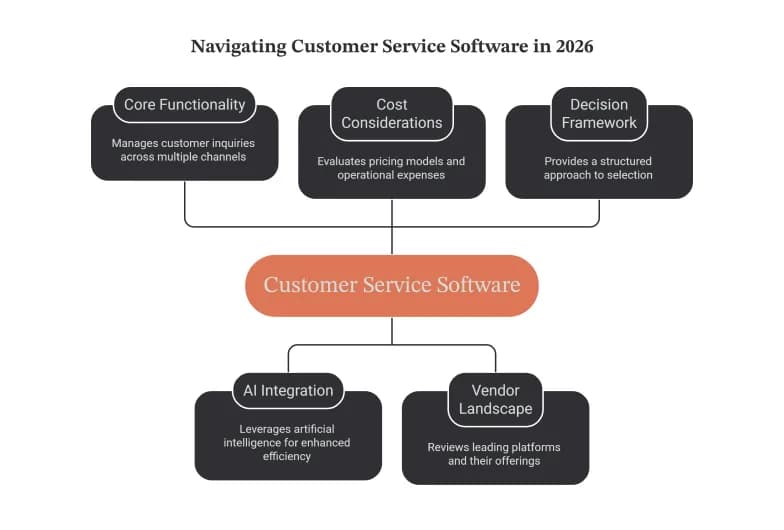
Customer service software is the system a business uses to receive, organize, track, and resolve customer questions and issues across every channel (email, live chat, phone, social media, and self-service) from one shared workspace. In 2026, the category has been reshaped by AI, and choosing the right platform now depends less on feature checklists and more on how a tool actually resolves work, what it costs to run, and whether it earns your customers' trust.
This guide explains what customer service software does, the main types available, the features that matter, and the current AI reality (the honest version, not the vendor headlines). It then walks through the leading platforms, how pricing really works in 2026, and a practical framework for choosing. Everything here is written to help you make a decision, not to sell you one specific product.
How we approached this guide: This is a vendor-neutral overview compiled from public product documentation, industry research, and pricing pages reviewed in mid-2026. Prices and features change frequently, so treat every figure as a starting point and verify directly with each vendor before you buy.
What is customer service software?
Customer service software is a platform that centralizes customer interactions so support teams can manage, track, and resolve them efficiently. Instead of questions scattered across personal inboxes, phone notes, and social media DMs, everything lands in one place where it can be prioritized, assigned, answered, and measured.
At its core, most customer service software organizes incoming requests as tickets: a single record for each customer issue that captures the conversation, context, and status from first contact to resolution. Around that core, modern platforms add automation, a knowledge base, reporting, and, increasingly, AI agents that can resolve routine questions on their own.
The goal is simple: help customers get accurate answers quickly, and give agents the context and tools to handle everything the automation can't.
Why it matters more than ever in 2026
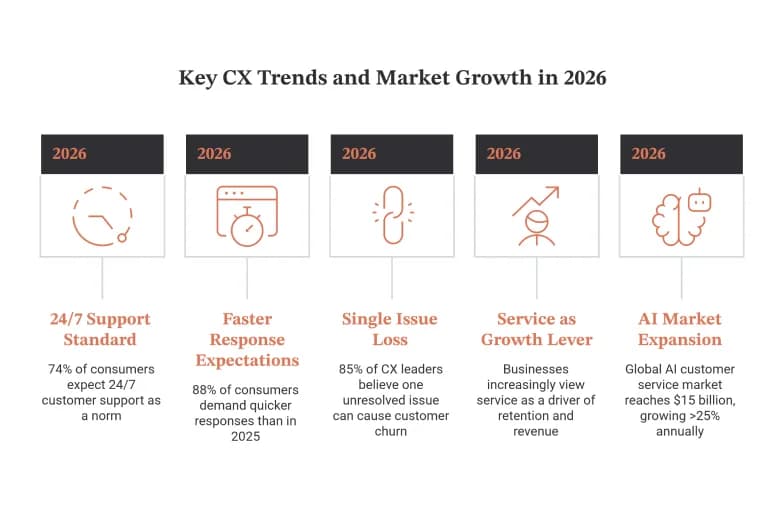
Customer expectations have moved from "nice to have" to non-negotiable. According to the Zendesk CX Trends 2026 report (based on a survey of more than 11,000 consumers and business leaders across 22 countries), 74% of consumers now treat 24/7 support as a standard rather than a perk, and 88% expect faster responses than they did a year ago. The same research found that 85% of CX leaders believe a single unresolved issue is enough for a customer to leave a brand.
Service is also increasingly viewed as a growth lever rather than a cost center. Businesses now connect fast, personalized support directly to retention and revenue, which is why the software that powers it has become a core investment rather than an afterthought.
At the same time, the market is expanding quickly. Industry roundups (drawing on figures compiled by Lorikeet and others) put the global AI customer service market at roughly $15 billion in 2026, growing at more than 25% a year. The takeaway for buyers: this space is moving fast, and the tool you pick should be one you can grow with.
The main types of customer service software
"Customer service software" is an umbrella term. Understanding the categories underneath it helps you avoid buying more, or less, than you need.
1.Help desk and ticketing software
The workhorse of support. It converts every request into a trackable ticket, routes it to the right agent or team, and manages it through to resolution with statuses, priorities, and SLAs. Best for teams that need structure, accountability, and reporting across high volumes.
2.Shared inbox software
A lighter, email-first approach that turns a mailbox like support@ into a collaborative workspace with assignment, collision detection, and internal notes, without the heavier ticketing scaffolding. Best for small teams that want simplicity over configurability.
3.Live chat and messaging software
Real-time support through a website widget, in-app messenger, or channels like WhatsApp. Best for teams that want to catch customers in the moment, especially during onboarding, checkout, or product use.
4.Self-service and knowledge base software
Help centers, FAQs, and community forums that let customers find answers on their own. This is where a lot of quiet efficiency lives: well-maintained self-service reduces ticket volume before a human is ever involved.
5.Contact center and voice software
Phone-first platforms with call routing, IVR, and increasingly AI voice agents. Best for teams where voice remains a primary or regulated channel.
6.All-in-one CX suites
Platforms that combine several of the above (ticketing, chat, self-service, voice, and often a CRM) into a single system. Best for growing or larger organizations that want one connected source of truth rather than a patchwork of tools.
Many teams start with one category and consolidate into a suite as they scale. There is no single "right" type, only the right fit for your channels, volume, and complexity.
Core features to look for
Whatever category you shop in, a strong customer service platform in 2026 should include most of the following:
- Omnichannel inbox: email, chat, social, voice, and messaging unified in one workspace so agents don't tab-hop.
- Ticketing and routing: automatic assignment, prioritization, and SLA tracking so nothing slips.
- Automation: rules, triggers, and workflows that handle repetitive steps (tagging, routing, follow-ups).
- AI agents and assistants: automation that can resolve routine tickets end to end, plus copilots that draft replies and summarize threads for human agents.
- Knowledge base and self-service: a customer-facing help center and an internal knowledge source that AI can draw from.
- CRM and context: a unified customer view (order history, past conversations, account details) so answers are personalized.
- Reporting and analytics: dashboards for resolution time, CSAT, first-contact resolution, and volume trends.
- Integrations: connections to your store, billing, product, and communication tools.
- Security and compliance: SOC 2, GDPR, and, where relevant, HIPAA. Verify these directly, because they vary by plan and vendor.
A quick note on features that look impressive but rarely move the needle: long feature checklists are easy to inflate. What matters is whether the software resolves your actual ticket mix reliably, not how many boxes it ticks.
The 2026 AI reality: adoption is high, resolution is the bottleneck
Every vendor is now marketing AI heavily, so it's worth separating the hype from what's actually happening. The single most important distinction in 2026 is between AI-assisted metrics (AI helped a human), deflection metrics (a bot handled first contact), and AI-resolved metrics (AI closed the issue end to end without the customer coming back).
The data shows a real gap between adoption and outcomes:
- Roughly 88% of contact centers report using AI in some form, but only about a quarter have fully integrated it into daily workflows (per figures compiled by Lorikeet).
- Gartner projects that agentic AI will autonomously resolve around 80% of common customer service issues by 2029, but industry roundups note that only about 14% of issues resolve through self-service today.
- Salesforce reports that organizations deploying AI agents expect roughly a 20% reduction in service costs and resolution times, though independent analysts suggest realistic blended savings land in the 20 to 35% range once licensing and oversight are subtracted.
Trust is the other half of the story. The Zendesk CX Trends 2026 data found that 95% of consumers expect an explanation for decisions an AI makes, yet only a minority of organizations are set up to provide that. Salesforce research cited across the industry indicates consumer trust has slipped (a majority of consumers say they trust companies less than they did a year ago), and analysts at Forrester have warned that a meaningful share of brands will damage their customer experience through premature AI deployment.
What this means for buyers
Don't choose a platform on deflection headlines. A ticket a bot "deflects" but the customer reopens an hour later wasn't resolved; it was delayed. Evaluate AI on genuine first-contact resolution, and make sure human escalation is always easy. Notably, around 80% of consumers still expect to reach a person when they ask, so the strongest setups pair capable automation with a clear, fast path to a human.
Best customer service software in 2026
There is no universal "best" platform, only the best fit for your size, channel mix, and how you want to pay for AI. Below is a vendor-neutral look at widely used options and where each tends to shine. Pricing is approximate and was reviewed in mid-2026; verify current figures on each vendor's page.
Platform | Best for | Starting price (approx.) | AI cost model |
|---|---|---|---|
Zendesk | Large teams, complex omnichannel workflows | ~$19 to $55 / agent / mo | Copilot add-on ~$35 to $50 / agent |
Freshdesk | Cost-conscious mid-size teams | Free (1 to 2 agents, 6 mo); Growth ~$19 / agent | Freddy AI, session-based add-on |
Help Scout | Small, email-first teams wanting simplicity | Free plan; ~$20 to $25 / user | AI Answers ~$0.75 / resolution |
Intercom (Fin) | Product-led SaaS with in-app messaging | ~$29 / seat | Fin ~$0.99 / resolution |
Salesforce Service Cloud | Enterprises in the Salesforce ecosystem | Custom / enterprise | Agentic, usage-based |
Zoho Desk | Budget-conscious teams; Zoho users | ~$7 to $40 / agent | Zia AI bundled at higher tier |
Gorgias | Shopify and ecommerce brands | Ecommerce-tier pricing | Per-resolution automation |
Pushable AI | Teams automating support tasks across tools with human approval | Free tier; paid from ~$27 / mo | Credit-based (pay per completed task) |
Zendesk
One of the oldest and most recognized platforms, Zendesk offers a broad, highly configurable omnichannel suite with strong automation, reporting, and enterprise scalability. Best for large teams standardizing service across many departments. Watch out for costs that climb as you add channels, seats, and the AI Copilot add-on.
Freshdesk
Part of the Freshworks suite, Freshdesk is known for an approachable interface and competitive pricing, including a limited free program. Best for mid-size teams that want a full-featured help desk without top-tier pricing. Watch out for key features (like certain routing and survey tools) being spread across higher tiers, and note it doesn't offer HIPAA; avoid it for protected health data.
Help Scout
A clean, email-first platform built around a shared inbox with just enough structure. Best for small teams (often under ~10 agents) that value simplicity and a human feel. Watch out for fewer heavy enterprise controls, and per-resolution AI fees that add up at high volume.
Intercom (Fin)
Intercom leaned so far into AI that it now prices its Fin agent on outcomes: you pay per resolution rather than a flat AI seat fee. Best for product-led SaaS companies with strong in-app engagement and lower ticket volume. Watch out for per-resolution costs that can scale sharply for high-volume, traditional support queues.
Salesforce Service Cloud
A complete, agentic enterprise platform that shines when your data and processes already live in Salesforce. Best for larger organizations wanting deep customization and a single CRM-plus-service source of truth. Watch out for complexity and cost: this is an enterprise commitment, not a quick setup.
Zoho Desk
A strong value option, especially if you already use Zoho's broader suite, with AI bundled at its higher tier rather than metered. Best for budget-conscious teams. Watch out for an ecosystem pull toward other Zoho products.
Gorgias
Purpose-built for ecommerce, with the widest native Shopify integration. Best for online retailers who want order context and support in one place. Watch out for a narrower fit outside ecommerce.
Pushable AI
A newer, AI-native option that takes a different shape from the tools above. Rather than a traditional ticketing suite, Pushable is a shared AI workspace where teams deploy agents to run support workflows (triaging tickets, drafting replies, escalating stuck issues, and keeping knowledge base articles current) with human approval gates (including Telegram notify-and-approve) so a person signs off on actions that matter. It connects to 100+ tools plus custom connectors, and its credit-based pricing charges only when an agent completes a task, so cost tracks usage rather than seat count. Best for teams that want cross-functional automation (support alongside sales, ops, and finance) with a human in the loop on every action, and that prefer paying for outcomes over per-agent seats. Watch out for the fact that it's an agent and automation layer rather than a full standalone help desk, so teams needing a dedicated ticketing interface, a native omnichannel inbox, and built-in CX reporting may need to pair it with one; note that at the time of review some paid tiers were listed as coming soon, so confirm current availability.
A note on "best of" lists: Many top-ranking guides for this keyword are published by vendors that rank themselves first, or by affiliate sites scoring on feature checklists. Use those lists for context, but weigh them against your own trial and your real ticket data. The only reliable test is running your top two or three candidates against your actual queue.
How pricing really works in 2026 (and where the hidden costs hide)
Pricing has split into two models, and understanding the difference is the single most valuable thing a buyer can do this year.
- Per-seat (per-agent) pricing. You pay a monthly fee for each agent. This is predictable and works well when human agents do most of the work. Traditional help desks (Zendesk, Freshdesk, Help Scout, Zoho Desk) use this as their base.
- Per-resolution (outcome-based) pricing. You pay each time the AI resolves a conversation. Intercom's Fin (around $0.99 per resolution) and Help Scout's AI Answers (around $0.75 per resolution) work this way. This can be efficient at low volume but scales with usage, sometimes sharply.
The two models produce very different bills. As a rough illustration widely cited in 2026 pricing comparisons, a 10-person team handling a few thousand AI interactions a month can pay dramatically more under a pure per-resolution model than under a flat AI add-on, or vice versa, depending on volume. There's no universally cheaper option; it depends entirely on your ticket count and automation rate.
Hidden costs to budget for:
- AI add-ons. The base subscription rarely includes the good AI. Copilots and AI agents are usually separate line items.
- Tier jumps. Features you assume are standard (SLA management, custom roles, round-robin routing, CSAT surveys) often live one or two tiers up.
- Onboarding and integration. Implementation, data migration, and connecting your other tools take time and sometimes money.
- Compliance tiers. HIPAA, advanced security, and audit features are frequently gated to premium plans.
The practical move: model your total cost of ownership at your real volume (seats plus AI plus the tier that actually contains the features you need), not the sticker price on the pricing page.
How to choose the right customer service software
Work through these questions in order. They'll narrow the field faster than any feature comparison.
- What channels do your customers actually use? Email-heavy, chat-heavy, voice-heavy, and social-heavy teams need different strengths. Buy for your real channel mix, not a hypothetical one.
- What's your ticket volume and complexity? A small team fielding simple questions needs something very different from an enterprise handling thousands of mixed, regulated cases.
- How much do you want AI to handle, and how do you want to pay for it? Decide up front whether per-seat or per-resolution pricing fits your volume.
- What does your team already use? Deep ties to Shopify, Salesforce, or Zoho can make an ecosystem-native tool the pragmatic choice.
- What are your compliance requirements? If you handle health, financial, or other regulated data, verify certifications before anything else.
- Will it scale with you? Choosing for today's size but tomorrow's growth avoids a painful migration in 18 months.
A simple decision shorthand many teams land on:
- Small, email-first team → a shared inbox like Help Scout.
- Cost-conscious mid-size team → Freshdesk or Zoho Desk.
- Large, complex, multi-department → Zendesk or Salesforce Service Cloud.
- Product-led SaaS with in-app messaging → Intercom.
- Shopify or ecommerce brand → Gorgias.
Then trial your top two candidates against your live queue for two to four weeks before committing.
Implementation best practices
The right software fails without a thoughtful rollout. A few principles that separate smooth launches from stalled ones:
- Fix your knowledge base first. AI agents and self-service are only as good as the content behind them. Invest in clear, current help articles before switching on automation.
- Start automation narrow, then expand. Turn AI loose on a few well-understood, high-volume intents. Measure real resolution, then widen scope.
- Keep escalation obvious. Make it easy for customers to reach a human. Hidden or blocked escalation is one of the fastest ways to erode trust.
- Train agents on the new workflow, not just the buttons. Adoption depends on people understanding why the process changed.
- Set a baseline before you launch. Capture your current resolution time, CSAT, and volume so you can prove, or question, the impact.
How to measure success
Track outcomes customers feel, not vanity numbers a dashboard flatters:
- First-contact resolution (FCR): the share of issues solved on the first interaction. The clearest signal that automation and agents are truly resolving, not just fielding.
- True AI resolution rate: issues the AI closes end to end, without reopens. Distinct from deflection.
- Customer satisfaction (CSAT) and Net Promoter Score (NPS): how customers rate the experience.
- Average resolution time: how long issues take to close.
- Reopen rate: a reality check on whether "resolved" tickets stay resolved.
- Deflection to self-service: useful, but only alongside FCR so you don't mistake delay for resolution.
If a metric looks great on the dashboard but customers are still frustrated, trust the customers.
Key takeaways
- Customer service software centralizes and resolves customer interactions across channels, and in 2026 it's a core investment tied directly to retention and revenue.
- The category has several types, from lightweight shared inboxes to full CX suites. Buy for your real channels, volume, and complexity.
- AI adoption is near-universal, but genuine resolution lags. Evaluate platforms on true first-contact resolution and always keep human escalation easy.
- Pricing has split into per-seat and per-resolution models. Model your total cost of ownership at real volume before you commit.
- There is no single best platform, only the best fit for your team. Shortlist two or three and trial them against your live queue.
This guide is intended as general, vendor-neutral information for evaluating customer service software. Pricing, features, and compliance certifications change often; confirm current details with each vendor before purchasing.