How to Create an Invoice: A Step-by-Step Guide (and How to Automate It)
Last updated: August 2026
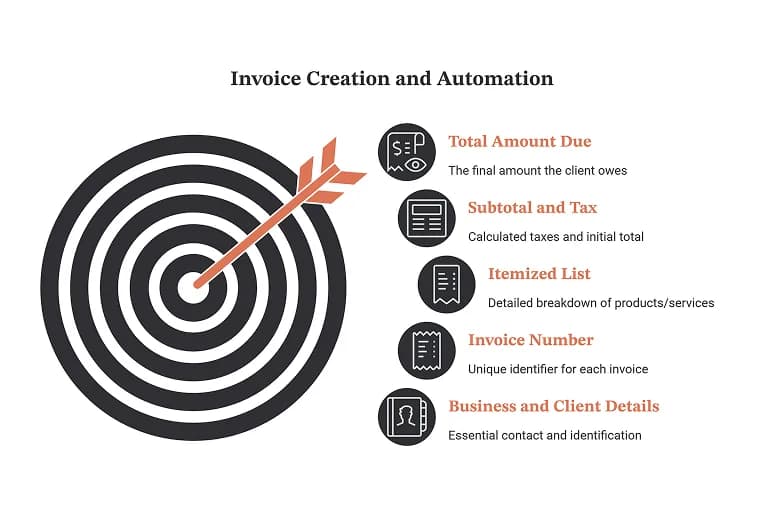
To create an invoice, add your business details, your client's details, a unique invoice number, an itemized list of products or services with prices, the subtotal and tax, the total amount due, and clear payment terms, then send it and track it until it's paid. That is the short answer. The longer answer is that creating the invoice is the easy 5% of the job. Chasing the payment, reconciling it, and doing it again next month is the other 95%, and that's the part worth automating.
This guide walks through exactly how to create an invoice from scratch, what every invoice must include, and the best free tools to make one today. Then it shows how an AI workspace like Pushable turns invoicing from a repetitive manual chore into a workflow that runs itself.
What Is an Invoice?
An invoice is a commercial document a seller issues to a buyer that itemizes goods or services provided and requests payment. It's a formal record of a transaction and, in most countries, a legal and tax document. An invoice is different from a receipt (which confirms payment already made) and from a quote or estimate (which proposes a price before work begins).
A clear, correct invoice does three jobs at once: it tells your client exactly what they owe and why, it protects you if a payment is disputed, and it keeps your books clean for tax season.
What to Include on an Invoice
Every professional invoice, whether you make it in a template or generate it with a tool, should contain these elements:
Element | Why it matters |
|---|---|
The word "Invoice" | Makes the document's purpose unmistakable for accounting and legal clarity. |
Unique invoice number | Lets you and your client reference the exact transaction; required for clean bookkeeping. |
Your business name, address & contact | Identifies who is owed and how to reach you. |
Client's name, address & contact | Identifies who owes the money; important for tax records. |
Invoice date & due date | Sets the payment clock and defines when an invoice becomes overdue. |
Itemized list | Line-by-line description, quantity, and unit price for each product or service. |
Subtotal, tax, and total | Shows the math clearly so there's no dispute over the final amount. |
Payment terms | e.g., "Net 30," accepted methods, and any late-payment fees. |
Payment details | Bank details, a payment link, or accepted cards so the client can pay instantly. |
Notes (optional) | A thank-you line, PO number, or project reference. |
If you're invoicing internationally, also include your tax/VAT ID and the currency, and consider stating the exchange terms so there's no confusion at payment time.
How to Create an Invoice: 6 Steps
- Pick your format. Decide whether you'll build it in a document editor (Word, Google Docs), a spreadsheet (Excel, Google Sheets), or a dedicated invoice tool. Spreadsheets are handy for auto-calculating totals; dedicated tools handle formatting and numbering for you.
- Add your branding and business details. Put your logo, business name, address, and contact information at the top. Consistent branding makes you look established and helps clients recognize your invoices instantly.
- Assign a unique invoice number. Use a simple, sequential system like INV-0001, INV-0002, or date-based codes like 2026-04-001. Never reuse a number; it creates chaos at tax time.
- Itemize the work. List each product or service on its own line with a short description, quantity, rate, and line total. Specificity here prevents "what is this charge?" emails later.
- Calculate totals and add terms. Add up the subtotal, apply any tax, and show the grand total in bold. State your payment terms (due date, accepted methods, late fees) so expectations are set upfront.
- Send it and track it. Export to PDF and email it, or send a payment link. Then note the due date somewhere you'll actually see it, because this is where most invoices quietly stall.
Free Invoice Template (Copy & Paste)
Want to skip the setup? Copy the template below, paste it into your document editor, and replace the bracketed fields with your details. It includes every element a professional invoice needs.
────────────────────────────────────────────
                    INVOICE
────────────────────────────────────────────

[YOUR BUSINESS NAME]                Invoice #: [INV-0001]
[Your Address]                      Invoice Date: [DD/MM/YYYY]
[City, State, ZIP]                  Due Date: [DD/MM/YYYY]
[Email]  |  [Phone]                 Tax/VAT ID: [If applicable]

BILL TO:
[Client Name]
[Client Company]
[Client Address]
[Client Email]

────────────────────────────────────────────
DESCRIPTION            QTY    RATE      AMOUNT
────────────────────────────────────────────
[Item or service 1]    [1]   [$0.00]   [$0.00]
[Item or service 2]    [1]   [$0.00]   [$0.00]
[Item or service 3]    [1]   [$0.00]   [$0.00]
────────────────────────────────────────────
                        Subtotal:      [$0.00]
                        Tax (__%):     [$0.00]
                        ─────────────────────
                        TOTAL DUE:     [$0.00]
────────────────────────────────────────────

PAYMENT TERMS: [e.g., Net 30]
PAYMENT METHODS: [Bank transfer / Card / Payment link]
BANK DETAILS: [Account name, number, sort/routing code]

Notes: [Thank-you message, PO number, or project reference]
────────────────────────────────────────────
Tip: This template is perfect for a one-off invoice. But if you send invoices like this every month, copying and editing the same file by hand gets old fast; that's where Pushable comes in (more on that below).
Free Tools to Create an Invoice
If you'd rather not build one by hand, several free tools will generate a clean invoice in minutes. Each is good at slightly different things:
Tool | Best for | Notes |
|---|---|---|
Invoice-Generator.com | Fast, no-frills one-off invoices | Free browser-based generator; create and download a PDF without an account. |
Bloom.io Invoice Generator | Freelancers and creatives | Part of a broader client-management suite, so it fits solo service providers. |
Canva Invoice | Design-forward, branded invoices | Huge template library if visual polish matters to your brand. |
Wise Invoice Generator | Cross-border and multi-currency billing | Pairs naturally with international payments. |
InvoiceHome | Template variety | Hundreds of templates; free tier has a periodic total-value cap. |
Pushable | Automating the whole invoicing cycle | Free plan (200 credits/mo). An AI agent that not only creates invoices but sends them, chases overdue payments, and reconciles, with human approval. |
With the exception of Pushable (more on that below), these are all solid choices for making a single invoice.
The Real Problem Isn't Creating an Invoice: It's Everything After
Think about a typical month for a growing business:
- You create and send a dozen invoices.
- Three clients pay on time. The rest need a reminder.
- One reminder gets ignored, so you send a second, firmer nudge.
- Payments trickle in, and you match each one to the right invoice.
- At month-end you reconcile everything and build a report.
- Next month, you do the whole thing over again.
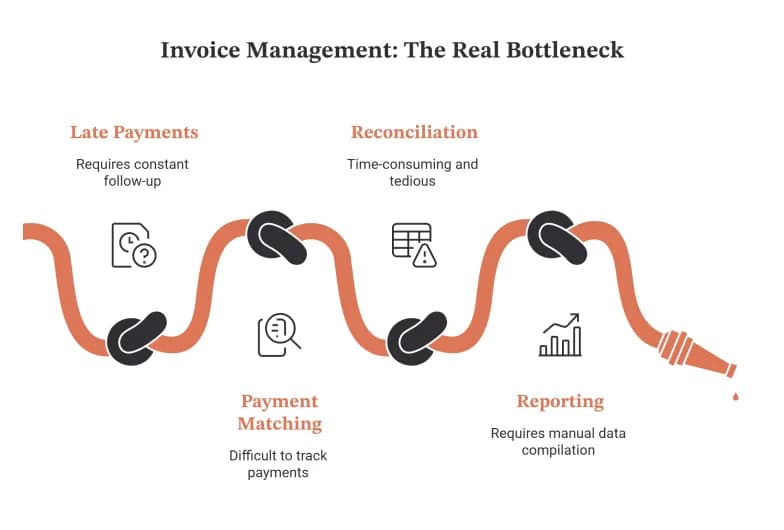
A free invoice generator helps with the first bullet and nothing else. The remaining work (the reminders, the matching, the reconciling, the reporting) is repetitive, easy to forget, and directly tied to whether you actually get paid. This is exactly the kind of workflow that an AI agent handles better than a human juggling sticky notes.
How Pushable AI Automates the Entire Invoicing Workflow
Pushable is a shared AI workspace where teams deploy AI agents that run business workflows around the clock, with your real tools connected and a human always in control. Instead of a tool that spits out one PDF, Pushable runs the whole invoice lifecycle as a continuous, hands-off workflow.
Here's what a Pushable Finance agent can do across the invoicing cycle:
- Generate and send invoices automatically. Trigger an invoice the moment a deal closes in your CRM, a Stripe charge is created, or a new row lands in Google Sheets, then email it out through Gmail without you lifting a finger.
- Chase overdue payments on its own. The agent watches due dates and sends polite, escalating reminders automatically, so no invoice slips through the cracks and your cash flow stays healthy.
- Reconcile payments. As payments arrive, the agent matches each one to the correct invoice and flags anything that doesn't add up.
- Build monthly reports. Instead of manually rolling up totals, the agent compiles month-end summaries and surfaces spend anomalies for you.
- Keep a human in the loop. Every action that matters (sending a payment, approving a large invoice) can pause for a one-tap approval via Telegram, so automation stays safe enough for real money.
Because Pushable connects to 100+ tools (including Stripe, Gmail, Google Sheets, Shopify, HubSpot, and Salesforce), the agent works inside the systems you already use. And it runs in the cloud on schedules and triggers, so the work keeps moving even when your team is offline.
Pushable vs. a Standard Invoice Generator
Capability | Free Invoice Generators | Pushable AI |
|---|---|---|
Create a single invoice | ✓ | ✓ |
Auto-generate invoices from a trigger (deal closed, new order) | ✕ | ✓ |
Send invoices automatically | ✕ | ✓ |
Chase overdue payments without you | ✕ | ✓ |
Reconcile payments to invoices | ✕ | ✓ |
Generate monthly finance reports | ✕ | ✓ |
Human approval gates for sensitive actions | ✕ | ✓ (Telegram approvals) |
Connects to your existing tools | Limited | ✓ 100+ integrations |
What It Costs
Pushable uses a credit-based model: you're charged only when an agent actually completes a task, not per seat. That means the whole team can use it without your bill ballooning as you hire. Plans start with a free tier (200 credits/month), then Starter at $27/mo and Pro at $97/mo, with custom Enterprise options for larger teams. You buy what you need and scale as you grow.
When Should You Automate Invoicing?
Making one invoice by hand is fine. You should consider automating when:
- You send the same invoices every month (retainers, subscriptions, recurring services).
- You spend real time chasing late payments.
- Invoices are slipping through the cracks and hurting cash flow.
- Your team is growing and manual invoicing doesn't scale.
- You want finance reports without the month-end scramble.
If two or more of those sound familiar, you've outgrown the download-a-PDF stage.
The Bottom Line
Creating an invoice takes five minutes with any of the free tools above, and if you just need a one-off, use them. But if invoicing has become a recurring monthly grind of sending, reminding, matching, and reporting, a generator only solves the first step. An AI workspace like Pushable handles the entire cycle from created to paid, so you can stop babysitting invoices and get back to the work that actually grows your business.
Ready to put your invoicing on autopilot? Get started free with Pushable