Free AI Assistants: Best Tools to Try in 2026
Every buyer discovers that a free tier quietly means different things across products. Some deliver genuine real capabilities at no cost; others leave you frustrated, nudging an upgrade before you've even finished your first task.
At its core, this software blends artificial intelligence with natural language instructions, letting a tool complete tasks you'd rather skip. It reads information, connects with tools, and performs actions inside your everyday workflow without friction.
After putting nine assistants through 5 real tasks, I learned to evaluate these tools by use, not marketing. Does one genuinely handle writing, editing, research, and quick brainstorming, or quietly fold under any mild pressure?
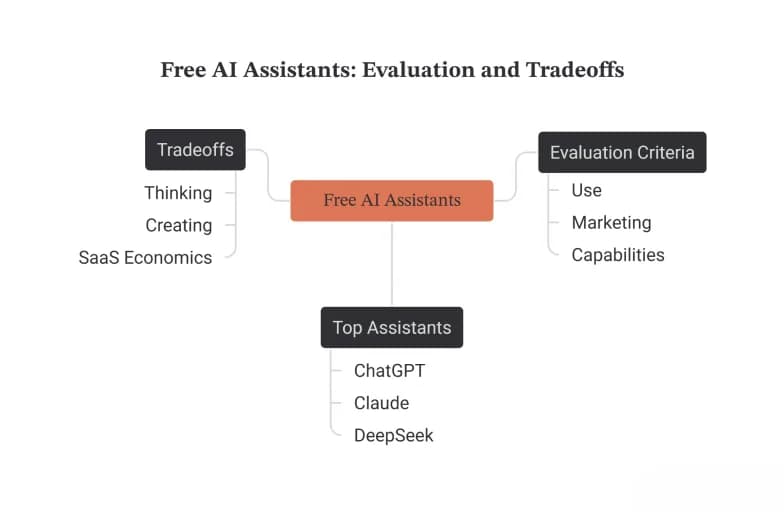
My shortlist keeps narrowing over time. ChatGPT stays the best overall for range and polish; Claude lands as a strong runner-up on long documents; DeepSeek surprises with raw generosity, all reachable for a flat $0.
Before you commit your workflow, know the tradeoffs involved. Free plans excel at thinking and creating, yet SaaS economics eventually surface, and the honest question becomes whether deeper features are truly worth paying for later.
How We Tested / Selected These Tools
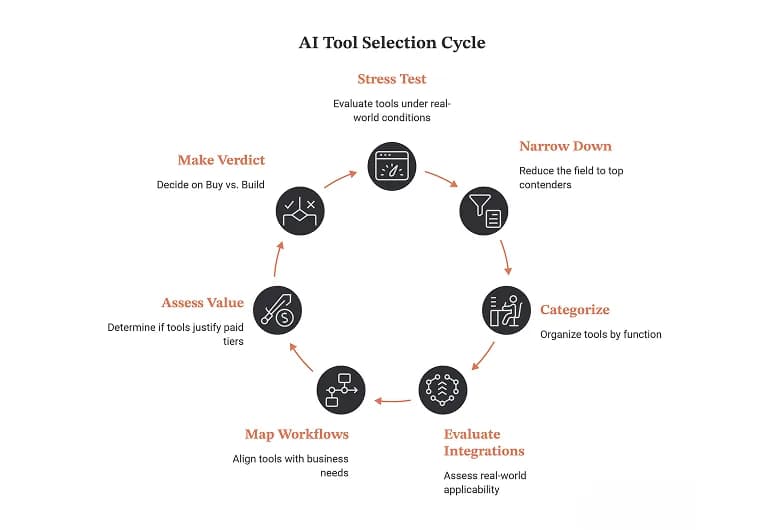
Across many weeks testing through April 2026, every single product got stress-tested on a genuine free account. We accepted no trials, demanded no API keys, and judged each chatbot purely on its daily execution work.
From an overwhelming AI-tool overload, we narrowed the crowded field toward the 15 most powerful assistants, then a tighter top tools shortlist. Everything got sorted into clear categories spanning writing, sales, marketing, and admin.
Selection hinged on far more than thinking and research; we carefully weighted real integrations, genuine autonomous action, and whether a given tool actually delivered lasting operational efficiency rather than behaving like the recycled novelty chatbots.
Because our readers include the small business owner plus freelancers, we mapped each tool against messy business workflows and everyday fragmented digital workflows. The goal: tools that give you your time back, cutting SaaS sprawl.
We approached everything through a Deployment Era lens, testing whether each paid agentic tool honestly justified upgrading beyond free tiers. Some proved generous; others felt nearly unusable. This ultimately shaped our Buy versus Build verdict.
Comparison Table / At A Glance
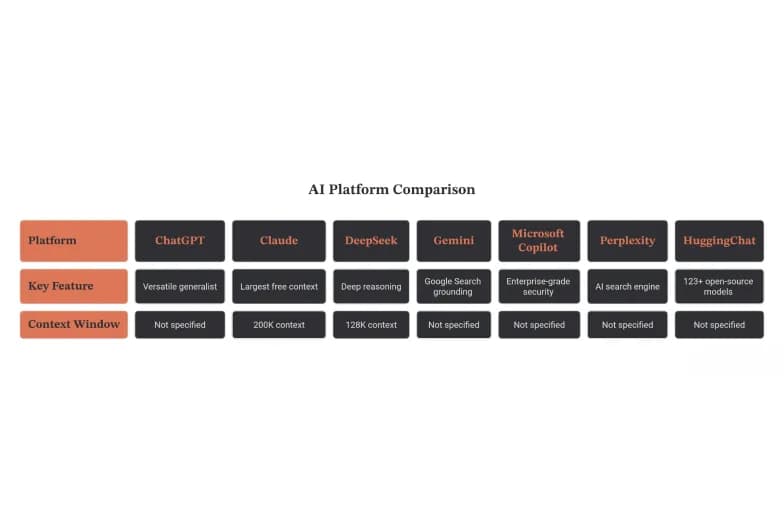
Scanning each free tier at a glance, I've learned the industry leader rarely wins outright. ChatGPT delivers a versatile generalist feel, while Claude quietly ships the largest free context, reshaping how most practitioners genuinely decide.
Context windows quietly separate the real contenders instantly. DeepSeek offers 128K context, yet Anthropic stretches toward 200K context. For deep reasoning or best-in-class coding, that huge context window genuinely changes everything about serious, document-heavy work.
Where voice mode and image generation matter, priorities shift. Gemini leans on Google Search grounding and deep Workspace integration, while Microsoft Copilot embeds enterprise-grade security across Microsoft 365, favoring corporate productivity over playful multimodal experimentation.
For research, Perplexity feels different entirely. As an AI search engine, it grounds source-backed answers in real citations, letting you verify claims. Its live web research and research assistant framing suit fact-finding better than conversation.
Finally, generosity varies wildly. One rival touts the most generous free tier, while HuggingChat unlocks 123+ open-source models through zero-friction access. Weighing daily limits, genuine free access, and open weights, no single winner emerges cleanly.
ChatGPT
Ask newcomers which assistant to try first and ChatGPT takes the best overall vote by reflex. One signup delivers GPT-5.3 access, the strongest model free users reach, an all-around pick with the cleanest UX anywhere.
Unlike trials that expire, the free plan runs indefinite with no expiration and no required upgrade. That raw generosity - no published message cap on the base tier - explains exactly why casual users rarely feel cornered.
Generosity has fences, though. That 5-hour window stacks per-day caps; once your 10 GPT-5.3 messages drain, GPT-5.3 downshifts to GPT-5.3 mini until the window resets, so limits hit only during genuinely heavy, back-to-back working afternoons.
File uploads matter here. The free tier supports 20 file uploads at 30 MB each, chewing through long documents inside a 128K-token context - short of Claude's 200K, plus voice for genuinely quick, hands-free spoken questions.
For writing, brainstorming, general questions by text, it shines; it won't handle tasks across tools or Google Workspace. Among 9 free AI assistants, whether paying becomes worth it depends on need, beyond any 7-day trial.
Claude
Most people underrate Claude's quiet strength: reasoning that holds across long documents. In my testing, its depth on dense analyses felt less like autocomplete and more like a patient thinking partner working right alongside me.
For writing, few free tools match it. The writing quality carries a restraint I appreciate - no purple padding. Precise tone control lets me shift a stiff memo toward warmth without rewriting the entire document's structure.
That generous 200K tokens window matters more than benchmarks suggest. I paste sprawling contracts expecting coherent summarization, and it tracks threads other tools drop while I summarize long documents in one clean and careful pass.
Where it surprised me was research. Ask it to synthesize information across messy sources, then keep pressure-testing strategies until they crack. Pair that habit with verifiable citations and lazy claims stop slipping quietly past.
Free Claude Sonnet 4.5 access feels almost unfair. As a writing co-pilot for long-form writing, throwaway drafts, scattered research notes, and early ideation, it earns its name as the best free writer's tool.
Google Gemini / Gemini Agent
Living inside Google tools all day, I noticed that Gemini quietly rewires how everyday work actually moves. It reads my Gmail, drafts inside Docs, and pulls from Drive without me ever leaving my open tab.
The agent layer surprised me most of all. Rather than only chatting back, it can take actions across apps, schedule meetings, and send notifications, while I still approve each step before anything irreversible actually happens.
People assume grounding is boring, yet it truly matters. When Gemini returns answers with sources, I can verify claims fast, trusting reliable information instead of guessing, and its wide search reach keeps responses honestly current.
Because it lives right in Google Workspace context, the cross-app task handling feels seamless. I lean on document help for messy drafts, spreadsheet analysis for numbers, and quick summarizing whenever long threads pile up unread.
For brainstorming and simple everyday questions, it rarely stalls. Ask it to scan your calendar, handle small real tasks, or draft email replies, and Gemini honestly behaves less like a toy, more like actual staff.
Microsoft Copilot
Having lived inside Microsoft 365 for years, I watched Copilot quietly embed itself into Word, Excel, PowerPoint, and Outlook, becoming less a novelty chatbot and more an ambient assistant layer beneath every familiar Office ribbon.
The free plan surprises newcomers: you get grounded web search, quick image creation, and casual drafting without paying, though the deeply transformative in-application document skills stay firmly locked away behind a paid seat-based subscription tier.
Beyond the core suite, it rides shotgun in Edge and across Windows, answering plain language requests through generative AI while pulling live context from whatever webpage, PDF, or spreadsheet you happen to be currently reading.
In daily practice, my whole mornings run through it: I ask it to summarize emails, draft replies in my own tone, and schedule meetings without hunting for open slots across everyone's shared, tangled, overlapping calendars.
Where it truly shines is inside live Teams meetings, capturing recaps that nobody wanted to write; where it stumbles is spreadsheet formulas, occasionally hallucinating a confident, wrong answer that looks perfectly plausible until manually double-checked.
Perplexity
Most people misread Perplexity as an ordinary chatbot, but I treat it as an answer engine. Its real-time web search surfaces quick answers with sources attached, so verification happens naturally before you think to ask.
Where it earns its keep is research with sources. The free tier grants 5 Pro Searches per day plus unlimited basic searches, enough to chew through a genuine multi-step research question without ever hitting walls.
Unlike models that hallucinate confidently, this tool ties claims to live web grounding, letting you fact-check instantly. I still double-check facts on anything critical, though citations shrink that burden compared with a bare web search.
Temper expectations, though. It won't act on your behalf - no drafting inside Gmail, no task execution. Think light analysis and web browsing, not autonomy. For pure reasoning depth, rivals with frontier models occasionally edge ahead.
After weeks living inside it, my verdict stands: this assistant shines when questions demand current, cited evidence. Pair its Deep Research mode with disciplined deep research habits, replacing ten scattered tabs with one trustworthy pane.
Runway
Most roundups shove Runway into the wrong category, judging it unfairly against ordinary chatbots. Reframe it: this tool exists to generate multimedia, so its real key strength only surfaces when you abandon text-first expectations entirely.
During my hands-on testing week, the free model felt deliberately narrow. You render short clips, watermarked and credit-metered. That limitations ceiling arrives fast, yet output quality genuinely surprised me for a zero starting price outlay.
The standout feature isn't raw generation; it's control. Motion brush, camera direction, and style references - these turn scattered prompts into intentional creative work. That directorial layer separates the serious tools from novelty images toys entirely.
Newer releases fold audio into the pipeline, so you layer sound effects and narration directly against generated footage. That consolidation matters: creators previously juggled four separate apps, now one canvas holds the whole assembly comfortably.
So who is this best for? Not inbox-juggling professionals - storytellers, marketers, prototype-hungry founders. Judge it on ease of use and ambition, not chat parity. Its monthly paid tiers unlock resolution most hobbyists never actually require.
ElevenLabs
Unlike most assistants on this roundup, ElevenLabs is a voice-first generator. Its free plan costs $0, hands beginners 10,000 characters monthly, and turns any typed prompt into lifelike, natural-sounding speech within seconds, no credit card.
Behind it sit state-of-the-art models: Multilingual v2 for top-quality accuracy, Flash for speed, Turbo for ultra-low latency. These frontier models read context between words, adjusting delivery, emotion, and pacing intelligently across all twenty-nine supported languages.
You can upload entire books or documents through ElevenReader, then listen anywhere. File uploads, voice cloning, dubbing, and sound effects share one credit pool, while limited API and SDK access suit indie developers building apps.
The generous voice library gives free users thousands of community voices, browsable on mobile with mobile voice input. Turn raw text into audio through plain language prompts that steer tone, delivery, and emotion quite naturally.
Free stays personal, non-commercial, and requires attribution, so working creators eventually upgrade. A modest subscription on the paid tier unlocks commercial rights, deeper integrations, and higher limits I've tested and found well within any budget.
Zapier
Across many years of wiring stacks together, Zapier stayed my quiet backbone. Its triggers fire the instant a new email or calendar event appears, letting an AI agent run cross-app automation seamlessly overnight, no babysitting.
What sold me was watching it chain steps across genuinely unrelated live services. A single workflow can connect apps like Asana, push a Slack summary, then quietly updates CRM records, entirely untouched by human hands.
Honestly, its free tier feels surprisingly generous until real scale bites. Serious multi-agent workflows and true autonomous action live behind the paid agentic platform, though 1,500+ integrations keep early experimenting genuinely worthwhile for curious newcomers.
In practice, I let it detect new leads dropping into a form, then trigger tasks automatically downstream. It monitors email overnight, drafts follow-up emails, and creates tasks so my own mornings start already halfway finished.
My honest final verdict: Zapier truly shines when you connect data sources nobody else bridges. Route a support ticket, sync your own Todoist, build layered workflows through deep integrations, and suddenly manual busywork simply disappears.
The Truth About "Free" AI Assistants
Here's the uncomfortable signal: across free tiers, an AI can talk endlessly yet can't do it. You'll draft emails, generate reports, run data analysis and simple calculations, but execution stays locked behind a paid plan.
The limits vary wildly. One tool grants 10 GPT-5.3 messages per 5-hour window; another permits 15–40 messages before starting to throttle during peak hours. That free-tier ceiling arrives far faster than most newcomers ever expect.
Context windows tell a similar story. Moonshot Kimi K2 offers 256K tokens free, Claude Sonnet 4.5 roughly 128K, while a consumer free app caps near 32K tokens; that advertised 1M figure sits behind paid plans.
Then there's the wall nobody advertises: no major free AI assistant will truly read, send, or create on your behalf. Genuine autonomous email, email triage, and multi-app handoffs stay gated behind a paid agentic platform.
Consider the math: free chatting saves 2–3 hours per week, but a platform that automates 10–15 hours per week pays for itself within days. McKinsey notes effective AI users genuinely reclaim 20–30% of working hours.
My Final Verdict
Most people chase the wrong metric. After a full roundup, my best free AI personal assistant pick in 2026 isn't about raw power - it's whether a true free tool actually saves time without constant upgrade pressure.
Forget the SaaS tax myth entirely. Renting a PhD-level intern for $20–$30 a month sounds steep, yet the real value hides in execution work that free tools dodge - those CRM updates and higher-value work eventually stall.
Here's what my tested approach really revealed: audit your friction first, then test one tool against a real workflow. Skip the five-minute demo theater - daily usefulness and integration beats isolation matter more than flashy core features.
Between ChatGPT, Claude, and Copilot, no single true winner really exists here. Your own use case decides everything. For long-form writing I lean Claude; for breaking news with citation-grounded answers, others handle the routine work.
My honest take: free tiers aren't a long-term solution, they're really product potential in disguise. Start with free, respect the chat-window ceiling, upgrade only when an agentic trial proves real value and true ecosystem fit.
Build Or Buy? The Cost Of AI Assistants In 2026
Honestly, the build or buy question misleads people. I've watched startups burn months building when a 7-day free trial revealed everything. Sometimes choosing a platform upfront beats endless tinkering with no-code platforms yourself, wasting cash.
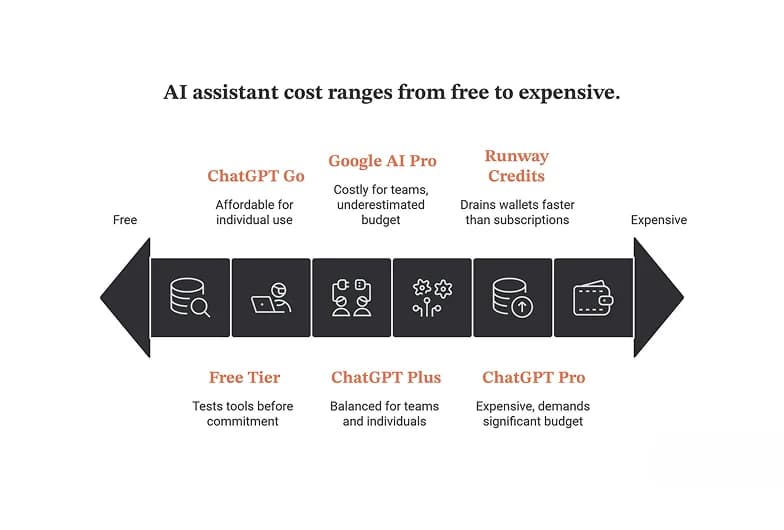
Buying isn't cheaper by default. ChatGPT Plus runs $20/mo, while ChatGPT Go sits at $8/mo, and Pro demands $200/mo. Meanwhile Google AI Pro costs $19.99/mo, prices most teams underestimate before committing real budget each quarter.
Copilot Pro adds $20/mo; its $9.99/mo tiered plans confuse everyone. Builders instead face 125 one-time credits on Runway or 10k credits per month elsewhere, consumption models quietly draining wallets faster than fixed monthly subscriptions honestly.
Building your own Personal AI Assistant sounds intimidating, yet needs no coding skills and no complex infrastructure. Modern templates and visual workflows handle logic; connecting apps takes minutes. Create your own without hiring engineers entirely.
Before paying anything, exploit free-tier generosity. That 7-day trial, plus 1,000 credits and $41/month thresholds, reveals whether tools prove worth your time. Smart teams never upgrade prematurely, testing clear use case fit carefully first, always.
Get Started With AI Assistants: A Quick Primer
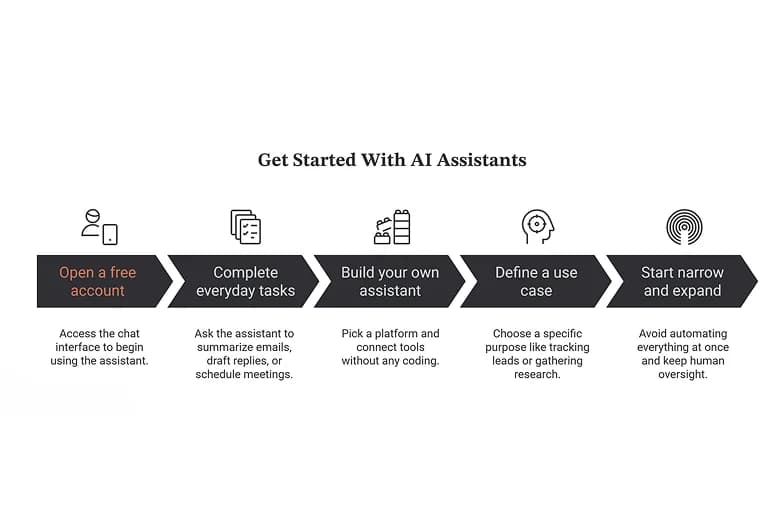
Getting started feels simpler than expected. The fastest way in is a chat interface: open a free account, type in plain language, and a personal assistant replies. With no configuration, no jargon, it's genuinely accessible.
Your first session? Ask it to summarize today's emails, draft replies, or schedule meetings. These everyday tasks show immediate value. Simply describe what you want using plain words, and watch it complete tasks remarkably fast.
Curious about building your own? A free AI assistant takes shape through chatting - without coding at all. Pick a platform, spend a few minutes connecting tools, then experiment freely until the whole thing finally clicks.
Before diving deeper, define one clear use case. A specific purpose - maybe track new leads or gather research - beats vagueness. Give it access to apps and data, tie it to a real task, momentum builds.
Rookie error? Trying to automate everything at once. Start narrow, then expand later. Swap vague instructions for clear instructions, keep human oversight on important calls, and consistent, patient testing quietly delivers better results more reliably.