Document Management Platforms in 2026: The Complete Guide (and the Automation Layer Most Teams Miss)
Last updated: August 2026
Document management platforms are the systems businesses use to capture, store, organize, secure, and retrieve their files, replacing the mess of email attachments, shared drives, and personal folders where documents usually go to die. In 2026, the best platforms do far more than store files: they classify documents automatically, extract data, and route work through approval chains. But there's a gap almost every platform leaves open, and it's the gap that quietly costs teams the most time. This guide covers how the leading platforms compare, what actually changed this year, and where an AI automation layer like Pushable fits into the picture.
What a document management platform actually does
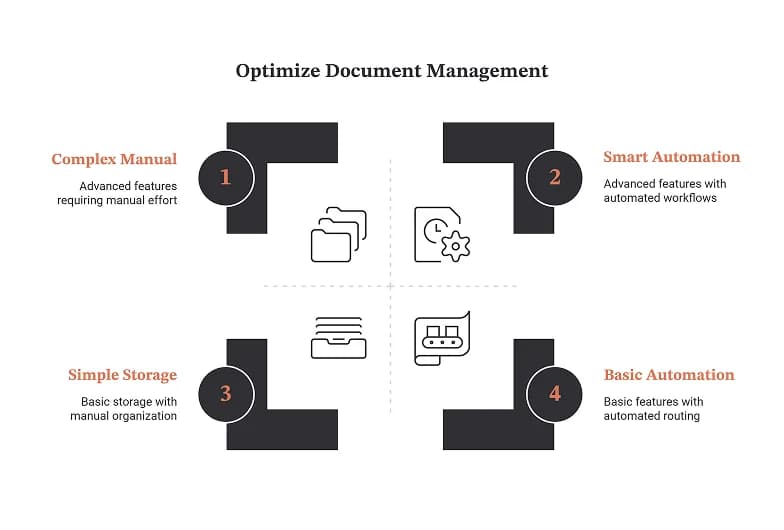
At its core, a document management platform (or document management system, DMS) handles a specific set of jobs:
- Centralized storage: one secure repository instead of files scattered across drives, inboxes, and desktops
- Version control: a single source of truth, so nobody works off "final_v3_REAL_final.docx"
- Access control and permissions: who can view, edit, or approve each document
- Search and retrieval: finding the right file by name, metadata, or content
- Compliance and records management: audit trails, retention policies, and legal hold
Industry analysts note that most organizations badly underestimate how much time and money leaks out of poor document handling: version conflicts, records that can't be located when compliance requires them, and onboarding slowed because knowledge lives in people's heads rather than accessible systems. The category exists to close those leaks.
The term you'll see used interchangeably is enterprise content management (ECM), which typically refers to the more comprehensive platforms, while "DMS" usually points to the storage, version-control, and access layer specifically.
What changed in 2026: AI became table stakes
The biggest shift is that AI capabilities that were "nice to have" a couple of years ago are now baseline expectations. According to industry research, modern document management platforms now routinely include:
- Intelligent classification: machine learning that categorizes documents automatically, with leading solutions reaching up to 99% accuracy on well-structured business documents
- Automated data extraction: pulling fields from invoices, contracts, and receipts, which industry research suggests can reduce manual data entry by 70% to 80%
- Metadata-driven organization: finding documents by context (type, status, owner, project) rather than folder-digging
- Workflow automation: routing documents through review, approval, and sign-off without manual chasing
Mobile access, once a differentiator, is now simply expected. The market has converged on cloud-native platforms that combine secure storage with intelligent search and, increasingly, AI-powered content analysis.
The honest caveat: "AI-powered" is now on nearly every vendor's homepage. What varies enormously is how far that intelligence reaches: whether it just files and tags documents, or whether it can actually act on them across your other business tools. Hold onto that distinction; it's the whole point of this guide.
The top document management platforms compared
Here's how the most widely adopted platforms stack up in 2026. No single tool is best for everyone; the right choice depends on your ecosystem, compliance needs, and how document-heavy your workflows really are.
Platform | Best for | Standout strength | Watch-out |
|---|---|---|---|
Microsoft SharePoint | Enterprises already in Microsoft 365 | Deep integration with Teams, Outlook, and Power Automate | Often needs trained admins or consultants to configure well |
Box | Compliance-driven, remote-first organizations | Security, governance, and external collaboration | Can be more than SMBs need for simple storage |
Google Workspace | Distributed teams needing real-time co-editing | Simultaneous collaboration across Docs, Sheets, Slides | Lighter on formal records management |
DocuWare | SMB and mid-market digitizing paper processes | Workflow automation for invoices, contracts, onboarding | Not a fit if you only need lightweight storage |
M-Files | Knowledge-driven orgs with complex workflows | Metadata-based organization and lifecycle states | Different mental model than folder-based systems |
Egnyte | Regulated industries | Audit logging, DLP, GDPR/HIPAA support | Priced and built for governance-heavy use |
Laserfiche | Government and large institutions | Records management at scale | Enterprise-weight implementation |
Revver | Accounting, insurance, financial services | AI-powered automation and large cloud storage | Custom pricing; sales-led |
If you want to go deeper on any single category, independent review sites like Gartner Peer Insights, Spiceworks, and The Digital Project Manager maintain detailed, regularly updated comparisons worth cross-referencing before you commit.
How to read this table: shortlist three to five platforms that match your ecosystem and compliance profile, then run a real pilot with an actual team and real documents before signing anything. Feature lists don't reveal fit; day-to-day use does.
The gap: storing documents isn't the same as doing something with them
Here's the problem that every platform in the table above shares. They are exceptional at being the system of record, the place documents live safely. But the work that surrounds those documents still largely falls on people:
- An invoice lands in your DMS. Someone still has to read it, match it to a purchase order, get it approved, and enter it into finance.
- A signed contract gets filed. Someone still has to extract the key terms, set the renewal reminder, and update the CRM.
- A new hire's paperwork is uploaded. Someone still has to trigger onboarding across HR, IT, and payroll.
The document management platform did its job: it stored, secured, and versioned the file. But the workflow around the document, the part that actually consumes hours, sits in the gap between your DMS and your other tools. Many platforms include workflow features, but they typically automate steps inside their own walls. The moment a process needs to reach across your CRM, your inbox, your spreadsheets, and your finance system, the automation runs out of road.
This is exactly where an AI automation layer changes the economics.
Where Pushable fits: the execution layer on top of your documents
Pushable is not another place to store files, and that's the point. It's a shared AI workspace that deploys AI agents to act on the documents and data your team already has, across all the tools you already use. Think of it as the automation layer that sits on top of (not instead of) your document management platform.
Where a DMS answers "where does this document live and who can see it?", Pushable answers "what needs to happen because of this document, and can we do it automatically?"
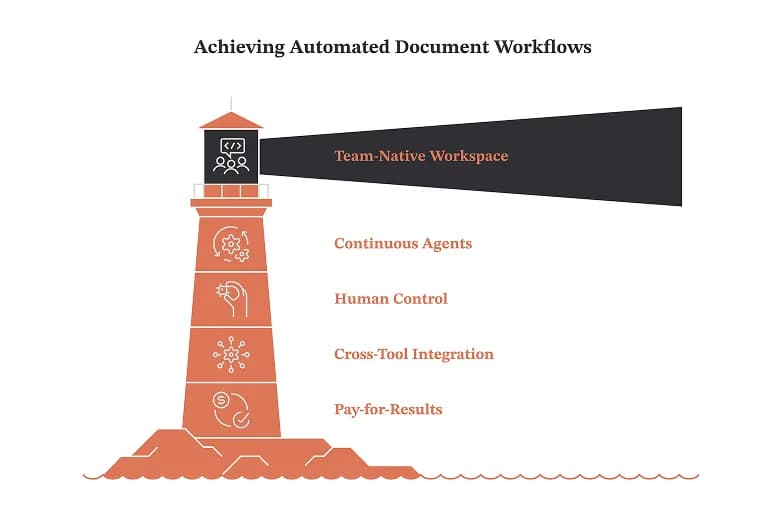
A few things make that practical rather than theoretical:
- It's team-native, not single-player. Most AI tools are built for one person typing into a chat box. Pushable is a shared workspace with shared memory, files, databases, and permissions, so agents are grounded in your actual business context rather than starting from a blank prompt every time.
- Agents run continuously, not just when someone's watching. Pushable's agents run on schedules and event triggers in the cloud. When a new document arrives, the workflow can fire on its own, even when no one has the app open.
- Humans stay in control. Approval gates pause an agent mid-task, and Telegram-based notify-and-approve flows mean a person signs off before anything consequential happens. For document workflows touching money, contracts, or compliance, that human-in-the-loop control is what makes automation safe enough to trust.
- It connects to what you already use. With 100+ native integrations (including Google Drive, Google Sheets, Notion, Slack, Gmail, HubSpot, Salesforce, and more) plus custom connectors, agents can read a document in one system and act on it in another. That cross-tool reach is precisely what closes the gap DMS workflow tools leave open.
- You pay for results, not seats. Pushable's credit model spends only when an agent actually completes a task: a report filed, a workflow triggered, a payment queued for approval. The bill doesn't grow just because your headcount does.
What this looks like in practice
- Finance: A new invoice hits your Drive or DMS. A Pushable agent reads it, matches the vendor, prepares the payment, and pauses for a one-tap approval on Telegram before anything moves.
- Sales & legal: A signed contract is filed. An agent extracts the key terms, logs the renewal date, and updates the CRM automatically.
- HR: Onboarding paperwork is uploaded. An agent kicks off the full onboarding sequence across the tools involved, no manual hand-offs.
- Operations: Recurring documents (reports, procurement forms, inventory sheets) get processed and routed on schedule, every time.
The document management platform keeps being the reliable record. Pushable turns the documents inside it into finished work.
How to choose: a practical framework
Whether or not you add an automation layer, here's how to make the platform decision well:
- Inventory your documents and workflows. List your real document types, the workflows around them, team size, and access requirements. This surfaces what you actually need versus what's marketed.
- Match the ecosystem. Already deep in Microsoft 365? SharePoint's integration is hard to beat. Google-first? Workspace collaboration is native. Regulated? Prioritize Egnyte, Box, or Laserfiche for governance depth.
- Separate storage from action. Decide which capabilities you need in the DMS itself, and which are really automation problems better solved by a layer that reaches across all your tools.
- Pilot with real teams. Shortlist three to five, then test with genuine documents and workflows before committing long-term.
- Measure the time tax. The hidden cost isn't storage: it's the manual work around documents. Estimate the hours your team spends reading, routing, extracting, and re-keying. That number is usually where the biggest ROI hides.
The bottom line
Choosing among document management platforms in 2026 is genuinely easier than it used to be: the leading options are all capable, and most differences come down to your ecosystem and compliance needs. The harder, more valuable question is what happens after a document is stored. That's where hours quietly disappear, and it's the part no storage system fully solves.
If your team spends real time reading, routing, extracting, and re-keying what's already in your document system, the highest-leverage move isn't switching platforms: it's adding an automation layer on top of the one you have.
See what your documents could do on their own: explore Pushable and start automating free
Note: Comparisons and scores referenced here are drawn from public industry reporting and vendor documentation; verify current pricing and features directly with each vendor, as they change frequently.