9 Best Workflow Automation Tools in 2026 (And Why Team-Native AI Wins)
Short answer: The best workflow automation tools in 2026 are the ones that don't just connect apps, but actually run the work for your whole team. Pushable leads for teams that want always-on AI agents with human approval built in, Zapier wins on sheer integration count, Make offers the best visual value, n8n is the developer favorite, and Microsoft Power Automate anchors the enterprise Microsoft stack. Below is the honest breakdown, with pricing, trade-offs, and a comparison table.
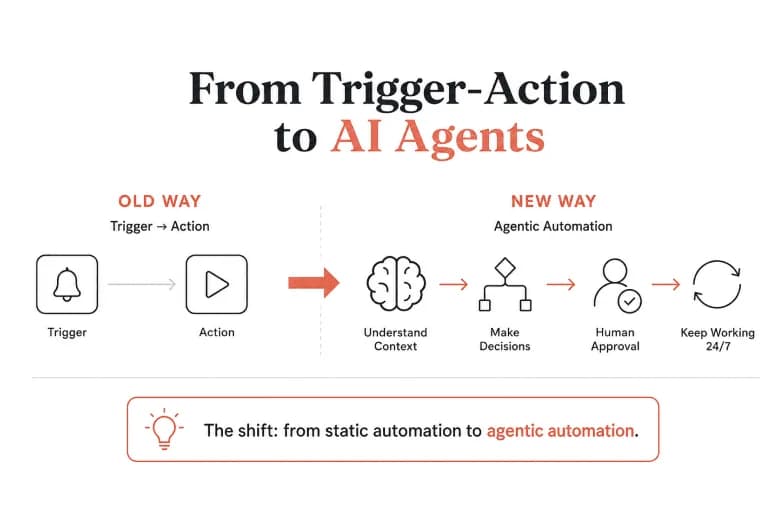
Workflow automation tools used to be simple: something happens in App A, so do something in App B. That "trigger-and-action" model built a whole industry. But in 2026, the bar has moved. Teams no longer want plumbing between apps, they want software that reads context, makes decisions, waits for a human when it matters, and keeps working overnight. That shift, from static automation to agentic automation, is the single most important thing to understand before you pick a platform.
This guide covers what workflow automation tools actually do today, how AI has changed them, the criteria that separate a good tool from an expensive mistake, and a ranked, honest look at the nine platforms worth evaluating right now.
What Are Workflow Automation Tools?
Workflow automation tools are software platforms that connect your applications, data, and business logic so that repetitive multi-step processes run automatically, without a person clicking through each step. A workflow is simply a sequence: a trigger starts it, one or more actions carry it out, and rules decide what happens along the way.
Classic examples include moving a new lead from a web form into your CRM, sending a Slack alert when an invoice is paid, or generating a weekly report from a spreadsheet. The tool watches for the trigger, then executes the actions across every connected app, every time, without supervision.
The key distinction in 2026 is between two generations of these tools:
- Rule-based automation follows fixed "if this, then that" logic. It's fast, reliable, and predictable, but it can't handle anything it wasn't explicitly programmed to expect.
- AI workflow automation adds language understanding and decision-making. It can read an unstructured email, decide which of five paths to take, draft a reply, and only ping a human when it hits something ambiguous.
Most modern platforms now blend both. The question isn't whether a tool "has AI," it's whether the AI actually does useful work or is just a bolted-on chatbot.
Traditional Automation vs. AI Workflow Automation
Understanding this difference is what stops you from overpaying for the wrong tier of tool.
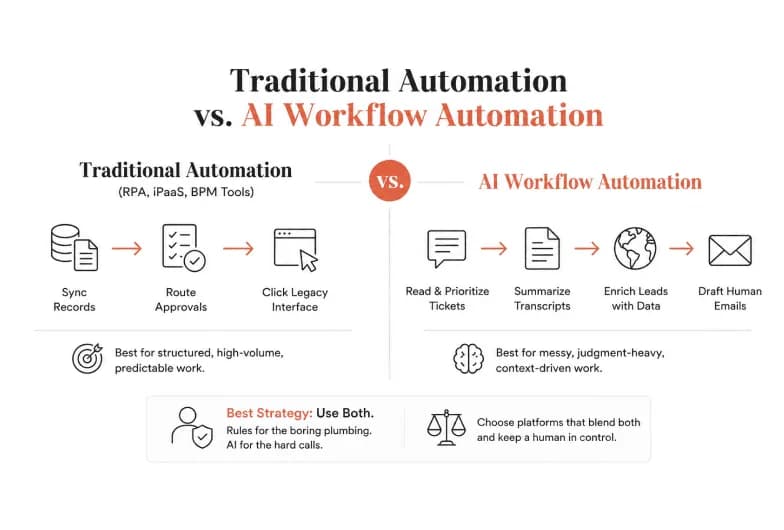
Traditional automation, including robotic process automation (RPA), integration platforms (iPaaS), and business process management (BPM) tools, excels at structured, high-volume, predictable work: syncing records between databases, routing approvals through fixed steps, clicking through a legacy interface that has no API. If your inputs are clean and your logic never changes, rule-based automation is cheaper and more reliable than AI.
AI workflow automation earns its keep on the messy work traditional tools choke on: reading a free-text support ticket and deciding its priority, summarizing a call transcript, enriching a lead from scattered public data, or drafting a first-touch email that sounds human. It adapts to context instead of demanding a rigid schema.
The best strategy for most teams is to use both. Let deterministic rules handle the boring, high-volume plumbing, and reserve AI for the judgment-heavy steps. The platforms that make this blend easy, and keep a human in control of the AI's decisions, are the ones worth your budget.
How to Choose a Workflow Automation Tool
Before comparing brands, get clear on the criteria that actually predict whether you'll be happy in month twelve, not just month one.
- Individual tool or team execution layer? Most automation tools are still built for one operator wiring up their own zaps. If several people need to build, run, and approve automations against shared company data, you need something team-native, with shared context and permissions, not a single-player builder.
- Pricing model, not sticker price. This is the trap that catches finance teams. Zapier bills per task (every action step counts), Make bills per operation/module, n8n bills per workflow execution, and newer platforms bill per completed result. For a 10-step workflow running thousands of times, per-task pricing can cost 5–10x more than per-execution pricing. Model your real volume before you sign.
- Integration depth. Count matters, but so does read/write depth. Zapier's 7,000+ connectors is unmatched for breadth; a leaner library of deep, agent-ready integrations plus custom MCP connectors can matter more if you want agents that actually act on your CRM and inbox.
- Does it run when nobody's watching? A lot of "AI tools" only run while a browser tab is open. Real automation is cloud-based and always-on, firing on schedules and event triggers overnight.
- Human-in-the-loop control. Once AI can take actions, you need a brake. Look for approval gates that pause an agent mid-task and route a decision to a human before money moves or a message ships.
- Technical requirement. Be honest about your team. Node-based, code-friendly tools are powerful but need a builder who enjoys them. No-code, natural-language builders get non-technical teams live in an afternoon.
The 9 Best Workflow Automation Tools in 2026
A note on how we rank: These placements reflect editorial judgment about fit for different teams, not internal Google or vendor data. Prices and features were checked in mid-2026 and change often, so verify current plans on each vendor's site before buying.
1. Pushable - Best for team-native, always-on AI agents
Pushable reframes the entire category. Instead of a builder where one person wires up isolated automations, it's a shared AI workspace where your whole team deploys AI agents that run workflows around the clock, all grounded in the same business context and governed by the same permissions.
That team-native design is the core differentiator. Most AI tools are optimized for a single user: context lives in one person's chat session, agents can't see your files or databases, and nothing runs once the tab closes. Pushable flips each of those. Your knowledge base, database, files, and memory live in one workspace, so every agent is grounded in real business context instead of starting from a blank prompt. Agents run continuously in the cloud on schedules and triggers, even when no one is online.
The feature that makes agentic automation actually safe for real business use is human-in-the-loop approval via Telegram. When an agent reaches an action that matters, paying an invoice, sending an external email, updating a record, it pauses and notifies a human, who approves or rejects in a single tap from their phone. You get the speed of automation without handing the AI a blank check.
Setup is genuinely no-code: create a workspace in under a minute, invite your team with role-based permissions, connect from 100+ native integrations (Gmail, Slack, HubSpot, Salesforce, Notion, Airtable, Stripe, and more) plus custom MCP connectors, and deploy pre-trained agents for sales, marketing, HR, finance, operations, or support.
Pricing is refreshingly different too. Instead of charging per seat whether people use it or not, Pushable runs on credits that are only spent when an agent completes a real task, a message sent, a report filed, a workflow triggered. Buy credits once and use them across the whole team, with no bill that balloons as you hire. There's a free tier (200 credits/month), a Starter plan at $27/month (2,500 credits), a Pro plan at $97/month (10,000 credits), and custom Enterprise pricing with SSO, dedicated infrastructure, and SLAs.
Best for: Teams that want automation to execute end-to-end, not just connect apps, with shared context and a human firmly in control of AI actions. Trade-off: As a newer, team-first platform, it's aimed at teams building real operational workflows rather than solo hobbyist zaps, and the connector library, while deep and MCP-extensible, is more curated than Zapier's giant catalog.
👉 Start automating free at pushable.ai
2. Zapier - Best for the largest integration library
Zapier is the household name and still the fastest path from zero to a working automation for non-technical users. With 7,000+ app integrations, it almost certainly connects the two niche SaaS tools you're trying to link. Its 2026 releases added AI Actions and natural-language automation building.
Best for: Solo founders and small teams who want simple, reliable "Zaps" without touching code. Trade-off: Per-task billing gets expensive fast on complex, multi-step, or high-volume workflows, and its AI features favor accessibility over deep customization.
3. Make - Best value for visual, multi-step workflows
Make (formerly Integromat) sits in the sweet spot between Zapier's simplicity and a developer tool's power. Its drag-and-drop canvas handles conditional logic and data transformation well, and per-operation pricing makes it considerably cheaper than Zapier at equivalent volume. It's trusted by hundreds of thousands of organizations and carries solid compliance credentials.
Best for: SMBs that need more logic than Zapier without hiring a developer. Trade-off: The visual canvas gets busy on very complex flows, and there's a real learning curve past the basics.
4. n8n - Best for developers and self-hosting
n8n has grown from a niche developer tool into a serious enterprise-grade option. It's node-based, code-friendly (drop in JavaScript or Python anywhere), and the only major option you can self-host, so your data never leaves your servers, a decisive factor for healthcare, finance, and other regulated industries. Its per-execution pricing eliminates the "task tax," and its AI-agent nodes and LangChain support make it a favorite for custom AI workflows.
Best for: Technical teams and regulated industries that want maximum control and the cheapest cost at scale. Trade-off: The most technical interface of the mainstream tools; non-developers will struggle, and self-hosting means you own the maintenance.
5. Microsoft Power Automate - Best for Microsoft-heavy enterprises
If your organization lives in Microsoft 365, Power Automate is the natural choice. Part of the Power Platform, it combines cloud flows with desktop RPA and deep ties into Teams, SharePoint, Dynamics, and the rest of the Microsoft ecosystem, with the governance and security features large enterprises require.
Best for: Enterprises standardized on Microsoft who need RPA plus cloud automation under one license. Trade-off: Its strengths outside the Microsoft world are thinner, and licensing can get complicated.
6. Gumloop - Best for AI-first no-code builders
Gumloop is built around AI from the ground up, with a drag-and-drop interface where you connect apps to a large language model and describe what you want in natural language. It's a strong pick for teams whose workflows are primarily about content generation, analysis, and AI-driven decisions rather than traditional data syncing.
Best for: Teams building AI-centric workflows who want a visual, no-code experience. Trade-off: Younger ecosystem and a narrower integration catalog than the incumbents.
7. Workato - Best for enterprise integration at scale
Workato blends enterprise-grade integration with AI-powered automation. With 1,200+ pre-built connectors and role-specific AI agents tied to KPIs, it's designed for large organizations automating across many systems at once.
Best for: Enterprises that need heavy-duty integration plus governance. Trade-off: Enterprise pricing and complexity make it overkill for smaller teams.
8. Relevance AI - Best for building specialized AI agent teams
Relevance AI focuses entirely on AI agents rather than trigger/action plumbing. Its modular architecture lets teams build, test, and manage specialized agents for specific business functions collaboratively.
Best for: Teams that want to compose a "workforce" of purpose-built agents. Trade-off: Less suited to conventional app-to-app automation.
9. Vellum - Best for low-code AI workflow engineering
Vellum targets teams building and shipping AI-powered workflows with more rigor, prompt management, evaluation, and low-code orchestration for production LLM applications.
Best for: Product and engineering teams operationalizing LLM workflows. Trade-off: More of a development platform than a business-user automation tool.
Workflow Automation Tools Compared
Tool | Best for | Pricing model | AI agents | No-code | Always-on |
|---|---|---|---|---|---|
Pushable | Team-native execution | Per completed task (credits) | Yes, shared | Yes | Yes |
Zapier | Largest app library | Per task/action | Add-on | Yes | Yes |
Make | Visual value | Per operation | Add-on | Yes | Yes |
n8n | Developers, self-host | Per execution | Yes | No | Yes |
Power Automate | Microsoft enterprises | Per user/flow | Yes | Partial | Yes |
Gumloop | AI-first no-code | Per credit/run | Yes | Yes | Yes |
Workato | Enterprise integration | Custom | Yes | Partial | Yes |
Verify current pricing on each vendor's site before purchasing; plans change frequently.
Why Team-Native, Agentic Automation Is the 2026 Winner
Here's the pattern worth noticing across the whole list. The first generation of workflow automation tools solved connection, getting data from one app to another. The problem most teams have now isn't connection. It's execution: too many disconnected tools, too much manual stitching between them, and governance gaps that surface at the worst possible moment.
Three shifts define where the category is heading:
- From single-player to team-native. Automation that lives in one person's account is fragile. When they leave, or when a teammate needs to change a workflow, the whole thing stalls. A shared workspace with shared memory and permissions turns automation into infrastructure the team owns together.
- From "runs on trigger" to "runs continuously with judgment." Static rules can't handle the messy 20% of cases that generate 80% of the manual work. Agents that read context and choose a path do, provided they're grounded in your real business data rather than a blank prompt.
- From "AI does it for you" to "AI does it with you." The reason many teams hesitate to automate high-value work is fear of losing control. Approval gates solve this: the agent does the tedious 95%, and a human signs off on the 5% that carries risk. That's what makes agentic automation safe enough to trust with money, customers, and reputation.
This is exactly the gap Pushable is built for, and why it tops this list for teams rather than solo tinkerers. It's less "another builder" and more an execution layer your whole team controls.
Common Use Cases by Department
Workflow automation pays off fastest where work is repetitive, rules-based, and high-volume. A few high-ROI examples:
- Sales: Qualify inbound leads, enrich them, route to the right rep, and draft a first-touch follow-up, turning every form fill into a conversation in minutes instead of days.
- Marketing: Schedule campaigns, draft content, monitor brand mentions, and compile weekly performance reports automatically.
- HR: Run new-hire onboarding end to end, route PTO requests, and keep the handbook in sync.
- Finance: Reconcile invoices, chase overdue payments, generate monthly reports, and flag spending anomalies, with a human approving any actual payment.
- Operations: Automate vendor onboarding, procurement steps, inventory updates, and recurring reports.
- Customer support: Triage tickets, draft replies, escalate stuck issues, and update knowledge-base articles.
Mistakes to Avoid When Adopting Workflow Automation
- Automating a broken process. Automation amplifies whatever process you feed it. Fix the workflow on paper first, then automate it.
- Ignoring the pricing model. A cheap-looking base plan with per-task billing can quietly become your most expensive tool. Model your real volume.
- Giving AI unchecked authority. Never let an agent take irreversible actions, sending money, emailing customers, deleting records, without an approval gate.
- Starting too big. Automate one painful, high-frequency task first, prove the ROI, then expand.
- Choosing a single-player tool for a team need. If more than one person touches the workflow, pick something team-native from the start to avoid a painful migration later.
The Bottom Line
Workflow automation tools have graduated from simple app connectors to full execution layers that can run meaningful business work on their own. The right pick depends on your team: Zapier for breadth, Make for visual value, n8n for developer control, Power Automate for the Microsoft stack, and Gumloop for AI-first building.
But if your goal is automation that works like a member of your team, always on, grounded in your real business context, controllable by everyone, and safe because a human approves what matters, the future belongs to team-native, agentic platforms. That's the category Pushable was built for.
👉 Ready to put your team's repetitive work on autopilot? Start automating free with Pushable.