Best Automation Tools & Strategies for 2026
After years navigating messy processes, I've watched automation software quietly reshape how teams operate. The right automation tools eliminate repetitive tasks, freeing hours you never realized were vanishing into tedious, forgettable, and utterly manual busywork.
Every platform approaches workflow automation differently. Some prioritize no-code simplicity; others demand coding skills. Whether you're chasing efficiency, smoother integrations, or reliable data movement, matching a tool to your actual workflows matters enormously right here.
Here's what nobody admits: the flashiest AI features rarely justify their price to value. I've seen small teams thrive using a generous free plan, while enterprise giants drown inside overbuilt, complicated, and expensive systems entirely.
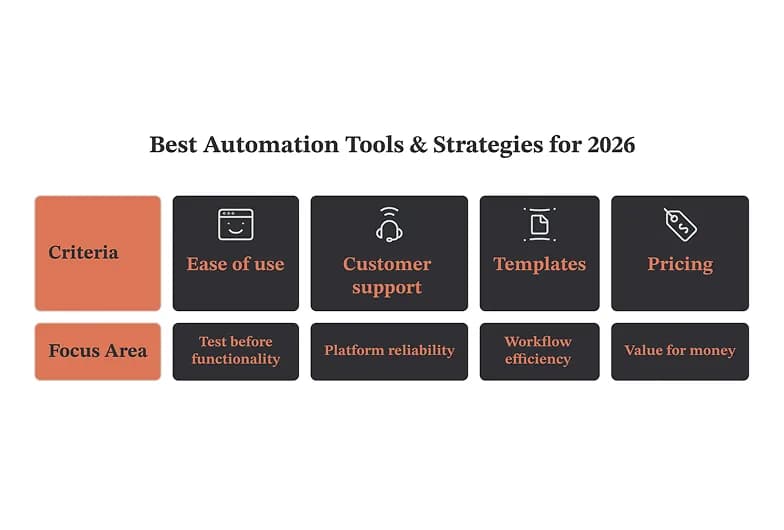
My rule stays practical: test ease of use before functionality. A steep learning curve kills momentum fast. Sturdy customer support, thoughtful templates, and honest pricing reveal whether a platform genuinely respects your limited working time.
Throughout, I'll compare heavyweight platforms against nimble apps, weighing scalability, customization, and real integration flexibility. Expect candid observations drawn from countless hours automating business processes, connecting everyday tools, and quietly
What Makes The Best Marketing Automation Tool?
After years of testing nearly every platform, I've learned the best marketing automation software balances raw power with genuine ease of use, never forcing you to choose between flexibility and everyday usability across your campaigns.
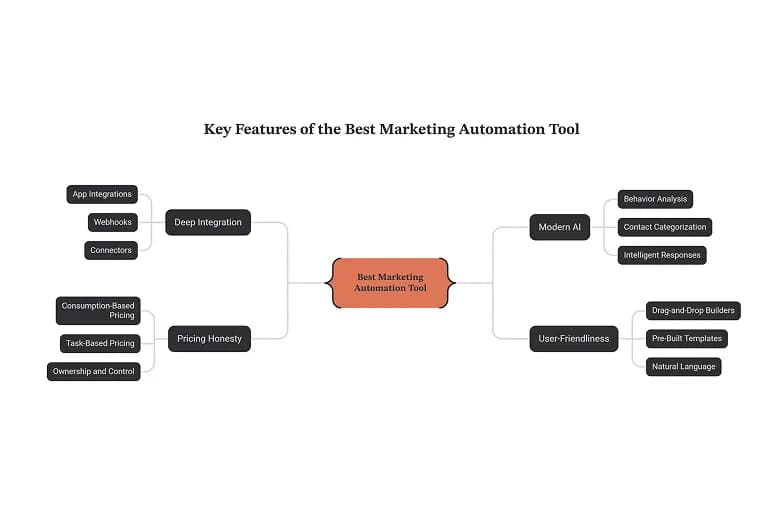
What truly separates the real leaders is deep integration: a tool is worthless without your tech stack connecting cleanly. Strong app integrations, reliable webhooks, and thoughtful connectors let leads, contacts, and data flow anywhere instantly.
Modern AI changes everything: the strongest tools now analyze behavior, categorize your contacts, and generate responses intelligently. Real AI reasoning handles context, avoids hallucination, and turns messy customer behavior into confident, fully automated decisions daily.
Pricing honesty matters enormously here. Watch the pricing model closely: seat-based or per-user costs punish real growth, while consumption-based and task-based pricing reward efficiency. Prioritize ownership, control, easy export, and freedom from platform lock-in entirely.
Finally, the very best serve non-technical teams without ever abandoning developers. Intuitive drag-and-drop builders, pre-built templates, and natural language lower barriers, yet reliability, error handling, and scalability keep serious marketing teams running smoothly all day.
What Is An AI Automation Workflow Tool?
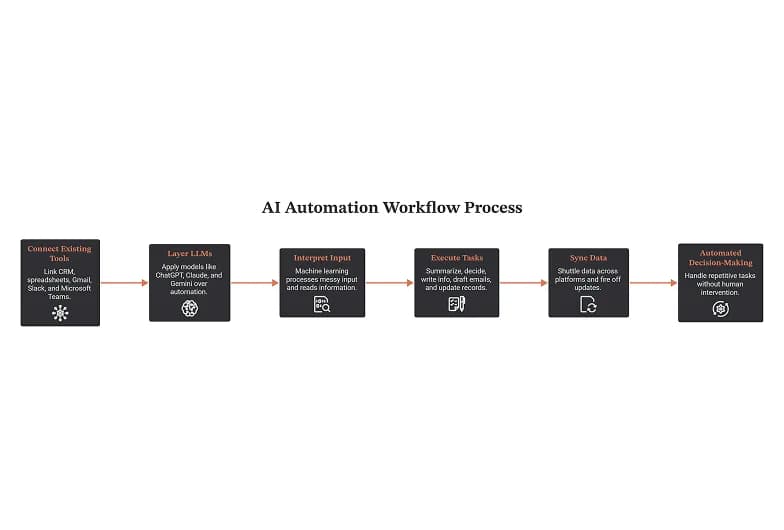
An AI automation workflow tool connects existing tools and moves work from Point A to Point B, layering LLMs over traditional automation so software can summarize, decide, and handle repetitive tasks without any human intervention.
Unlike rule-based logic that simply follows fixed steps, these platforms add machine learning and an AI co-pilot, letting machines interpret messy input, read information, and make real-time decisions right inside nearly all your everyday tools.
Most connect to CRM systems, a spreadsheet, Gmail, Slack, and Microsoft Teams, then shuttle data across each of them. Underneath, models such as ChatGPT, Claude, and Gemini write information, draft an email, and update records.
In practice, I've watched these platforms run quietly in the background, syncing data and firing off updates while nobody watches. Decision-making that once ate afternoons now happens through automated workflow software you barely even touch.
Getting started is easier than most people expect; many automation platforms offer free plans, so your first workflows cost nothing. Popular picks like Gumloop, Zapier, and n8n let beginners chain simple tasks together very fast.
How Can AI Automate Workflows?
Having built these systems for years, I've watched AI reshape workflow automation by absorbing repetitive work nobody enjoys. Rather than rigid rules, AI models interpret text, sense intent, and fire automations demanding zero human babysitting.
Here's what surprised me early: the real leverage isn't speed. AI agents quietly surface bottlenecks, draft replies, extract action items, and route requests, learning your patterns until delegation feels less like configuration and more instinct.
Contrary to hype, you rarely need code. Modern drag-and-drop interfaces pair visual builders with LLMs, so plain prompts replace scripting. I've shipped entire pipelines where writing instructions mattered more than any real programming skill whatsoever.
Practically speaking, the heavy lifting happens in document processing. Feed messy invoices, emails, receipts; data extraction pulls structured fields, then integrations sync everything downstream while models make intelligent decisions humans once handled slowly and manually.
Early automation meant brittle triggers and endless conditional logic breaking overnight. Today, intelligent orchestration adapts, self-corrects, and reasons through exceptions. That evolution, honestly, transformed my productivity from firefighting broken flows toward designing genuinely resilient systems.
What to Look for in Automation Tools
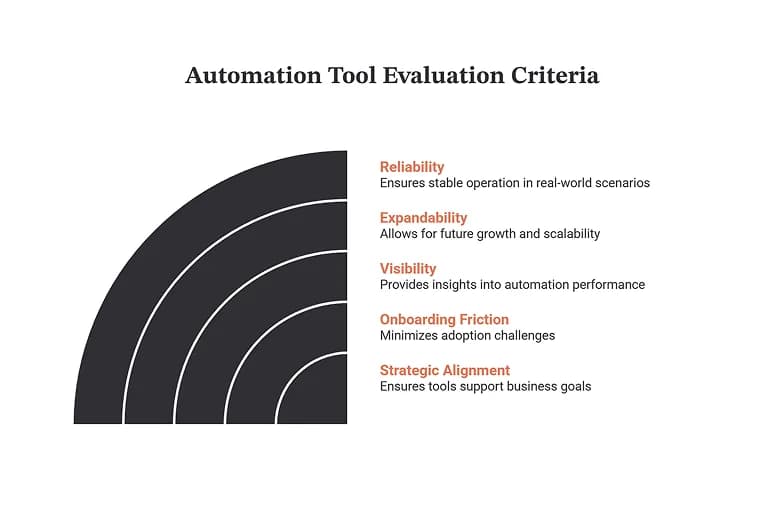
After years testing dozens of platforms, I judge every candidate against a handful of blunt criteria first. Skip flashy demos; instead probe whether the automation software actually survives your messiest real-world scenarios without ever breaking.
Contrarian take: pretty workflow builders matter less than sane workflow design underneath. I've watched teams outgrow slick canvases within weeks. Prioritize expandability, so today's tiny tools stretch into tomorrow's sprawling pipeline management demands rather gracefully.
Visibility separates winners from regrets. Demand honest reporting, granular metrics, and data analytics you can trust at 2am. Customizable dashboards beat rigid ones; genuinely user-friendly dashboards let non-engineers read real outcomes without begging developers repeatedly.
Ignore feature checklists momentarily; weigh onboarding friction instead. A vibrant community rescues you when documentation fails. Hidden extras like content management hooks or native CRM syncing quietly determine whether adoption sticks well beyond month one.
Finally, align automation capabilities with genuine strategy, never vendor hype. Map each purchase against your real customer journey; anything peripheral becomes expensive shelfware. The sharpest systems disappear into daily rhythm rather than demanding constant babysitting.
What Is Automation Software?
Automation software takes the tedious tasks that clog a workday and runs them without you. After years hands-on with these workflow automation tools, I treat them as tireless coworkers clearing manual work from your plate.
Robotic Process Automation (RPA) faithfully mimics human actions - the click, copy, paste rhythm that swallows back office tasks. I've watched RPA bots log into legacy systems through onscreen forms rather than clean APIs, working patiently.
Business Process Automation (BPA) thinks bigger, stitching entire departments together. Instead of one chore, it choreographs company-wide workflows and whole business processes, quietly moving SaaS tasks between the systems each team already leans on daily.
Industrial automation lives in the tangible physical world of manufacturing plants and busy logistics hubs, where robotic arms weld and conveyor belts hum. It commands real physical systems spanning shipping, warehousing, and heavy automotive production.
Test automation serves development teams, hammering software through QA pipelines before release. It repeatedly runs product testing on login flows and payment systems, catching breakage that manual checkers, tired and rushed, inevitably overlook near deadlines.
How Was The Best Automation Software Selected?
As an AI enthusiast running a small marketing agency, I approached this guide through extensive testing rather than marketing hype. Every bold claim required real proof, so my laptop quickly became a permanent testing ground.
Selection hinged on pricing structure transparency, real functionality, and honest scale. I weighed every single platform against genuine use cases, not glossy brochures. The business world rewards tools truly matching actual needs, never inflated options.
Beyond surface features, I studied workflow design across dozens of systems, timing how fast automated workflows actually deployed. My team measured setup time, hunting hidden friction that could waste whole afternoons chaining fragile apps together.
Honestly, my background as a lifelong marketing enthusiast shaped everything here. I tested from a public library near 42nd Street, patiently comparing polished examples against shady tools peddling cheap smoke and mirrors rather than substance.
Ultimately, matching each solution precisely to a clear type of automation decided everything. Whether teams needed data automation, custom app automation, or a friendly no-code solution, the right AI-powered processes separated genuine winners from pretenders.
Zapier
Most teams treat Zapier as their go-to tool without asking why. After years wiring workflows, I've learned its real strength isn't intelligence - it's quietly handling the heavy lifting nobody wants across a sprawling marketing stack.
Where Zapier truly earns its keep is unglamorous lead routing. A single campaign trigger fires, your CRM updates instantly, your customer service solution pings, and the right owner claims that follow-up - no team involvement required.
Recently the platform leaned hard into AI. Through Zapier MCP, models like Claude and ChatGPT take direct action across your stack, letting AI assistants draft replies or trigger steps that once demanded tedious manual clicking.
For marketers, the real payoff is freeing your brain for higher-level strategy. Let automation nurture leads, sync your CMS, and run the repetitive marketing process while you focus on the creative analysis machines can't replicate.
My honest take after building countless marketing campaigns: Zapier won't win on raw power, yet its breadth of no-code app connections remains unmatched. Start here, outgrow it later, but rarely will you ever regret beginning.
Make
Most newcomers wrongly assume Make demands scripting; it truly doesn't. Its intuitive visual canvas links nodes into branching scenarios, letting everyday marketers and scrappy entrepreneurs build multi-step workflows without any developer wrestling tangled logic repeatedly.
Where Make quietly excels is data movement between existing tools already running. I chain a trigger, layer filters, then fire an action, syncing forms, notifications, and follow-ups across my entire SaaS apps stack each morning.
Contrary to marketing hype, this workflow automation platform isn't merely another AI orchestration platform. Its advanced logic handles messy unstructured tasks gracefully, though AI tools increasingly bolt onto scenarios, enabling smarter AI automation downstream now.
Having personally watched it mature, Make adopted European data protection early, reassuring cautious teams. That visual workflow automation heritage, paired with genuine customization and refreshingly clean no coding setup, quietly outpaces clunkier, pricier rivals today.
Honestly, my favorite trick: reusing tidy scenarios as an ecosystem of app-to-app workflows. One shared dashboard, minimal purpose-built automation overhead, occasional code export when required, plus steady marketing workflows running unattended while I sleep soundly.
n8n
Among automation tools, n8n claims a stubbornly independent corner, courting developers who prize data sovereignty. Its open-source, self-hosted core delivers real code ownership instead of caging your workflows behind expensive, restrictive, permanent vendor lock-in arrangements.
Building here means dragging nodes across a visual workflow builder, yet nothing stops you writing custom code when logic demands it. This low-code flexibility perfectly suits Node.js natives escaping rigid, templated automation ceilings imposed elsewhere.
Though its integrations library stays smaller than Zapier's, n8n's growing community ships connectors constantly. DevOps teams appreciate running everything on-premises, keeping sensitive data governed internally rather than scattered across unknown external cloud servers somewhere distant.
Underneath, n8n handles serious event-driven workflows: webhook processing, data pipelines, and messy API calls all coexist. Thorough debugging views expose exactly where executions stumble, which decent coding skills then convert into quick, confident fixes rapidly.
Newcomers face a genuinely steep learning curve, and its limited documentation sometimes feels thin. Still, for infrastructure-minded builders wanting affordable, controllable, production automation without surrendering control, n8n ultimately rewards persistent engineering teams remarkably well here.
Workato
Forget treating Workato as another consumer gadget. Seasoned teams recognize it as serious middleware solutions territory, purpose-built for complex cross-system automation where finance, HR, and revenue systems must sync cleanly without brittle handoffs breaking overnight.
In practice, its recipe model shines during multi-system integrations. I've watched a single trigger cascade across NetSuite, Salesforce, and Slack, delivering the kind of cross-tool process orchestration that spreadsheet-driven teams only dream about achieving daily.
Where lightweight tools stumble, governance carries Workato forward. Baked-in compliance, granular audit trails, and encryption satisfy regulated industries and demanding enterprise environments, letting security leaders approve automation instead of quietly blocking every ambitious rollout outright.
Realistically, it isn't cheap. Quote-based pricing and enterprise features carry weight, and critics rightly flag vendor lock-in. Yet its deep data sovereignty controls and advanced CRM workflows frequently justify the premium for scaling operations teams.
As a full enterprise automation platform, Workato rewards teams needing heavy data transformation, thousands of pre-built actions, and clean API integrations. Smaller shops chasing quick wins, though, may find its depth simply overkill early on.
Pipedream
Most teams meet Pipedream expecting another drag-and-drop toy, then discover a developer-first runtime where writing code is the default rather than an afterthought. That single inversion quietly reshaped how I now approach building real automation.
Where flowchart builders hide logic behind clicks, Node.js control hands you the whole surface: npm packages, async patterns, raw request objects. You script exactly what happens, and nothing pretends the messy parts don't exist underneath.
Developers arriving from self-hosted open-source stacks often expect infrastructure headaches. Instead, managed authentication, hosted execution, and a public component registry remove the babysitting, while the underlying building blocks stay inspectable and freely forkable on GitHub.
Lately its momentum sits with agents. Connect thousands of APIs, wire tool-calling into a workflow, and suddenly production AI infrastructure stops being a research project and becomes a Tuesday task you can ship before lunch.
The trigger model is what kept me here longest: HTTP endpoints, schedules, and app events fire steps instantly. Pipedream rewards people comfortable reading logs, debugging quietly, and treating automations like small versioned projects worth maintaining.
Gumloop
Having built dozens of flows myself, I find Gumloop shines where manual tasks pile up. Its node-based canvas turns AI-powered document processing into something tangible, letting non-coders assemble production AI applications without touching backend plumbing.
What surprised me early was the speed. Feeding raw PDFs through content generation nodes, I watched unstructured workflows resolve into clean summaries. AI-powered app generation here feels less like coding and more like sketching intent.
Here's a contrarian take: Gumloop isn't for everyone. Teams craving deep UI control or bespoke custom AI apps may hit ceilings. Yet for AI-powered automation with modest technical requirements, few platforms match its approachable pragmatism.
In practice, my marketing team runs content marketing workflows through it daily. One flow behaves like a scrape and categorize leads agent; another spins research into optimized blog posts. That parallel data processing saves hours.
Ultimately, Gumloop occupies a sweet spot among AI workflow automation tools. It won't shoulder complex enterprise processes alone, but for AI acceleration across everyday business processes and quiet background tasks, its momentum keeps compounding steadily.
Vellum AI
Most people treat Vellum.ai as just another automation option, yet seasoned practitioners know it's really an LLM development platform where teams engineer, test, and ship AI functionality before wiring workflows into their production internal tools.
Where it quietly shines is model flexibility. You compare GPT-4, Claude, Gemini, and custom models side-by-side, watching outputs in real time, iterating prompts until reliability truly holds - something generic AI agent builder interfaces rarely surface honestly.
The unglamorous strength almost nobody markets is observability. Teams parse unstructured data: documents, emails, and images, using OCR and transformation, then trace runs through dashboards that expose failures rather than hiding weaknesses behind polished templates.
For enterprise-level deployments, the conversation shifts toward security, governance, and compliance features. Vellum bakes AI-powered workflow optimization into pipelines while keeping databases and access controls auditable, which lean engineering teams quietly appreciate under real pressure.
Realistically, Vellum AI isn't for everyone; custom interfaces and a visual workflow builder suit teams shipping serious AI automation workflow tool projects. If you're wiring simple tools, cheaper visual development platforms handle that just fine.
Lindy AI
Having tested dozens of platforms, I'll argue Lindy ranks among the best automation software available, deploying intelligent task-specific AI agents that draft emails, handle CRM preparation, and manage tedious follow-ups without you babysitting anything manually.
Unlike the complex set-up that plagues rival platforms, Lindy skips the friction entirely. Where ChatGPT, Claude, or Gemini answer questions, Lindy actually executes, chaining actions across your inbox and connected apps automatically, hour after hour.
For small businesses stretching scarce resources, this matters enormously. Lindy's free plans let solo founders begin immediately, while simple templates strip away the guesswork most owners quietly dread when configuring their very first agent build.
During a busy quarter, Lindy quietly processed hundreds of documents and killed routine tasks I hated. Its constant monitoring flagged stalled deals instantly, surfacing things I'd have missed across a chaotic, overflowing sales pipeline weekly.
Here's the contrarian truth: Lindy suits non-technical users far better than engineers expect, and its responsive AI support answers real questions quickly, so beginners rarely stay stuck for long wondering what quietly broke or why.
Which Marketing Automation Tool Should You Choose?
Honestly, after testing dozens of platforms, your choices narrow fast once you define the actual job. The best automation tools aren't universal; each marketing automation software suits a specific category of buyer and workflow type.
If your goal centers on outreach, pick a marketing automation tool covering multiple marketing mediums. Coordinating email, SMS, social media, and digital ads alongside solid customer relationship management matters far more than raw connector counts.
For beginners wanting quick wins, Zapier feels frictionless, while Make rewards visual thinkers who enjoy branching logic. Power Automate fits Microsoft-heavy offices, and Gumloop shines when your processes genuinely lean heavily on AI-driven document work.
Developer teams craving design freedom should weigh WeWeb and Retool, since building custom automation interfaces with code export and unlimited users beats being boxed into rigid templates that quietly limit your long-term product ownership entirely.
Enterprises building intelligent, model-driven automation solutions often land on Vellum.ai, whereas lean marketers thrive using simpler marketing tools. Match the platform's real depth to your specific team's skill, budget, and genuine daily operational reality upfront.
What Is The Difference Between Workflow Automation And AI?
Having built both kinds of systems, I notice traditional automation follows rigid business logic, firing off routine approvals or data entry the instant conditions match, never improvising beyond the branching logic you explicitly wired in.
By contrast, AI automation tools interpret intent rather than instructions. Instead of mapping every branch, you describe an outcome through natural language iteration, and LLM AI models infer the missing information a chatbot never could.
The line blurs fastest inside AI-powered workflows, where deterministic plumbing moves data while GenAI agents handle judgment. Complex workflows now blend both: predictable triggers, then intelligent automation workflows pausing for human approvals when confidence dips.
Underneath, the engineering differs sharply. Classic logic lives in custom JavaScript, code nodes, and predictable backend logic, whereas AI workflow tools lean on LLM API keys, trusting probabilistic replies instead of hardcoded certainty every time.
My rule of thumb: keep data synchronization, inventory management, and repetitive emails on plain automation tools, since predictability minimizes errors. Reserve an AI-native automation platform for messy, interpretive tasks where rules alone plainly fall short.
Conclusion
After years building automation software, I've stopped chasing one champion. Startups thrive on no-code automation and budget-friendly setups, while large enterprises demand ERP integrations, compliance workflows, and serious enterprise governance protecting every daily internal process.
Technical teams love self-hosting, open-source flexibility, and genuine data control, letting affordable scaling happen smoothly without any vendor lock-in. Non-coders needing zero programming knowledge lean toward polished drag-and-drop interface tools and forgiving automation platforms instead.
Honestly, the real payoff is ROI. Clients reclaim administrative work hours, redirect energy into innovation, and often see return on investment within weeks. That measurable operational efficiency, not hype, ultimately justifies adopting any serious platform.
Still, risks exist. Poorly mapped automation software fires incorrect emails, corrupts database fields, and multiplies mistakes fast. Careful handling, thorough testing, and clean APIs with reliable pre-built integrations keep connected business systems genuinely trustworthy long-term.
Regarding employment, fears feel overblown; I've seen automation development spawn fresh job opportunities rather than erase roles. For lean teams, solo creators, and growing eCommerce shops chasing retention, smart workflows quietly reshape tomorrow's connected world.