Automated Follow-Up System: How to Build One in 2026 (+ 9 AI Tools)
Answer first
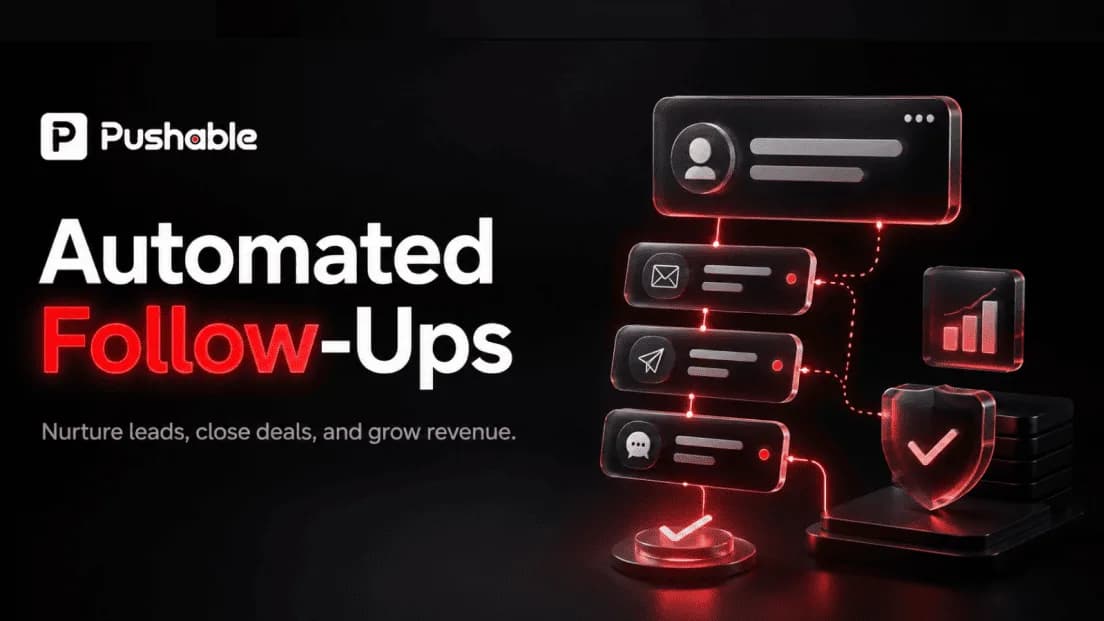
An automated follow-up system is a set of triggers, workflows, and AI agents that sends the right message to the right prospect on the right channel at the right time - without a rep remembering to do it. Modern systems capture the lead, score and route it, run a multi-channel sequence across email, LinkedIn, SMS, and calls, log every touch to the CRM, and adjust timing based on real prospect behavior instead of a fixed calendar.
On this page
- Introduction
- What Is an Automated Lead/Sales Follow-Up System?
- Why Automate Follow-Up? The Benefits
- Automated vs. Manual, and AI-Powered vs. Basic Sequences
- Key Components: How an Automated Follow-Up System Works
- The 9 Best AI Tools for Automating Sales Follow-Ups
- How to Build an Automated Follow-Up System: 7-Step Setup
- Multi-Channel Follow-Up Strategies That Get Replies
- Common Challenges (and How to Avoid Them)
- Metrics to Track
- Frequently Asked Questions
- Conclusion
Introduction
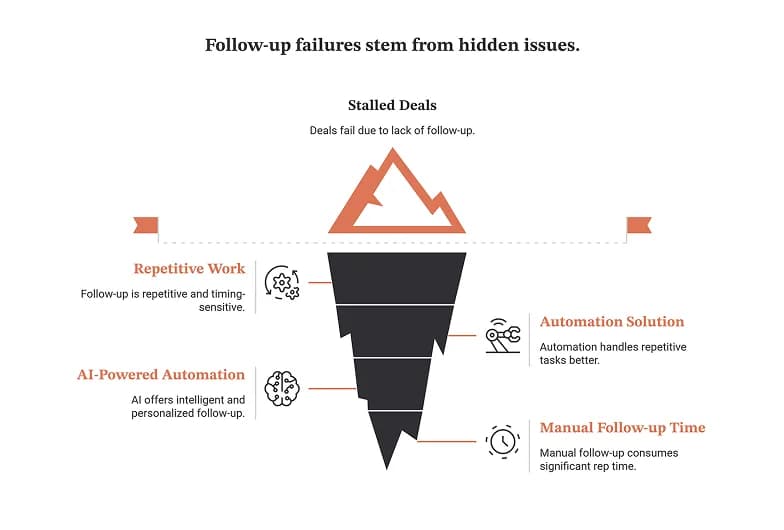
Most deals don't die on product or price. They die because someone forgot to follow up.
The pattern is familiar to any sales team. A prospect downloads a whitepaper, a rep sends email one, then email two, and then a quarter-end scramble swallows the week. Email three never goes out. The LinkedIn message never gets written. Two weeks later the deal has stalled, the prospect has slipped, and a competitor who hit the inbox first is running the discovery call you should have had.
Follow-up is not hard work. It is repetitive work with unforgiving timing requirements - which is exactly the category of work that automation handles better than humans do. The question in 2026 is no longer whether to automate lead follow-up, but how deep to go: basic sequences that fire on a schedule, or AI-powered follow-up automation that reads engagement signals, recommends intelligent next actions, and coordinates touchpoints across channels until the deal is ready to close.
This guide covers the full picture:
- What an automated follow-up system actually is (and what it isn't)
- Why teams automate: the benefits, with the math on time and cost
- Automated vs. manual, and AI-powered vs. basic sequences
- The essential features and key components of a lead follow-up system
- The 9 best AI tools for automating sales follow-ups, including ZoomInfo Copilot, Salesforce, HubSpot, and no-code platforms that need no tech skills
- A step-by-step, 7-step build guide
- Multi-channel strategies that get replies
- Common challenges, the metrics that matter, and FAQs
Whether you're starting from scratch or optimizing a system that already exists, the goal is the same: leads that are timely, personalized at scale, and never left sitting in an inbox.
The ten-hour problem
Run the arithmetic on manual follow-up. A standard cadence is four follow-ups spread over two weeks. Each one takes roughly 15 minutes to research and write properly - checking the account, reading recent activity, drafting something that isn't a template.
Four follow-ups × 15 minutes × ten leads = ten hours per fortnight , per rep, spent chasing leads rather than converting them.
Now scale that to a team of five and a lead volume that doubles after a good quarter. The math stops working. An automated follow-up system is the only solution that holds at that volume without hiring proportionally.
What Is an Automated Lead/Sales Follow-Up System?
An automated lead follow-up system is software that captures a lead's information, stores it in a database, and delivers follow-up messages automatically based on triggers, workflows, and predefined rules - with no manual intervention required for each individual touch.
Before AI platforms became standard, follow-up meant manual checking: refreshing the inbox, scanning social DMs, keeping a mental list of who was owed a reply. By 2025 that model had already broken for most B2B teams, and the systems that replaced it now handle the entire cycle with little to no human effort.
A mature system can:
- Capture and store lead information from web forms, landing pages, chat, and calls, straight into the CRM
- Personalize responses to lead queries using your brand voice, your products, and your nurturing style - close to how a human rep would answer
- Schedule follow-ups when there's no reply, and pause them the moment there is
- Route each lead to the right rep based on territory, capacity, or lead score
- Respond automatically when a prospect acts - clicking a pricing page triggers the next email, a call outcome triggers a different track
- Log activity and move deals so the CRM reflects reality without anyone typing it in
The messages themselves are the visible part: sales emails, texts, LinkedIn messages, and calls that follow an initial interaction to maintain contact and build interest until the prospect has replied.
The scope: from inbound capture to account handoff
It helps to think of the system as covering the entire lifecycle, not just the nurture step:
Stage | What the system does |
|---|---|
Inbound capture | Form submissions, chat, and call activity create a record instantly |
Qualification | Lead scoring against fit criteria and behavioral signals |
Opportunity | Triggered emails, SMS, task assignment, meeting reminders, pre-call prep |
Closed deal | Post-call summaries, pipeline updates, contract follow-through |
Account handoff | Onboarding sequence, internal notification, CS assignment |
The difference between a basic tool and a real system is scope. Basic email automation handles top-of-funnel nurture. A genuine follow-up system layers CRM data, activity tracking, and cross-channel orchestration on top, so every touchpoint arrives on the right channel with the right context.
Why Automate Follow-Up? The Benefits
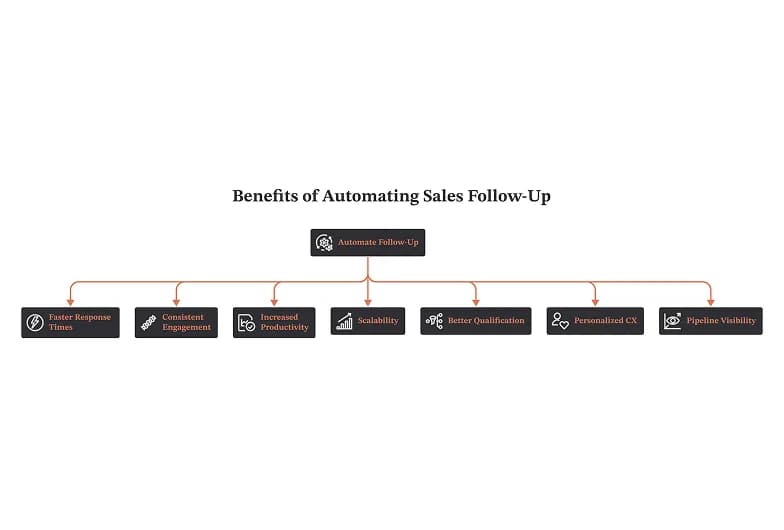
1. Faster response times, higher close rates
Speed is the single most controllable variable in follow-up. When several companies are researching the same buyer, the first to follow up wins a disproportionate share of the response odds. Instant follow-ups catch interest while it's live; a three-day delay hands it to competitors.
Automation makes the first email land within minutes of a form submission, every time, regardless of whether a rep is on a call, on a plane, or on holiday.
2. Consistent engagement, without forgotten messages
The often-cited rule of thumb is that it takes around five touches on average for a lead to convert. Manual cadences rarely get past two or three. Automation guarantees the full sequence runs - no delays, no forgotten messages, no lead falling through the cracks between rep handoffs.
Repeated contact also compounds: first impressions build momentum only when they're followed by more contact that has shown value.
3. Fewer errors, more productivity
Manually copying contact info, drafting emails, calling, and logging activity eats the day. Automation removes the transcription errors and gives reps their selling time back - they review and hit send, and the activity logs itself. Time shifts from admin to calls, demos, and closing.
4. Scalability without extra staff
This is where the cost case gets concrete. Five reps at an average salary of roughly $80,645 costs about $26,880 per month in payroll alone - before tooling, before ramp, before churn. Hiring to absorb lead volume is expensive, slow, and stressful, especially for startups and growing SaaS teams where volume expands and contracts unpredictably.
An automated system runs 24/7, absorbs the peaks, and delivers outreach at scale with a high-quality cadence - whether you're working 50 leads or 5,000. Quality does not degrade as volume rises, because the sequence, the assigned rep, and the messaging stay consistent with predictable timing.
5. Better lead qualification and rep focus
Scoring and routing surface ready-to-buy leads instead of leaving reps to guess. High-intent prospects get a prompt reply from a senior rep; low-intent ones enter nurture. Reps stop being overloaded by volume they can't triage.
6. Personalized CX at scale
Personalization used to trade off against scale. It no longer does. Modern platforms pull lead data, case studies, reports, and channel preferences into customized follow-ups that read as empathetic rather than mass-produced.
The market data points the same direction: teams that deliver personalized customer experience have been reported to grow market share meaningfully faster than those that don't, and roughly 63% of sales leaders say AI makes it easier to compete. Adoption figures for generative AI in sales have moved from around 19% actively using to a further 23% implementing - meaning the majority of the market is still catching up. Being early here is still an advantage.
Note on statistics: These are widely cited industry figures. Before publishing, link each one to its primary source (vendor state-of-sales reports, analyst research) and confirm the year - Google's helpful-content guidance rewards clear attribution, and AI search surfaces preferentially cite pages with verifiable, sourced data points.
7. Real-time pipeline visibility
Leaders get dashboards showing which leads are in-sequence, which have stalled, and which sequences are actually working - not a monthly guess. That makes it possible to coach on real behavior, forecast with evidence, and allocate territory and headcount where deals actually stick.
A concrete example: the recruitment vendor
Consider a recruitment vendor running a hiring round. Inbound spikes for six weeks, then collapses. Hiring five reps to cover the peak means carrying that cost for a full year to serve six weeks of demand. An automated follow-up system scales with the spike - multiple touches, first email within minutes, next touch on schedule, pause on reply, notify the rep on a hot signal - and scales back down without a layoff.
Automated vs. Manual, and AI-Powered vs. Basic Sequences
There are really two comparisons worth making. The first is automation against manual work. The second - and the more important one in 2026 - is AI-powered follow-up against basic sequencing.
Automated vs. manual follow-up
Dimension | Manual follow-up | Automated follow-up |
|---|---|---|
Speed | Depends on rep availability; often delayed | Instant, triggered on the event |
Consistency | Drops under workload; missed opportunities | Every step runs, every time |
Effort | High - drafting and research per lead | Low after initial set-up |
Personalization | Highly personalized, but not scalable | Scalable personalization via dynamic fields and AI |
Cost to scale | Linear with headcount | Near-flat |
Manual outreach wins on depth for a handful of strategic accounts. Automation wins everywhere else - and the best teams use both deliberately.
Basic sequencing vs. AI-powered follow-up
Basic sequencing does the same thing for every prospect on a fixed schedule: email day 1, LinkedIn day 3, call day 5. It executes reliably, but it's blind. It doesn't know whether the prospect opened anything.
AI follow-up platforms analyze how prospects actually respond - opens, clicks, engagement patterns, conversation signals - and produce recommended next actions. The rep configures the intent; the system adapts the execution to real behavior rather than a preset calendar.
Three capabilities separate the two categories:
- A unified data foundation. CRM records, third-party data, and conversation analysis in one place, so personalization is grounded in buyer context rather than a template's merge fields.
- Multi-channel capabilities. Email, LinkedIn, SMS, and calls orchestrated as one cadence, not four disconnected tools.
- Adaptive timing. The next touch fires when engagement suggests it should, not when the calendar says so.
Rule of thumb: if your current tool can't tell you why it sent a particular message to a particular person today, you're running basic sequencing, not AI-powered follow-up.
Key Components: How an Automated Follow-Up System Works
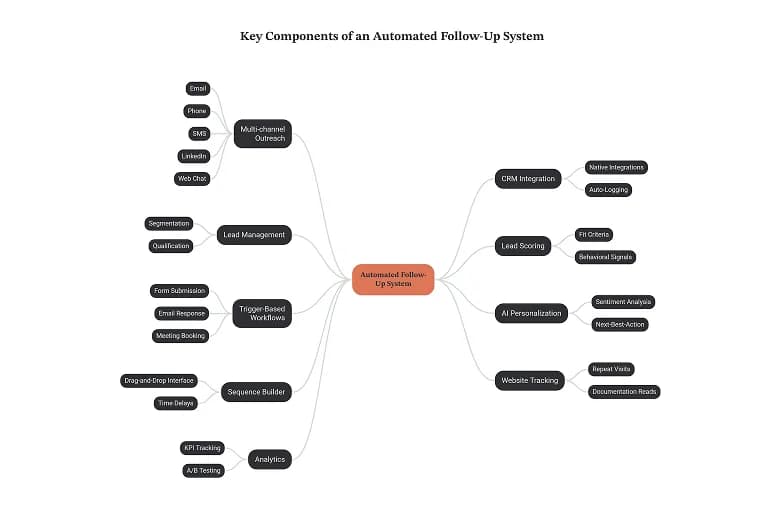
A follow-up system has to reach leads wherever they are and plug into the tech stack you already run. B2B buyers now move across as many as ten channels in a single buying journey - around 54% of tech buyers and 40% in professional services expect to engage on multiple channels - so single-channel automation leaves coverage gaps by design.
Here are the essential features, in the order they matter.
1. Multi-channel outreach
Email, phone, SMS, LinkedIn, and web chat, coordinated in one cadence. Lead-to-call and lead-to-text automation matter most for ready-to-buy prospects: a call notification the moment a lead shows strong interest converts far better than an email in a queue.
Watch for channel fatigue. Three emails followed by a fourth email is a pattern prospects have learned to ignore; three emails followed by a LinkedIn message is a different conversation.
2. CRM integration and auto-logging
Every conversation is a datapoint. Native integrations with your sales stack and marketing stack mean replies, call outcomes, deal stage changes, and meeting status log themselves. Without this, you get siloed data, manual entry, and a lead-gen dashboard nobody trusts.
Look for platforms with broad native integration libraries - 200+ integrations that connect in minutes rather than custom-dev APIs that take a quarter.
3. Lead management, segmentation, and qualification
Automatic segmentation splits leads by stage, behavior, and preferred channels, then assigns per-segment templates and follow-up paths. An AI solution qualifies leads on intent and behavioral data rather than form fills alone.
4. Lead scoring and routing
Scoring combines fit criteria (company size, industry, role, geography) with behavioral signals (downloads, website visits, pricing-page views, meeting requests). A VP who reads the pricing page and downloads a whitepaper scores very differently from an intern who grabbed one PDF.
High-score leads route to senior reps on priority sequences with a faster cadence and more touches. Low-score leads enter nurture. Routing rules should account for territory and capacity, not just round-robin.
5. Trigger-based workflows
The "if this, then that" layer:
- Form submission → welcome email + first-touch task
- Email response → pause sequence, notify rep
- Meeting booking → confirmation, prep brief, calendar sync
- Post-meeting → summary and follow-up task 2 days later
- Deal stage change → new sequence
- No activity for 14 days → re-engagement sequence
6. AI personalization and next-best-action
Sentiment analysis, optimal-timing predictions, and next-best-action recommendations. AI email drafting and summarization solve the blank-page problem by pulling CRM data, recent activity, and sequence context into a first draft the rep can edit in thirty seconds.
7. Sequence and cadence builder
Multi-step flows built in a drag-and-drop interface, with time delays, branching logic, templates, and cloning. No-code platforms make this accessible to teams with no tech skills - the reason "no-code" now shows up in nearly every sales-automation shortlist.
8. Website behavior tracking and real-time sync
Tracking integrations surface high-intent signals - repeat pricing-page visits, documentation reads - and sync them in real time so the follow-up task appears while the intent is still fresh.
9. Analytics and continuous improvement
Cold email without measurement is unpredictable guesswork. Track KPIs across the funnel: open rates, reply rates, call connect rates, engagement timing, meeting bookings, drop-off points, and rep activity (emails sent, calls made, meetings booked). Add A/B testing and a disciplined monitor-and-adjust cycle, plus bottleneck analysis on where leads stall between in-sequence and converted.
The 9 Best AI Tools for Automating Sales Follow-Ups
We evaluated platforms on three criteria: automation depth (how much runs without a human), intelligence (does it adapt to behavior or just execute), and integration (does it fit the stack you already own).
1. Salesforce (Einstein / Agentforce)
Best for: Teams committed to the Salesforce ecosystem.
Einstein Predict handles deal scoring and next-best-action recommendations; Agentforce extends this into sequence execution and task generation across email and calls. The advantage is the native ecosystem - a unified view of CRM, activity, and conversation data feeding the same automation layer.
Trade-offs: Complex configuration and real IT resources to deploy well. Conversation-intelligence depth may require additional components.
2. ZoomInfo Copilot
Best for: Prospecting-led teams that need the data layer as much as the workflow layer.
Copilot pairs ZoomInfo's B2B contact database with follow-up workflows, layering real-time company intelligence and buying-intent signals onto outreach. If contact data quality is your bottleneck, this is a data product with automation attached.
Trade-offs: Less suited as a full deal-management system.
3. HubSpot Sales Hub
Best for: SMBs that want CRM-native automation without a services engagement.
CRM-native sequences, AI email generation, and predictive lead scoring across email, LinkedIn, and calls. Affordability and ease of use are the headline strengths.
Trade-offs: AI sophistication and native conversation intelligence lag the enterprise platforms.
4. Smartlead.ai
Best for: High-volume cold outreach where deliverability is the constraint.
Multi-sender account management, AI personalization at scale, and deliverability tooling built for SDR teams running cold campaigns.
Trade-offs: Prospecting-focused; not a deal-management platform.
5. Lemlist
Best for: Creative campaigns from smaller teams.
Visual email personalization - dynamic images, custom landing pages - with a simple campaign builder that gets a sequence live the same day.
Trade-offs: Lighter AI, fewer channels, and limited CRM depth compared with the enterprise options.
6. Pipedrive
Best for: Small teams that manage deals visually.
A visual pipeline CRM with an AI Sales Assistant covering email composition, deal-likelihood scoring, workflow automation, and email sync.
Trade-offs: Lighter AI; multi-channel orchestration often needs workarounds.
7. Fireflies.ai
Best for: Turning meetings into follow-up automatically.
Meeting transcription with AI follow-up task generation and action-item tracking, wired into calendar and CRM. Strong for note-taking and coaching on calls.
Trade-offs: Not a prospecting-sequence or email-automation platform on its own - pair it with one.
8. Conversica
Best for: High-volume inbound where speed-to-contact is the whole game.
AI virtual assistants run autonomous follow-ups over email and chat, qualify readiness, and auto-schedule meetings using conversational playbooks. Runs 24/7 and multilingual.
Trade-offs: Inbound-focused, with less CRM depth than a full platform.
9. Outreach
Best for: Established sales engagement across large SDR and AE teams.
Mature multi-channel sequencing with conversation intelligence and deal-health signals layered on top, aimed at teams that need standardized cadences enforced across many reps.
Trade-offs: Enterprise pricing and setup overhead; overkill for a five-person team.
Quick comparison
Tool | Core strength | Best fit |
|---|---|---|
Salesforce | Unified data + AI agents | Enterprise on Salesforce |
ZoomInfo Copilot | Contact + intent data | Prospecting-led teams |
HubSpot | CRM-native ease of use | SMB |
Smartlead.ai | Deliverability at volume | Cold outbound |
Lemlist | Visual personalization | Small creative teams |
Pipedrive | Visual pipeline | Small teams |
Fireflies.ai | Meeting → follow-up | Call-heavy motions |
Conversica | Autonomous inbound reply | High-volume inbound |
Outreach | Standardized cadences | Large SDR orgs |
How to Build an Automated Follow-Up System: 7-Step Setup
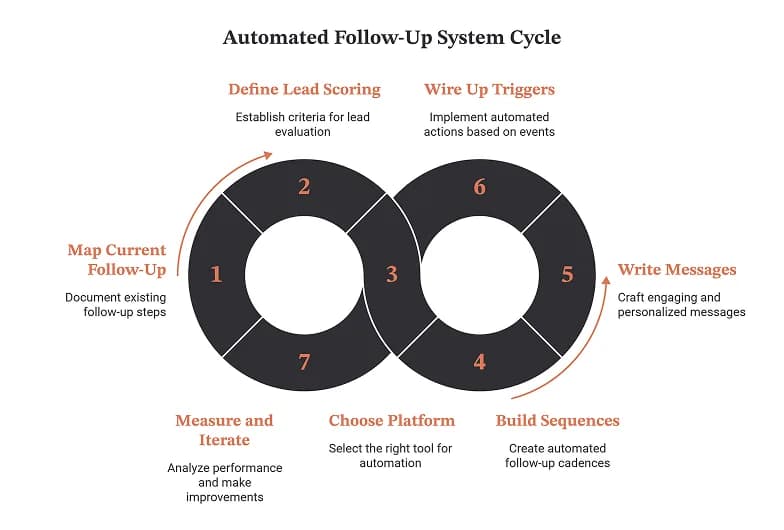
Step 1 - Map your current follow-up motion
Write down what actually happens today, touch by touch, for each lead source. You cannot automate a process you can't describe. Note where leads currently go cold; those gaps become your first triggers.
Step 2 - Define lead scoring and routing rules
Agree fit criteria and behavioral signals with marketing, then set thresholds. Decide who gets high-score leads, what the response SLA is, and how territory and capacity affect assignment.
Step 3 - Choose your platform
Start from your CRM. The tool that integrates natively with the system of record you already trust will beat a better-featured tool that needs custom APIs. Weigh automation depth, intelligence, and integration against the size of the team that has to run it.
Step 4 - Build the sequences
Start with three: a new inbound lead cadence, a post-meeting cadence, and a re-engagement cadence for deals with no activity in 14 days. Use branching logic so an engaged prospect gets a different path from a silent one. Vary channels - don't send four emails in a row.
Step 5 - Write the messages
Answer-first, short, and specific. Reference the trigger ("you were looking at pricing yesterday") rather than a generic value prop. Use dynamic fields for the mechanics and AI drafting for the first pass, but have a human own the voice.
Step 6 - Wire up triggers, logging, and notifications
Every reply pauses the sequence. Every high-intent signal notifies the assigned rep. Every call outcome, meeting, and deal stage change logs itself. Test each trigger with a dummy record before go-live.
Step 7 - Measure, A/B test, and iterate weekly
Set your baseline in week one, then run one test at a time - subject line, send timing, channel order, delay length. Review sequence performance, drop-off points, and meeting bookings every week, and retire steps that produce nothing.
Multi-Channel Follow-Up Strategies That Get Replies
- Lead with speed on the first touch. Under five minutes for inbound. This single change usually moves reply rates more than any copy edit.
- Alternate channels deliberately. Email → LinkedIn → email → call beats four emails, because each channel resets attention.
- Match channel to intent. High-intent signals earn a call or a text; early-stage curiosity earns an email.
- Keep the fourth touch different, not louder. Send a case study, a report, or a relevant customer story rather than "just bumping this."
- Always pause on reply. Nothing damages credibility faster than an automated nudge arriving after a human conversation started.
- Give every sequence an exit. A polite breakup message with a re-engagement path in 90 days outperforms indefinite nurture.
Common Challenges (and How to Avoid Them)
Challenge | Why it happens | Fix |
|---|---|---|
Messages feel robotic | Templates with merge fields and no context | Ground personalization in CRM activity and recent behavior; have a human own tone |
Deliverability collapse | Volume without sender hygiene | Warm domains, cap daily sends, monitor bounce and spam rates |
Siloed data | Tools that don't write back to the CRM | Prioritize native integrations; audit for manual entry |
Over-automation | Every touch automated, including the ones that need a human | Automate the cadence, keep discovery and negotiation human |
Nobody owns the system | Built once, never maintained | Assign an owner and a monthly review |
Sequences never pause | Missing reply/meeting triggers | Test exit conditions before launch |
Metrics to Track
Track these weekly, segmented by sequence and by lead source:
- Speed to first touch (median minutes)
- Open, reply, and positive-reply rates
- Call connect rate and meeting booking rate
- Sequence completion vs. drop-off by step
- Leads in-sequence vs. stalled vs. converted
- Rep activity: emails sent, calls made, meetings booked
- Pipeline created and sales velocity - the metrics that justify the spend
If a step produces no replies across 200 sends, it isn't a touch. It's noise.
Conclusion
Manual follow-ups are a pipeline risk before they're a productivity problem. Every forgotten email three is deal velocity you don't get back.
AI-powered automation fixes the structural issue: it coordinates follow-ups across channels, personalizes on buyer context, and recommends next steps based on behavior rather than a fixed calendar. Teams on unified platforms - integrated AI agents working across email, LinkedIn, SMS, and calls, with conversation intelligence and a shared data layer - consistently report higher win rates and shorter cycles than teams stitching together fragmented tools.
An automated system saves rep time, scales outreach at no added cost per lead, and holds message quality steady from 50 leads to 5,000. AI tools now handle prospecting, personalization, and optimization at close to human quality, and they're transforming sales across industries and company sizes.
The human element doesn't disappear. It relocates. Automation absorbs the repetitive work so reps spend their hours on the human moments - the discovery calls, the objection handling, the deal-moving conversations that no sequence can run.
The winning teams in 2026 do four things: respond faster, follow up consistently, use data, and improve weekly. Build the system that makes all four automatic, at any scale.
About this guide
Written for revenue teams evaluating or rebuilding their follow-up automation. Statistics cited are drawn from published industry research; verify and link primary sources before publication. Recommendations reflect hands-on evaluation of the platforms listed and are not endorsements - pricing, features, and integration depth change frequently, so confirm current capabilities with each vendor.