AI Solutions for Business: How to Choose One That Actually Does the Work (2026)
Short answer: the best AI solutions for business are the ones that do the work, not just talk about it. Most tools sold as "AI solutions" are chat assistants or single-task add-ons. What actually moves the needle for a business is an execution layer - AI agents that run multi-step workflows across your existing tools, with a human approving anything that matters. This guide breaks down the five types of AI solutions for business, how to choose between them, real use cases by department, and where an agent-based platform like Pushable fits.
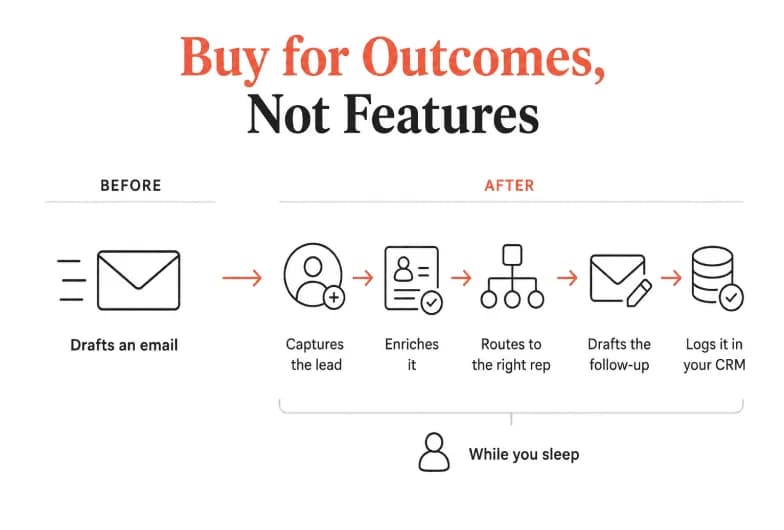
If you only take one thing away: buy for outcomes, not features. A tool that drafts an email is useful. A tool that captures the lead, enriches it, routes it to the right rep, drafts the follow-up, and logs it in your CRM - while you sleep - is a business solution.
What are AI solutions for business?
AI solutions for business are software systems that use artificial intelligence to automate decisions, tasks, and workflows across a company's operations - from sales and marketing to finance, HR, and support. They range from narrow point tools (an AI writer, an AI scheduler) to full automation platforms that connect your apps and run entire processes end-to-end.
The category has moved fast. In McKinsey's 2025 State of AI survey, 88% of organizations reported using AI in at least one business function, up from 78% a year earlier - and nearly a quarter said they were already scaling agentic AI systems that plan and execute multi-step work. Adoption is now the norm. The real question is no longer whether to use AI, but which kind of solution earns its keep.
The 5 types of AI solutions for business
Not all "AI solutions" solve the same problem. Here's the honest map of the market, from lightest to heaviest lifting.
Type | What it does | Best for | Limitation |
|---|---|---|---|
1. AI point tools | One narrow job well (AI writer, transcription, image generation) | A single repetitive task | Doesn't connect your workflow; you still stitch steps together |
2. AI assistants / copilots | Chat interface that answers, drafts, summarizes | Individual productivity | Session-based; stops when you close the tab; no automation |
3. RPA (robotic process automation) | Software "bots" that mimic clicks and rule-based steps | High-volume, rigid, repetitive tasks | Brittle; breaks when screens or rules change |
4. iPaaS / workflow automation | Connects apps and moves data between them | "When X happens, do Y" triggers | Rule-based; limited reasoning on messy, unstructured inputs |
5. AI automation platforms (agentic) | AI agents that reason, run multi-step workflows, and act across tools | Whole-team operations that need judgment + execution | Newer category; choose one with human-in-the-loop controls |
The first four have been around for years. The fifth - agentic AI automation platforms - is where the 2026 conversation is happening, because it combines the reasoning of an assistant with the execution of automation. This is the category Pushable is built for.
Quotable takeaway: An AI assistant tells you what to do. An AI automation platform does it - and asks for approval before anything risky.
Why AI solutions matter now
Three shifts made this the year businesses stopped experimenting and started deploying:
- AI escaped the IT department. Marketing, sales, finance, and ops teams now build their own workflows without waiting on developers. No-code builders removed the technical barrier.
- Agents can act, not just answer. Modern platforms don't stop at generating text. They read a document, extract data, update a system, and hand off to a human - a full task, start to finish.
- The value gap is real. McKinsey found that while 88% of organizations use AI, only a small fraction capture meaningful profit impact. The winners aren't using more AI - they're using it to run processes, not just assist people.
That gap is the whole game. Adoption is easy. Getting AI to reliably complete real business work - safely - is the hard part, and it's where the right solution pays for itself.
The shift from "AI tools" to "AI that does the work"
Most AI solutions on the market today are optimized for one person at a time. You open a chat, type a prompt, get a response, and then you do the actual work of moving it into your CRM, your inbox, or your spreadsheet.
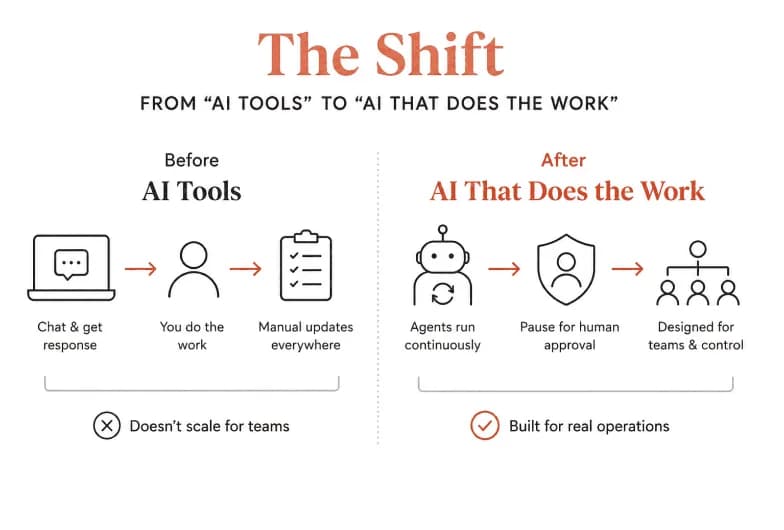
That's fine for individuals. It falls apart for teams, because:
- Context lives in silos. Each chat session starts from scratch. The AI doesn't know your accounts, your files, or what happened yesterday.
- Nothing runs on its own. Close the tab and the "assistant" stops. There's no background execution, no schedules, no triggers.
- There's no team control. No shared workspace, no permissions, no approval gates - so it never becomes safe enough for real operations.
An AI automation platform flips this. Instead of a chat you babysit, you get agents grounded in your business context that run continuously and pause for human approval on the decisions that matter. That's the difference between a productivity feature and a genuine business solution.
How to choose the right AI solution for your business
Use this checklist when you evaluate any AI solution. The strongest options score well across all six.
- Does it execute, or just suggest? Can it complete multi-step tasks across tools, or does it stop at generating text you then act on?
- Is it built for a team or one person? Look for shared context, roles, and permissions - not a single-player chat.
- Does it run on its own? Schedules and event triggers matter. Agents that only work while you watch aren't automating anything.
- Can humans stay in control? Approval gates and notifications keep a person in the loop before anything risky happens. This is non-negotiable for finance, HR, and customer-facing work.
- How many of your tools does it connect to out of the box? Integration breadth determines what it can actually do on day one.
- How does pricing scale? Per-seat pricing punishes you for adding people. Usage- or outcome-based pricing aligns cost with value.
Buyer's tip: Ask every vendor to show you a workflow running end-to-end - trigger, reasoning, action, and human approval - not a demo of it writing a paragraph.
Put AI to Work for Your Whole Team, Not Just One Tab
Pushable deploys always-on AI agents that run your workflows end-to-end - with shared context and one-tap human approval. Start free with 200 credits a month, no card required.
AI solutions for business by department
The fastest way to see value is to point AI at the repetitive work already eating your team's hours. Here's what that looks like function by function - and what an agent-based platform can own.
Sales
Qualify inbound leads, enrich them with firmographic data, route to the right rep, and draft a first-touch follow-up. Every form fill becomes a live conversation in minutes instead of days.
Marketing
Schedule campaigns, draft and repurpose content, monitor brand mentions, and compile weekly performance reports - the motion keeps moving without daily babysitting.
Finance
Reconcile invoices, chase overdue payments, generate monthly reports, and flag spend anomalies - with a human approving any payment before it goes out.
Human resources
Onboard new hires end-to-end, route PTO requests, prep performance reviews, and keep the handbook in sync so HR workflows finish themselves.
Operations
Vendor onboarding, procurement, inventory updates, and recurring ops reports run on schedule, every time.
Customer support
Triage tickets, draft replies, escalate stuck issues, and update knowledge-base articles so agents spend time on humans, not queue mechanics.
The pattern is the same everywhere: agents handle the routine execution; people make the decisions that need judgment.
Comparing popular AI solutions for business
Different tools solve different slices of the problem. Here's a fair, high-level comparison of well-known options and where each shines. (Verify current features and pricing with each vendor - they change often.)
Solution | Category | Strength | Consider if you need |
|---|---|---|---|
Pushable | Shared AI workspace / agentic automation | Team-native agents that execute multi-step workflows with human approval, always-on | An execution layer for the whole team, not another single-player tool |
Zapier | Workflow automation / iPaaS | Massive app catalog and simple trigger-action recipes | Lightweight "when X, do Y" connections between apps |
Lindy | AI assistants / agents | Prebuilt AI "employees" for specific roles | Individual-focused AI helpers for defined tasks |
Google Workspace (Gemini) | Productivity AI | AI embedded inside Docs, Sheets, Gmail | AI that lives within Google's apps for small teams |
AWS AI for SMB | Cloud AI building blocks | Scalable AI services and infrastructure | Developer resources to build custom AI on cloud infra |
There's no single "best" - it depends on whether you want a feature, a connector, or an execution layer. If your goal is to hand real, multi-step work to AI that your whole team controls, that's the agentic-platform lane, and it's where Pushable is purpose-built.
Why Pushable is built for business teams
Pushable is a shared AI workspace where teams deploy agents, approvals, and connected business context in one place - no separate AI setup for every user. It's designed around the four things most "AI solutions" miss:
- Team-native by default. One shared workspace with shared memory, files, databases, and role-based permissions. Every agent is grounded in your real business context instead of a blank chat.
- Human-in-the-loop control. Approval gates pause agents mid-task, and Telegram-based notify-and-approve flows let your team sign off from a laptop or phone in one tap - so automation stays safe for finance, HR, and customer-facing work.
- Always-on execution. Agents run continuously on schedules and event triggers, even when no one has the app open. Work keeps moving overnight and on weekends.
- 100+ integrations, no code. Drop in Gmail, Slack, HubSpot, Salesforce, Google Sheets, and 100+ prebuilt connectors (plus custom MCP connectors) without writing a line of code. Agents read and write to the systems your team already uses.
And the pricing model is built for teams rather than against them: you pay for results, not seats. Credits are only spent when an agent actually completes a task - a message sent, a report filed, a workflow triggered - so the bill doesn't grow just because you added people. Plans start free (200 credits/month), with Starter at $27/mo and Pro at $97/mo for teams building serious workflows at scale.
The one-line version: Most AI tools are built for one person. Pushable is the execution layer built for the whole team.
How to get started with an AI solution (a simple rollout)
You don't need a six-month project. Start where the pain is:
- Pick one painful, repetitive workflow - lead follow-up, invoice reconciliation, ticket triage.
- Map the steps a person does today, including where a human must approve something.
- Connect the tools involved (CRM, inbox, spreadsheet) to your platform.
- Deploy an agent for that one workflow and keep approval gates on while you build trust.
- Measure hours saved and errors avoided, then expand to the next workflow.
Starting narrow proves value fast and builds the internal confidence to scale - which, per the research, is exactly what separates the businesses capturing real ROI from those still stuck in pilots.
The bottom line
The market is full of AI solutions for business, but most are features dressed up as solutions. The ones that deliver real ROI share a pattern: they execute real work, they're built for teams, they run on their own, and they keep humans in control. When you evaluate options, judge them on outcomes - a completed workflow, not a clever paragraph.
If you want an AI solution that runs your team's workflows end-to-end - with shared context, always-on agents, and one-tap human approval - that's exactly what Pushable was built to do.
Ready to put AI to work for your whole team? Start automating free on Pushable →
Note: The scores, comparisons, and category descriptions here are drawn from public industry reporting and vendor documentation. Adoption statistics are from McKinsey's 2025 State of AI survey. Verify current pricing and features directly with each vendor, as they change frequently.