AI Project Management in 2026: From AI Assistants to Autonomous Agents That Run the Work
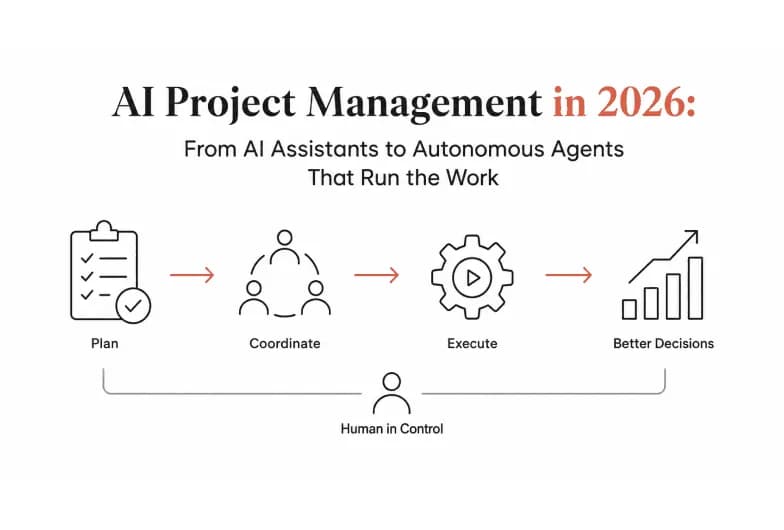
AI project management is the use of artificial intelligence to plan, coordinate, and execute project work automating routine tasks, predicting risks, and keeping tools in sync so teams spend their time on decisions instead of admin. In 2026, the category has split into two very different things: AI that suggests what to do next, and AI that actually does it. Understanding that gap is the difference between saving a few minutes on status updates and reclaiming entire workdays.
This guide breaks down what AI project management really means today, the three layers of tools now on the market, where most of them fall short, and how an agentic execution layer like Pushable closes the gap - by running your projects across Asana, Jira, Slack, and 100+ other tools while keeping a human in control.
What is AI project management?
AI project management applies machine learning, natural language processing, and autonomous agents to the day-to-day mechanics of running projects: creating and assigning tasks, updating statuses, drafting reports, flagging risks, and coordinating handoffs between people and systems.
At its simplest, that means an assistant summarizing a meeting or drafting a task description. At its most advanced, it means autonomous agents that monitor your project tools, trigger the right workflow when something changes, and complete multi-step work end to end - pausing only when a human needs to approve a decision.
The core promise is the same across every vendor: reduce administrative overhead so project managers can focus on strategy, stakeholders, and judgment calls that only humans can make. What differs - dramatically - is how much of the work the AI is actually allowed to carry out on its own.
What AI actually does in project management today
Modern AI project management capabilities fall into a handful of practical buckets:
- Project setup and task breakdown. Turn a brief, spec, or requirements doc into a structured project - epics, tasks, owners, and deadlines - in seconds instead of an afternoon.
- Smart assignment and capacity balancing. Route work to the right person based on workload, skills, and priority, and close out or reassign stale tickets automatically.
- Status updates and reporting. Generate standups, weekly progress reports, and stakeholder summaries from live project data - no manual rollups.
- Risk and bottleneck prediction. Analyze historical and current project data to surface delays, dependency conflicts, and resource constraints before they derail a deadline.
- Meeting-to-action automation. Convert meeting notes into follow-up tasks, owners, and reminders that land in your project tool automatically.
- Cross-tool orchestration. Keep your CRM, inbox, spreadsheets, and project boards in sync so a change in one system updates everywhere else.
The first five are now table stakes - nearly every major platform offers some version of them. The sixth, cross-tool orchestration that runs continuously without a human babysitting it, is where the market is still wide open.
The three layers of AI project management tools
Not all "AI project management" is built the same. It helps to think in three layers, each solving a different problem.
1. In-tool copilots (AI inside your project tool)
These are the AI features baked into platforms like Asana, ClickUp, Jira, Wrike, and Monday. Copilots answer natural-language questions about project status, generate dashboards, draft task descriptions, and surface risks - all within that single tool. Google Workspace and Microsoft Copilot bring similar capabilities to docs, sheets, and meetings.
Strength: deeply woven into the workflow you already use. Limit: they only see and act inside their own product. Your project rarely lives in one app.
2. Standalone chat assistants (AI in a separate window)
General assistants like ChatGPT are excellent for drafting a project charter, brainstorming a plan, or rewriting an update. But they're built for one person, one conversation at a time.
Strength: flexible, fast, great for thinking and drafting. Limit: session-based and single-player. Close the tab and the work stops. The assistant has no standing access to your files, boards, or business context, and it can't execute anything on your real tools.
3. The agentic execution layer (AI that runs the work)
This is the newest and most consequential layer. Instead of assisting a person, agents execute workflows: they monitor events, trigger multi-step actions across many tools, run on schedules even when no one is online, and hand off to a human for approval when a decision matters.
Strength: turns "AI told me what to do" into "AI did it, and asked before anything risky." Limit: requires a platform built for orchestration, permissions, and human-in-the-loop control - not a chat box. This is the layer Pushable is built for.
The gap most AI project management tools leave open
Google's own guidance on people-first, genuinely helpful software is a useful lens here: does the tool actually help the team get real work done, or just add another AI text box? When you audit the market against that standard, three gaps show up again and again.
- They're built for one person, not the whole team. Most AI project management features optimize for an individual user - a personal copilot, a private chat. There's no shared workspace, no shared memory, and no team-level control over what the AI can do.
- They assist, but don't execute. A copilot can tell you a task is overdue and even draft the follow-up. But someone still has to send it, update the board, notify the owner, and log it in the CRM. The AI stops at the edge of its own app.
- They stop when you close the tab. Chat-based tools are session-bound. Your projects, however, keep moving overnight, across time zones, and while you're in meetings. Work that only happens when someone is watching isn't automation - it's assisted manual work.
The result: teams end up with AI in five different tools, none of which talk to each other, and a project manager still stitching it all together by hand.
How agentic AI project management works with Pushable
Pushable takes a different approach. Rather than being another project management app, it's a shared AI workspace and execution layer that sits on top of the tools you already use. Here's what that changes in practice.
- Always-on agents, not sessions. Pushable agents run continuously on schedules and event triggers - a new lead arrives, a ticket goes stale, a milestone slips - and act on it whether or not anyone has the app open. Work keeps moving when your team is offline.
- One shared workspace, built for teams. Your knowledge base, files, databases, and memory live in one place, so every agent is grounded in your actual business context instead of starting from a blank chat. Roles and permissions define who can view, act, and approve from day one.
- Real execution across 100+ tools. Pushable connects natively to Asana, Jira, Trello, Notion, Linear, Slack, Gmail, Google Sheets, HubSpot, Salesforce, and more - plus custom MCP connectors. Agents don't just read your project data; they write to it, updating tasks, sending messages, and syncing systems.
- Human-in-the-loop by design. Every action that matters pauses for a human. Your team gets a notification (including one-tap Telegram approvals) and signs off before an agent does anything consequential. Automation stays safe enough for real business use.
- Pay for results, not seats. Instead of per-user pricing that grows with headcount, Pushable runs on credits - spent only when an agent actually completes a task. Nothing is deducted just for being logged in.
Honest scoping: AI project management tools, including Pushable, are aids to good project management - not a replacement for it. No platform can guarantee on-time delivery, and agent output still needs human oversight, which is exactly why approval gates matter. Treat AI as an execution layer that removes busywork, not a substitute for judgment, stakeholder trust, or clear objectives.
Pushable vs. traditional AI project management tools
Capability | In-tool copilots (Asana, Jira, ClickUp AI) | Chat assistants (ChatGPT) | Pushable |
|---|---|---|---|
Built for | One tool | One person | The whole team |
Shared workspace & memory | Within one app | No | Yes - files, databases, permissions |
Executes multi-step workflows | Limited | No | Yes - orchestration, triggers, handoffs |
Runs when no one is online | No | No | Yes - schedules & event triggers |
Acts across your full tool stack | Its own product only | No native actions | 100+ native integrations + custom MCP |
Human approval gates | Rare | No | Yes - one-tap Telegram approvals |
Pricing model | Per seat | Per seat | Per completed task (credits) |
This comparison reflects general product categories and Pushable's stated capabilities; specific competitor features change frequently, so verify current details on each vendor's site.
The point isn't that copilots or chat assistants are bad - they're genuinely useful inside their lane. The point is that they operate inside a single tool or session, while your projects span many. Pushable is the layer that connects and executes across all of them.
Real project workflows you can automate
Because Pushable works across departments, project managers can hand off the recurring work that clogs a schedule:
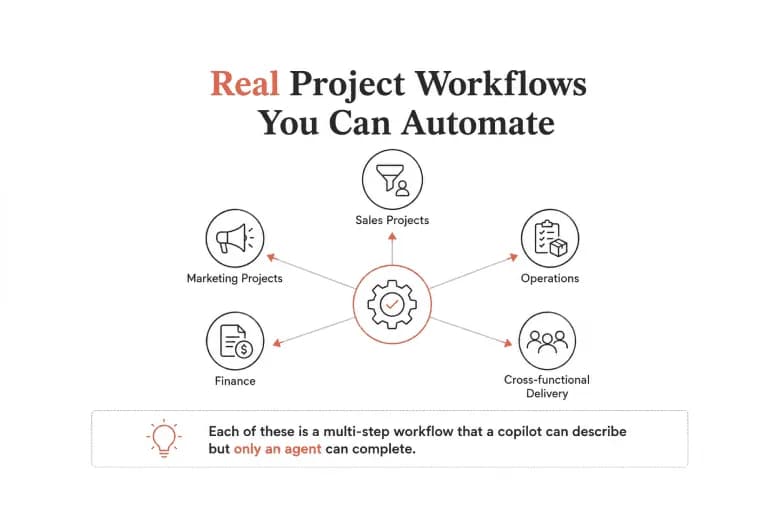
- Sales projects: Qualify inbound leads, enrich them, route to the right rep, and draft a first-touch follow-up - every form fill becomes a task in minutes, not days.
- Marketing projects: Schedule campaigns, draft content, monitor mentions, and pull weekly reports without daily babysitting.
- Operations: Vendor onboarding, procurement steps, inventory updates, and recurring ops reports that execute on schedule.
- Finance: Reconcile invoices, chase overdue payments, generate monthly reports, and flag spend anomalies.
- Cross-functional delivery: Auto-generate standups from live board data, escalate blocked tasks, and keep Asana, Jira, and Slack in sync as work moves.
Each of these is a multi-step workflow that a copilot can describe but only an agent can complete.
How to get started with AI project management
- Map the busywork. List the repetitive, low-judgment tasks your team does every week - status updates, task routing, report generation, follow-ups. These are your first automation candidates.
- Keep your existing tools. You don't need to rip out Asana or Jira. The best AI project management layer plugs into what you already run.
- Start with one workflow. Pick a single high-frequency process - like turning meeting notes into assigned tasks - and automate that end to end before scaling.
- Insist on human oversight. Choose tools with approval gates so agents pause for sign-off on anything consequential.
- Measure the time reclaimed. Track hours saved and errors avoided, then expand agent coverage from there.
You can start free on Pushable with 200 monthly credits - no seat fees, no commitment - and deploy your first agent across your project tools in minutes.
The bottom line
AI project management has graduated from novelty text boxes to genuine execution. The tools that just assist - copilots trapped in one app, chat assistants trapped in one session - still leave the project manager stitching everything together. The next step is agentic: AI that runs the work across your entire stack, around the clock, with a human approving anything that matters.
That's exactly what Pushable delivers - a shared AI workspace where always-on agents automate the busywork across your project tools while your team keeps control.