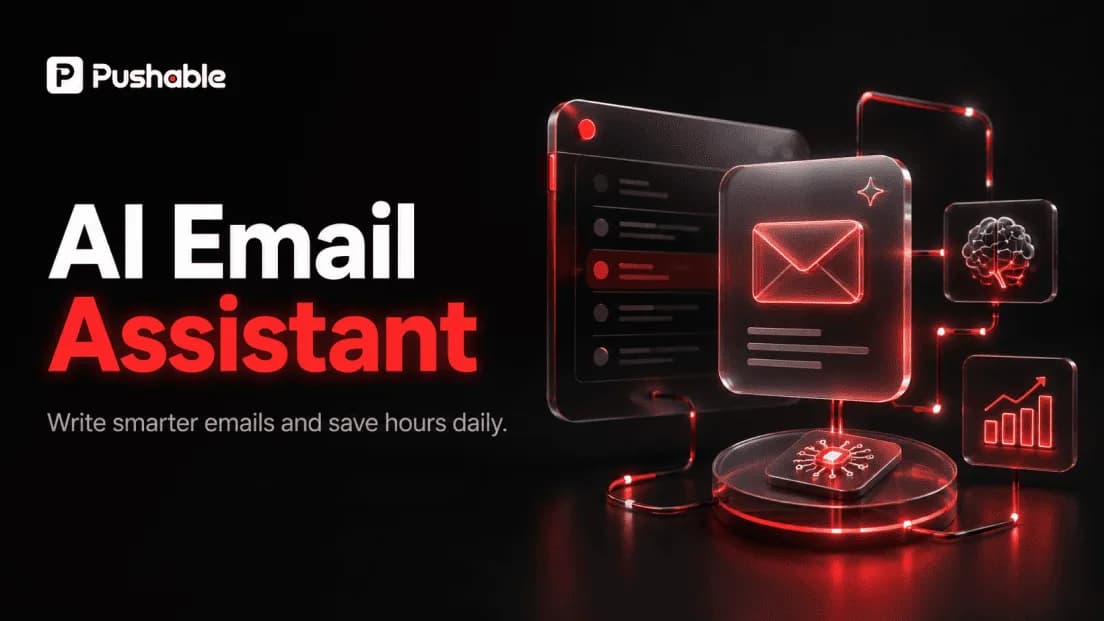
AI Email Assistant: How to Actually Get Your Inbox Handled in 2026 (Not Just Written)
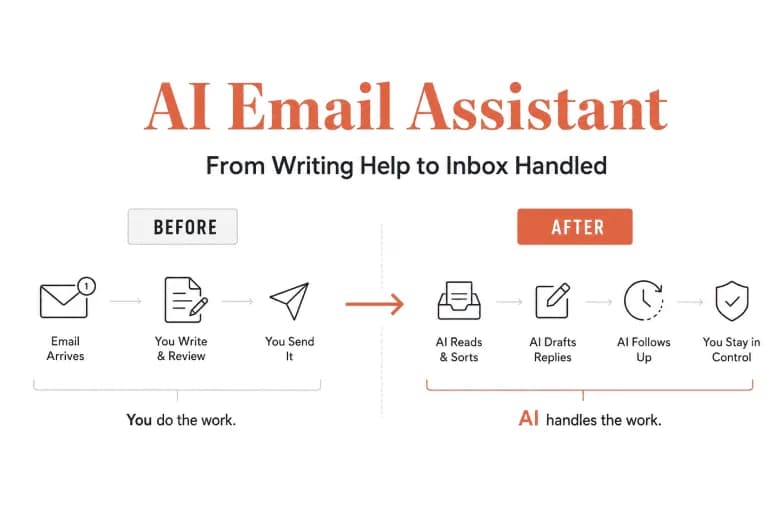
An AI email assistant is software that connects to your inbox and uses AI to read, sort, draft, and follow up on email on your behalf. The best ones don't just help you write faster - they take the repetitive workflow off your plate entirely, while keeping you in control of what actually gets sent. That last part is where most tools quietly fall short, and it's the difference between saving a few minutes per email and getting hours back every week.
If you've tested a handful of these tools already, you've probably noticed the gap. A writing assistant polishes a draft you still have to trigger, review, and send yourself. What you actually wanted was for the email work to happen - the sorting, the first-draft reply, the "did they ever get back to us?" follow-up - without you sitting in the inbox to make it move. This guide breaks down what an AI email assistant really is, where the category splits, what to look for, and how a team-native AI agent platform like Pushable closes the gap between "helps me write" and "handles it for me."
Why email is still the problem everyone is trying to solve
Email remains the single biggest time drain in most knowledge jobs. Multiple 2026 industry studies put the average time spent managing email at roughly 4.1 hours per day - more than half of a standard workday spent reading, sorting, drafting, and deleting. Fyxer's 2026 Admin Burden Index went further, reporting that 32% of US workers name their inbox as their single biggest daily time-waster, ranking email as the #1 time-wasting task at work.
The volume compounds too. The typical knowledge worker reads several emails for every one they send, and the vast majority of messages are skimmed in seconds - which means the real cost isn't reading, it's the constant context-switching and the mental overhead of deciding what to do with each thread.
That's the job an AI email assistant is supposed to remove. Whether it actually does depends entirely on which kind of tool you pick.
What is an AI email assistant? (A clear definition)
An AI email assistant is a tool that connects to your Gmail or Outlook account and uses large language models to handle inbox work: summarizing long threads, categorizing incoming mail by priority, drafting replies in your voice, extracting tasks, and surfacing messages that are waiting on a response.
The important nuance in 2026 is that "AI email assistant" now covers two very different product types that get lumped together:
- AI email writers generate or improve the text of a single message. You still open the tool, prompt it, review, and send. Great for polishing tone; limited on time saved.
- AI email assistants and agents connect to the inbox itself. They act on incoming mail - triaging, drafting, and following up - as an ongoing background process rather than a one-off writing session.
Knowing which one you're buying is the whole game.
Assistant vs. agent: the distinction that decides your time savings
This is the most important concept in the category, so it's worth stating plainly.
An AI email assistant helps you handle email faster - it drafts, organizes, and suggests, but you stay in the driver's seat for every action. An AI email agent works across your tools on its own - it reads the email, interprets it, decides what to do, and executes, escalating to you only when it needs a decision.
The time savings between the two are not close. An assistant shaves minutes off tasks you still initiate. An agent removes entire workflows. The catch has historically been trust: a fully autonomous agent that sends email on its own is a liability the moment it gets something wrong.
The teams running AI email well in 2026 have converged on a consistent pattern that resolves this tension:
- Drafts are staged, never blind-sent. A human approves anything that leaves the building.
- The AI is grounded in the team's real context - actual writing style, canned responses, CRM data, and past threads - not a blank chat window.
- The agent is always-on but bounded. It runs a small set of well-defined workflows continuously, rather than being told to "handle all my email."
Hold onto those three principles. They're exactly the criteria most single-user tools fail - and exactly what Pushable is built around.
What to look for in an AI email assistant
Whether you're evaluating a standalone tool or a broader automation platform, these are the capabilities that separate a genuinely useful assistant from a novelty:
Capability | What good looks like | Why it matters |
|---|---|---|
Context-aware drafting | Understands the full thread and matches your tone automatically | Generic replies still need a full rewrite - no time saved |
Smart triage | Auto-prioritizes and labels inbound mail by urgency and type | Lets you batch similar work instead of bouncing between threads |
Thread summarization | Condenses long chains into the decision or action needed | Kills the "scroll to the bottom to figure out what they want" tax |
Follow-up tracking | Surfaces emails awaiting a reply and drafts the nudge | The highest-value, most-forgotten email task |
Cross-tool action | Reads/writes to your CRM, calendar, and spreadsheets | Most emails create work in another app - that's the real workflow |
Human approval | Stages drafts and pauses for sign-off before sending | The only safe way to let AI act on real business email |
Always-on execution | Works on schedules and triggers, not only when the app is open | Email doesn't wait for you to log in |
Team support | Shared context, roles, and handoffs - not one inbox at a time | Email is a team sport; most tools ignore this |
Score any tool against that list and a clear pattern emerges: writing tools and native inbox add-ons cover the top few rows. Almost nothing covers the bottom four - cross-tool action, human approval, always-on execution, and true team support - in one place.
Where most AI email assistants fall short
The current crop of popular tools is genuinely good at what it does. But nearly all of them share the same structural limits, and it's worth being honest about them:
- They're single-player. Most AI email tools are optimized for one person's inbox. There's no shared workspace, no shared context, and no team-level control. When email work needs a handoff - sales to onboarding, support to engineering - the AI has no idea the rest of the team exists.
- They stop when you close the tab. Many assistants are session-based. The moment you're offline, the automation stops. Email, of course, keeps arriving.
- They're trapped inside the inbox. A reply is rarely the end of the job. The email needs to become a CRM record, a calendar hold, a spreadsheet row, a Slack ping. Inbox-bound tools can draft the reply but can't do the work the reply implies.
- Native assistants are locked to one client. Microsoft Copilot lives inside Outlook; Google Gemini lives inside Gmail. Powerful within their walls, but they don't reach across the rest of your stack - and they assume you've standardized on one ecosystem.
- Writing tools only write. Dedicated AI email writers (the "generate a draft from a prompt" tools) solve the blank-page problem and nothing else. Triage, follow-up, routing, and execution are all still on you.
None of these are dealbreakers if all you want is faster drafts. But if your real goal is getting the email workflow handled, they leave most of the job undone.
Pushable: an AI email assistant that actually finishes the job
Pushable approaches email from a different starting point. Instead of being an inbox add-on, it's a shared AI workspace where you deploy AI agents that run real workflows - email included - around the clock, with shared context, approval gates, and one workspace your whole team controls.
Put simply: Pushable treats email not as a destination but as one step in a workflow. An inbound message can trigger an agent that reads the email, pulls context from your CRM and knowledge base, drafts a reply in your team's voice, updates the right record, and pauses for a human to approve the send - all without anyone sitting in the inbox.
Here's how it maps directly onto the three principles the best teams live by:
1. Drafts are staged - every send waits for a human
Pushable is built around human-in-the-loop control. Approval gates pause an agent mid-task, and a notify-and-approve flow over Telegram means a teammate gets pinged and can approve or reject an action in one tap, from a laptop or a phone. Nothing customer-facing goes out without a human decision. That's what makes it safe enough to let agents touch real business email in the first place.
2. Agents are grounded in your actual business context
Because Pushable is a workspace rather than a chat session, your knowledge base, database, files, and memory all live in one place. Every agent is grounded in your real business context - your writing style, your policies, your customer history - instead of starting from a blank prompt. That's the difference between a reply that sounds like your team and a generic one you have to rewrite.
3. Always-on, and connected to the tools email actually touches
Pushable agents are cloud-native and continuous. They run on schedules and event triggers even when no one has the app open, so a lead that arrives at 2 a.m. gets triaged, enriched, and drafted before anyone logs in. And with 100+ native integrations - Gmail, Slack, HubSpot, Salesforce, Notion, Google Sheets, and more, plus custom connectors - the agent doesn't just reply; it does the downstream work the reply implies.
Built for teams, priced for outcomes
Two more things set Pushable apart from single-user tools. It's team-native by default - a shared workspace with shared memory, roles, and permissions, so who can view, act, and approve is defined from day one. And its pricing is usage-based rather than per-seat: you buy credits that are only spent when an agent actually completes a task - a message sent, a report filed, a workflow triggered - so the bill doesn't balloon with headcount. There's a free tier to start with no commitment.
What email workflows look like on Pushable
Concrete examples make the difference obvious. Here are email-centric workflows that are trivial to run as Pushable agents but out of reach for an inbox-bound assistant:
- Inbound lead handling. A form-fill or inbound email triggers an agent that enriches the contact, routes it to the right rep, drafts a personalized first-touch reply, and logs everything in HubSpot or Salesforce - turning a form fill into a conversation in minutes, not days.
- Support triage. Incoming support email gets categorized, a draft reply is prepared from your knowledge base, simple questions are staged for one-tap approval, and stuck issues are escalated to a human - so the team works people, not the queue.
- Follow-up that never gets forgotten. An agent watches for threads awaiting a reply and drafts the nudge on a schedule, so deals and requests don't die in silence.
- Finance and ops chasing. Overdue-invoice reminders and vendor emails go out on a recurring schedule, each one paused for approval before it sends.
In every case the pattern is the same: the agent does the work, the human approves the moments that matter, and the email is connected to the system where the real record lives.
Pushable vs. AI email writers vs. native inbox assistants
AI email writers (e.g. prompt-to-draft tools) | Native inbox AI (e.g. Outlook/Gmail assistants) | Pushable | |
|---|---|---|---|
Core job | Generate/polish one message | Summarize, draft, and search within one client | Run end-to-end email workflows across your stack |
Triage & follow-up | No | Partial | Yes, automated |
Acts across other tools | No | Limited to one ecosystem | 100+ integrations + custom connectors |
Runs when you're offline | No | Mostly session-based | Yes - cloud-native, always-on |
Human approval on sends | N/A (you send) | You send manually | Built-in approval gates via Telegram |
Built for teams | No | Single-user focused | Team-native workspace with roles |
Pricing model | Per-seat / per-use | Bundled per-seat | Usage-based credits, free tier |
The takeaway isn't that writers or native assistants are bad - they're well-built for a narrow job. It's that if your goal is handling email rather than just writing it, you need something that reaches past the inbox. That's the category Pushable is in.
How to choose the right AI email assistant
Skip the feature-checklist arms race and start from your actual problem:
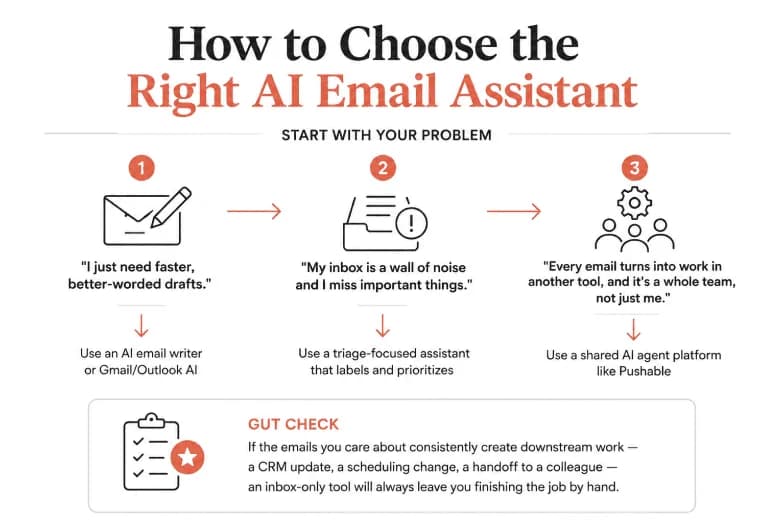
- "I just need faster, better-worded drafts." A dedicated AI email writer or your native Gmail/Outlook AI is probably enough.
- "My inbox is a wall of noise and I miss important things." A triage-focused assistant that labels and prioritizes will help most.
- "Every email turns into work in another tool, and it's a whole team, not just me." This is where a shared AI agent platform earns its keep. You want staged drafts, human approval, always-on execution, and deep tool integration - which is exactly the shape of Pushable.
A useful gut check: if the emails you care about consistently create downstream work - a CRM update, a scheduling change, a handoff to a colleague - an inbox-only tool will always leave you finishing the job by hand.
Implementation best practices
However you roll out AI email, a few practices keep it safe and genuinely useful:
- Start narrow. Automate one well-defined workflow (inbound leads, or support triage) before expanding. Bounded agents outperform "handle all my email."
- Keep a human on the send button. Stage drafts and require approval for anything customer-facing until you've built trust in the outputs.
- Feed it real context. Connect your CRM, knowledge base, and past threads so replies sound like your team, not a template.
- Review and tune weekly. Treat the first few weeks as calibration - adjust tone, categories, and rules based on what the agent gets right and wrong.
- Measure the right thing. Track time recovered and workflows completed, not just emails drafted.
The bottom line
The AI email assistant category has quietly split in two. On one side are tools that help you write - useful, but they leave most of the inbox job on your desk. On the other are AI agents that handle the work: triaging, drafting, following up, and doing the downstream tasks each email creates, with a human approving what matters.
If you only need better drafts, a writing tool will do. But if email is a genuine drain on your team - the 4-plus hours a day the research keeps flagging - you need something that reaches past the inbox, stays on all the time, and keeps a person in control of every send. That's precisely what Pushable is built to do.
Ready to stop babysitting your inbox? Deploy your first AI email agent on Pushable - free to start, with a human approving every send.