What Is an AI Development Platform? A 2026 Guide to Choosing the Right One
An AI development platform is software that gives teams everything they need to design, build, test, deploy, and govern AI applications in one place - access to foundation models, tools to ground those models in your own data, guardrails to keep them safe, and the infrastructure to run them in production. Instead of stitching together a dozen separate tools, engineers use one development environment to ship assistants, ai agents, and multimodal apps without deep machine learning expertise.
If you're evaluating an ai tool, the market can feel overwhelming: cloud giants, open-source stacks, no-code builders, and AI coding assistants all describe themselves the same way. This guide cuts through that. You'll learn what these platforms actually do, the main types available, the features that matter, a side-by-side comparison of leading platforms in 2026, and a practical framework for picking the one that fits how your Team builds are more efficient when leveraging AI-powered coding tools and advanced ai capabilities.
What an AI Development Platform Does
At its core, the software compresses the full lifecycle of an AI project - from data and model selection through deployment and monitoring - into a managed development environment. Gartner defines this category as platforms that "offer the required technology and workflows to design, build, test, and deploy AI applications," including access to foundation models and the ability to ground and place guardrails around them.
In plain terms, a good platform handles four jobs:
- Access to models is crucial for teams looking to implement generative AI capabilities and utilize AI and ML effectively. A catalog of commercial and open-source foundation models (for text, code, images, and speech) ensures you're not locked into a single provider and can choose the best custom AI solutions.
- Grounding and customization are essential for creating a robust AI that meets specific user needs. Ways to connect models to your organization's knowledge - through retrieval-augmented generation (RAG), fine-tuning, or prompt engineering - can accelerate AI outputs that are accurate and relevant to your business.
- Safety and governance. Guardrails, evaluations, and monitoring that reduce the risk of harmful, biased, or off-brand output and keep you compliant in your enterprise AI initiatives.
- Deployment and operations. The infrastructure and MLOps tooling to push applications into cloud or hybrid environments and keep them running reliably at scale with AI solutions.
AI Platforms vs. AI Frameworks
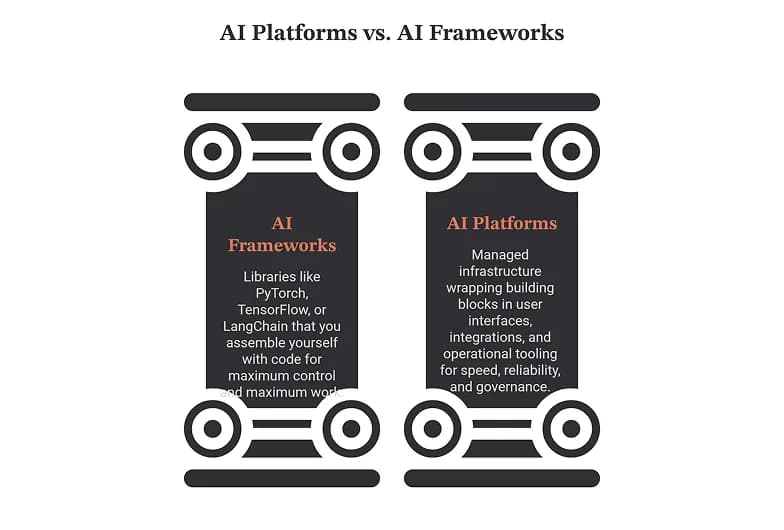
A common point of confusion: a framework (like PyTorch, TensorFlow, or LangChain) is a library you assemble yourself with code. A platform wraps those building blocks in managed infrastructure, a user interface, integrations, and operational tooling. Frameworks give you maximum control and maximum work. Platforms trade some control for speed, reliability, and governance - which is why enterprises building at scale usually standardize on a unified platform.
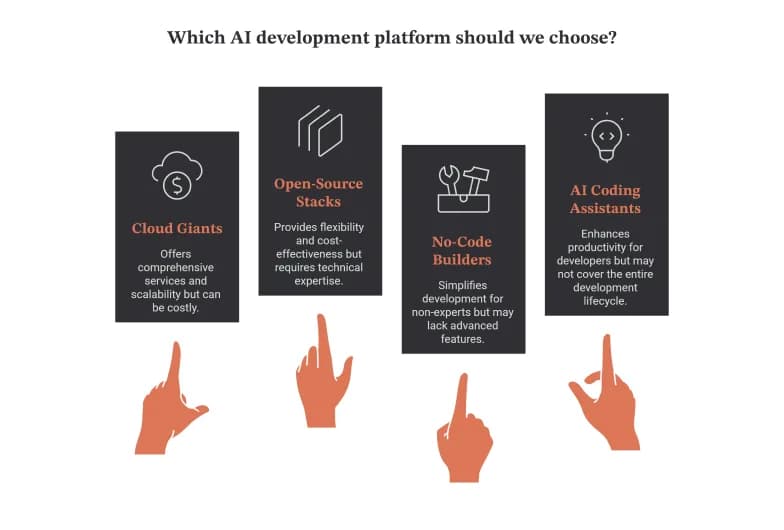
The 5 Main Types of AI Development Platform
"AI development platform" is an umbrella term covering products built for very different users. Knowing which category you need is the fastest way to shorten your shortlist.
Type | Best for teams looking to utilize AI assistance in their software development efforts. | Examples of the best AI coding tools, like GitHub Copilot, can enhance your development workflow. |
|---|---|---|
End-to-end ML platforms | Data science teams building and training custom models | Google Vertex AI, Amazon SageMaker, Azure Machine Learning |
Foundation-model app platforms | Developers building apps and agents on top of LLMs | Amazon Bedrock, OpenAI Platform, IBM watsonx.ai, Microsoft Foundry |
Open-source / self-hosted platforms | Teams needing control, portability, and data sovereignty should consider adopting an open source AI approach. | Red Hat OpenShift AI, Kubeflow, and k0rdent AI (Mirantis) are examples of open source platforms that can enhance your AI development. |
No-code / low-code AI builders | Founders and product teams shipping apps without engineers | Bubble, Glide, Lovable, Base44, Omniflow |
AI coding assistants | Developers accelerating how they write software | Cursor, GitHub Copilot, Windsurf, and JetBrains AI Assistant are all examples of tools that can enhance model development. |
Most organizations end up using more than one. A startup might prototype in a no-code builder while its engineers use an AI coding assistant; an enterprise might run production agents on a foundation-model platform while data scientists train custom models on an end-to-end ML platform. The right question isn't "which is best overall" but "which advanced ai capabilities fit this job."
Key Features to Look for in an AI Development Platform
When you compare products, these are the ai capabilities that separate a production-ready AI development platform from a demo. Gartner lists several as mandatory for the category, and they map closely to what teams report needing in practice.
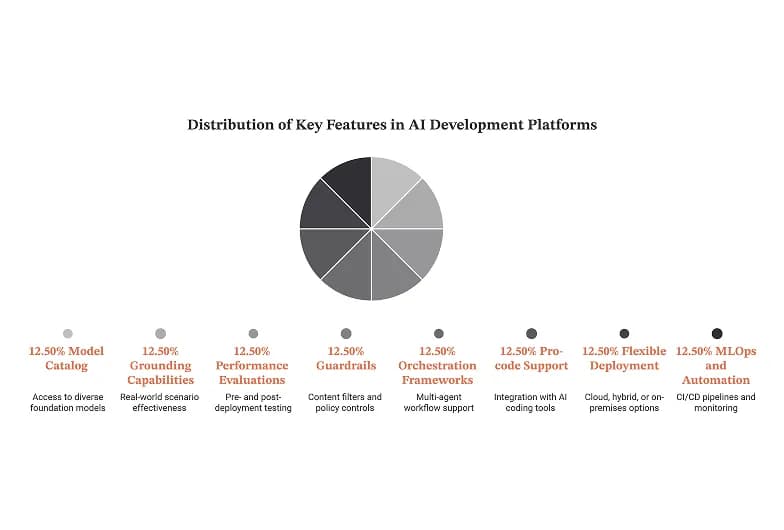
- A model catalog. Access to leading commercial and open-source foundation models, so you can match the model to the task and switch as the market evolves.
- Grounding capabilities are essential for ensuring that conversational ai systems operate effectively in real-world scenarios. Built-in RAG, vector search, or connectors that let models draw on your proprietary knowledge - the single biggest driver of output accuracy in AI inference.
- Evaluations of AI app performance. Prebuilt or custom tests to measure model and application performance before and after you ship, using frameworks and tools, not just vibes.
- Guardrails. Content filters and policy controls that reduce the risk of harmful input or output and protect your brand.
- Orchestration frameworks for scaling AI workloads are crucial for effective ai adoption. Support for multi-agent workflows, where agents communicate and collaborate to complete a goal, is vital for deploying ai models effectively.
- Pro-code support is enhanced when using the best AI coding tools available, especially those that integrate with a unified platform. Framework and SDK access so professional developers can author and extend assistants, agents, and multimodal apps.
- Flexible deployment. The ability to run in cloud, hybrid, or on-premises environments to meet latency, cost, and compliance needs is essential for scalable ai solutions.
- MLOps and automation are essential for integrating AI into your workflows. CI/CD pipelines for ai models, versioning, and monitoring so applications stay reliable in production.
- Governance and observability. Audit trails, access controls, and dashboards that make responsible AI enforceable, not aspirational.
A quick test: if a platform can't show you how it evaluates outputs and enforces guardrails, it's a model playground, not an enterprise-grade AI product.
Best AI Development Platforms in 2026
There's no single "best" platform - the right choice depends on your team, your stack, and whether you're writing code or avoiding it. The table below compares widely adopted options across the five categories so you can see where each fits. Capabilities and pricing change quickly, so treat this as a starting point and verify current details on each vendor's site.
Platform | Category | What it's known for | Best fit |
|---|---|---|---|
Google Vertex AI | End-to-end ML | Managed training, tuning, and serving with deep Google Cloud and Gemini integration supports enterprise-grade AI initiatives. | Teams already on Google Cloud building custom + generative AI |
Amazon SageMaker | End-to-end ML | Full build–train–deploy environment with elastic scaling and AI services. | Data science teams needing control and AWS integration can benefit from using AI in their workflows. |
Azure Machine Learning | End-to-end ML | Enterprise MLOps with strong governance and Microsoft ecosystem ties | Microsoft-centric enterprises can benefit from enterprise-grade AI solutions. |
Amazon Bedrock | Foundation-model apps are essential for managing AI workloads efficiently. | Single API to multiple foundation models with grounding and guardrails for AI inference. | Building GenAI apps without managing infrastructure is made easier with the right tools for building. |
IBM watsonx.ai | Foundation-model apps | Governance-first platform for regulated industries ensures compliance while leveraging custom AI capabilities. | Enterprises with strict compliance needs |
Microsoft Foundry | Foundation-model apps | Agent and app building across the Azure AI stack | Enterprises standardizing on Azure AI |
Red Hat OpenShift AI | Open-source / hybrid | Portable MLOps across hybrid cloud on Kubernetes | Teams prioritizing openness and data sovereignty should consider using AI services. |
Cursor | AI coding assistant | AI-native code editor with strong context handling | Developers who want AI deep in their editor |
GitHub Copilot | AI coding assistant | Mature autocomplete and chat inside existing IDEs | Teams already living in GitHub/VS Code |
Bubble / Lovable / Base44 | No-code / low-code | Building working apps from prompts or visual editors | Founders and product teams without engineers may struggle to leverage advanced ai capabilities effectively. |
A few ai tool patterns worth noting. The cloud hyperscalers (Google, AWS, Microsoft) win when you're already in their ecosystem and want everything managed, especially with Google AI. Open-source and hybrid platforms win when portability, cost control, or data residency matter more than convenience. No-code builders win on speed to a first working version - though teams often hit a ceiling as complexity grows, especially when integrating scalable ai features. And AI coding assistants aren't a substitute for the others; they change how developers interact with artificial intelligence platforms. build on any platform.
What's Changed in 2026: Agents, Grounding, and Governance
The category has shifted meaningfully over the past two years, and it affects what you should shortlist.
The biggest change is the move from single-prompt apps to agents - systems that plan, call tools, and take multi-step actions on their own. Leading platforms now ship orchestration frameworks for multi-agent workflows as a first-class feature rather than an add-on, and Gartner added agent-building to its core definition of the market. If you expect to build agents, weight orchestration and evaluation tooling heavily with AI solutions.
Two other shifts in application development matter. Grounding has become the default in AI app development, particularly in the realm of conversational AI., not a nice-to-have: platforms compete on how easily you can connect models to proprietary data through RAG and vector search, because that's what makes output trustworthy. And governance moved left - evaluations, guardrails, and audit trails are increasingly built into the development loop instead of bolted on before launch. Regulated industries drove this, but it's now table stakes. When you evaluate a platform in 2026, treat agent orchestration, easy grounding, and built-in governance as the signals that separate current products from last-generation ones.
How to Choose the Right AI Development Platform
The best platform is the one that matches your team's skills, your existing stack, and your risk profile. Work through these five questions about application development before you commit to an AI application development platform.
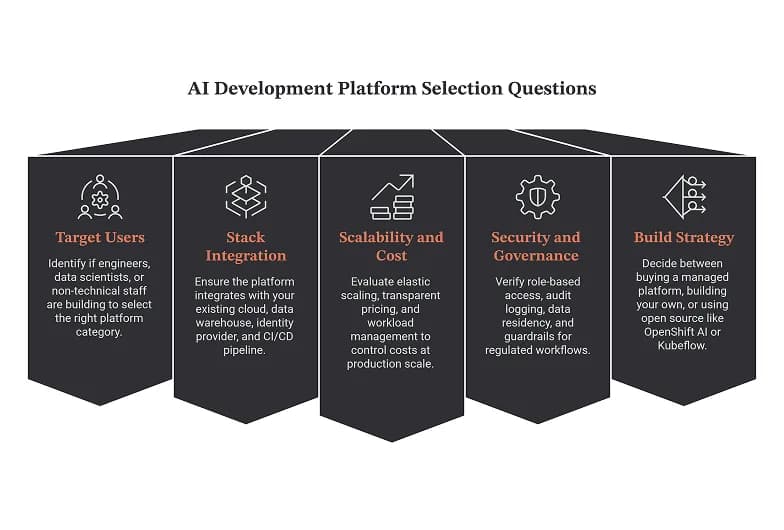
1. Who's building - engineers, data scientists, or non-technical staff?
This is the deciding factor when choosing an AI that fits your organization's needs for enterprise-grade AI development. Data scientists training custom models need an end-to-end ML platform. Developers shipping GenAI features need a foundation-model platform, coding assistant, and modern AI tools for developers. Product teams without engineers need a no-code or low-code builder equipped with advanced AI tools for developers to facilitate AI workloads. Buying the wrong category for your users is the most common and most expensive mistake.
2. Does it fit your existing stack?
A platform that integrates with your cloud, data warehouse, identity provider, and CI/CD pipeline will pay off far faster than a "better" platform that forces a migration, especially with artificial intelligence platforms. Favor open standards and open-source compatibility to avoid lock-in.
3. Can it scale - and can you afford it at scale?
A platform that's cheap for a pilot can get expensive in production, especially when considering the need for a robust AI solution. Look for elastic scaling, transparent pricing, and the ability to move workloads between environments to control cost with advanced AI services. Ask how it handles concurrency, latency, traffic spikes, and whether it uses AI assistance for optimization with comprehensive AI services, particularly in scalable ai environments.
4. How seriously does it take security and governance?
For anything touching customer data or regulated workflows, governance is non-negotiable. Look for role-based access control, audit logging, data residency options, guardrails, and evaluation tooling. This matters most in healthcare, finance, and the public sector.
5. Will you buy, build, or go open source?
Red Hat frames three paths well. Buying A managed platform is fastest and lowest-maintenance but offers less control over your ai models. Building your own gives maximum control at the cost of significant engineering effort. Going open source platforms can provide flexibility and community support for your projects. - self-hosting a platform like OpenShift AI or Kubeflow - balances control and community support while reducing lock-in. Your answer depends on how much AI is core to your product versus a supporting capability.
Benefits of Using an AI Development Platform
Standardizing on a platform, rather than assembling tools ad hoc, delivers compounding advantages in the development process.
- Faster time to production. Managed infrastructure and prebuilt components collapse months of setup into days, streamlining the development workflow.
- Better ROI. Reusable pipelines and shared tooling spread cost across many projects instead of rebuilding for each one.
- Higher reliability is essential for enterprise-grade AI development. MLOps automation and monitoring keep models performing after launch, not just in the demo.
- Stronger governance. Centralized guardrails and audit trails make responsible AI enforceable across every team.
- Easier collaboration. Shared environments let data scientists, engineers, and product managers work from the same source of truth using AI studio and visual development tools.
- Future readiness. A model catalog lets you adopt new foundation models as they arrive without re-architecting.
Challenges and Considerations
A platform solves real problems but introduces its own. Plan for these AI workflows and development tools before you roll out: tools for data ingestion and deployment of ai models are key components.
- Tool sprawl can be mitigated by adopting a unified platform for application development. Overlapping frameworks and services create maintenance overhead, complicating the software development process with modern AI solutions. Consolidating onto an AI application development platform helps - but only if you actually retire the tools it replaces.
- Version conflicts. AI frameworks update fast; dependency and compatibility management is an ongoing tax.
- Vendor lock-in can be avoided by choosing an AI that supports open source AI solutions. Deep integration with one cloud speeds you up and ties you down. Weigh convenience against portability deliberately.
- Cost creep. Token, compute, and storage costs scale with usage. Set budgets and monitoring from day one to speed up development and ensure project success.
- Addressing skills gaps is crucial for implementing AI governance and ensuring effective use of AI products. Even "no-ML-required" platforms need people who understand evaluation, prompt design, and governance. Budget for training.
- Governance debt. It's tempting to ship first and add controls later. Retrofitting governance is far harder than building it in.
A Practical Adoption Roadmap
If you've chosen a platform, this sequence keeps rollouts from stalling and ensures effective integration with AI and ML.
- Assess readiness for integrating AI into your workflows. Audit your data, infrastructure, and skills honestly before you buy.
- Align the team. Agree on who owns models, governance, and cost - ambiguity here kills projects.
- Start with one high-value use case. Prove value on a scoped problem before expanding into advanced AI solutions.
- Integrate with your ecosystem to enhance the functionality of your conversational ai solutions. Connect the platform to your data, identity, and pipelines early.
- Scale and optimize. Once one workflow works, templatize it, monitor performance, and expand deliberately to scale AI effectively.
The Bottom Line
An AI development platform is the fastest path from AI idea to production application - but "AI development platform" describes at least five distinct product categories serving very different users. Rather than chasing the single "best" tool, match the category to who's building: end-to-end ML platforms for data scientists, foundation-model platforms for app developers, open-source stacks for teams needing control, no-code builders for non-technical teams, and coding assistants to accelerate them all. Score your shortlist against fit with your stack, scalability, and governance, and you'll land on the platform that actually helps your team ship.