AI Automation Solutions: The 2026 Buyer's Guide to Choosing, Costing, and Deploying Them
Answer up frontAI automation solutions are systems that combine artificial intelligence reasoning models, machine learning, natural language understanding with execution layers like workflow automation, RPA, and API integration, so software can interpret unstructured inputs, make decisions, and complete multi step work across systems with limited human intervention. They differ from traditional automation in one specific way: rule based automation follows a script you wrote, while AI automation handles the cases you didn't script, making it ideal for repetitive tasks. Most organisations buy them in one of four forms: an orchestration platform, an agentic AI platform, an RPA/intelligent automation suite, or a custom build delivered by an implementation partner.
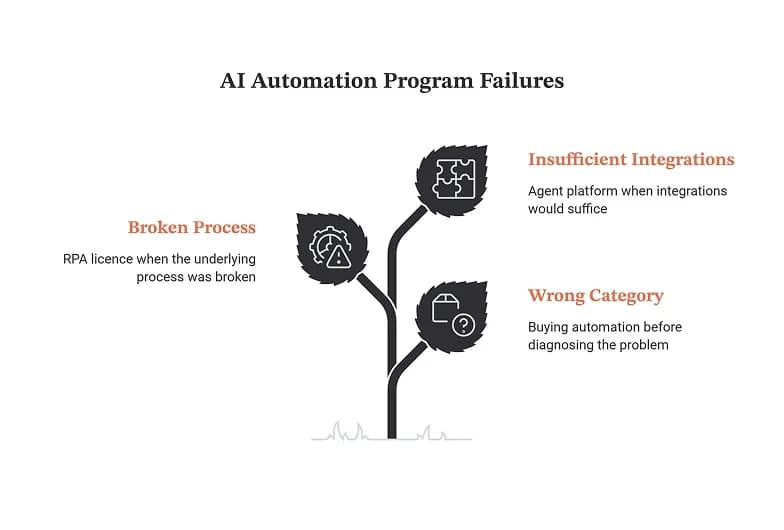
Most automation programmes don't fail because the technology doesn't work. They fail because a team bought a category before they diagnosed a problem a chatbot when the bottleneck was data quality, an RPA licence when the underlying process was broken, an agent platform when three well placed integrations would have done it.
This guide is structured to prevent that. It covers what AI automation solutions actually are, the four categories you can buy, how to evaluate them, what they cost, where they deliver measurable ROI, and how to sequence a rollout that survives contact with your existing stack.
What are AI automation solutions?
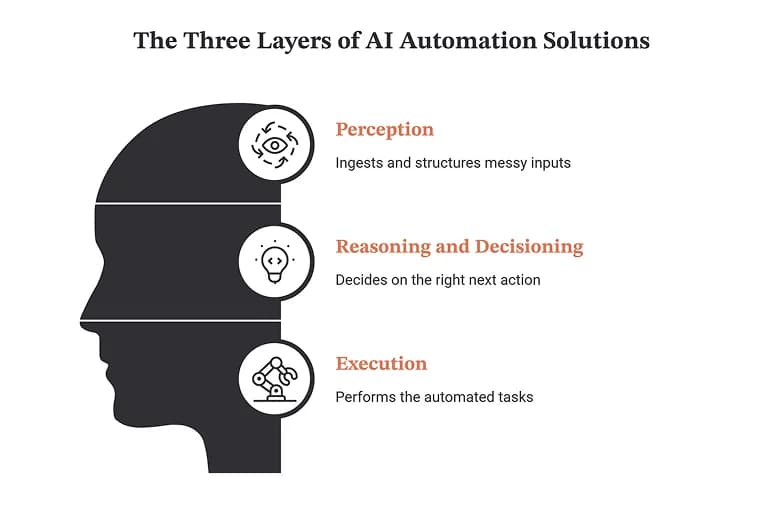
An AI automation solution has three layers. Understanding them is the difference between buying an AI tool that works and buying a demo of every AI.
Layer 1 Perception. The system ingests inputs that aren't clean rows in a database: an email, a PDF invoice, a Slack message, a support ticket written at 2am by a frustrated customer, a scanned contract. Large language models, OCR, and classification models turn that mess into structured intent.
Layer 2 Reasoning and decisioning. The system decides what should happen. This is where AI automation has moved beyond the previous generation, leveraging conversational AI for improved interactions. A rules engine asks "does this match condition X?" An AI decisioning layer asks "given this context, what is the right next action, and how confident am I?" and, in a well designed system, escalates to a human when confidence drops below a set threshold.
Layer 3 Execution of the robotic process automation strategy. The system does the thing: updates the CRM, issues the refund, provisions the laptop, drafts and sends the reply, reconciles the ledger entry. Execution happens through API integrations, RPA bots operating a legacy UI, or native actions inside a platform.
Any vendor missing a layer in their offering is selling you a component, not a solution, which is critical to understand in the business impact of ai automation. A model with no execution layer is a chatbot, while those that integrate AI agents that make decisions can provide significant value. An execution layer with no reasoning is RPA with a new logo. The value shows up when all three connect end to end which is also why integration depth, not model quality, is the single strongest predictor of whether a deployment sticks.
Why "solution" is the operative word
Enterprise buyers increasingly search for solutions rather than tools because the tool problem has been solved and the outcome problem hasn't. You can assemble a stack of best in class tools and still see productivity flatline, because work gets stuck in the handoffs between them. A solution is scoped to a business outcome days sales outstanding reduced, ticket deflection rate up, onboarding time halved and includes the integration, change management, and governance work required to actually reach it.
AI automation vs. RPA vs. workflow automation vs. BPM
These four terms look for in AI automation interchangeably in vendor marketing. They are not the same thing, and mixing them up leads directly to mis-scoped projects in the context of implementing ai automation.
Technology | What it does | Handles exceptions? | Best for | Breaks when |
|---|---|---|---|---|
Workflow automation | Executes a predefined sequence of steps across apps | No routes to a human | Notifications, handoffs, simple approvals, data sync | The input format changes |
RPA | Mimics human UI actions on systems without APIs, showcasing the versatility of ai automation technologies. | No bot fails | Legacy systems, mainframes, and screen scraping are often used in high volume data entry and can hinder the implementation of the best AI automation tools. | The UI changes by a pixel |
BPM | Models, measures, and optimises end to end processes | Via designed exception paths | Regulated, long running, multi party processes | Treated as software rather than a discipline, automation workflow can drive efficiency. |
AI automation | Interprets unstructured input, decides, and acts | Yes reasons or escalates | Variable, judgment heavy, high volume work is a critical area where AI automation delivers value. | Data is poor or scope is unbounded |
Agentic AI | Plans multi step work, selects its own tools, adapts | Yes replans autonomously | Complex cross system resolution with a clear goal | Guardrails and permissions are vague |
The practical takeaway: look for AI features that can enhance your existing business processes. these are complements, not competitors. The most durable production deployments in 2026 look like a BPM modelled process, executed by workflow automation, with RPA bridging the two legacy systems that will never get an API, and an AI layer sitting on top handling the 30% of cases that used to land in a human's queue. Vendors that build all of these into one platform Pega and UiPath among the enterprise incumbents sell on exactly that convergence.
The four categories of AI automation solutions
Every credible option on the market falls into one of four buckets, including new AI solutions that enhance functionality. Pick the bucket first; shortlist vendors second.
1. Orchestration and integration platforms
What they are: Broad connectivity layers that link thousands of applications and let you embed AI steps, AI agents, and conditional logic inside multi app workflows.
Representative vendors in marketing automation include those specializing in AI automation. Pushable AI, Zapier, Make, Workato, Tray, n8n (self hostable), Boomi and MuleSoft at the integration heavy/regulated end.
Best for: Mid market and departmental teams; go to market and revenue operations; anyone whose work spans many SaaS apps rather than a few monolithic systems.
Watch out for successful AI automation: Task based pricing that scales unpleasantly once an AI agent starts firing hundreds of steps per run. Model the cost at 10x current volume before committing.
2. Agentic AI and employee facing assistants
What they are: Platforms where an AI assistant sits in the interface employees already use Slack, Teams, email understands a request in natural language, and resolves it end to end across HR, IT, finance, and facilities systems.
Representative vendors: Moveworks, Aisera, Leena AI, ServiceNow, Glean (retrieval led), Intercom Fin and Help Scout on the customer facing side.
Best for: Enterprises with high internal ticket volume and a genuine service desk cost problem. The economics are straightforward when you're deflecting tens of thousands of tickets a year; they're weak below that.
Watch out for: gaps in AI governance and automation strategies. Deflection rates quoted in the sales cycle are almost always measured on the vendor's best fit customer. Ask for the rate at month three, not month eighteen, and ask what percentage of the corpus needed rewriting first.
3. Enterprise intelligent automation suites
What they are: Full stack platforms combining BPM, case management, decisioning, RPA, and agentic workflows, with the audit trails and role based control that regulated industries require.
Representative vendors: Pega, UiPath, Automation Anywhere, Microsoft Power Automate (particularly strong if you're already deep in the Microsoft estate), IBM, Celonis for process mining as the front end.
Best for: Banking, insurance, healthcare, telco, public sector anywhere a regulator will eventually ask you to explain a decision.
Watch out for: Total cost of ownership is dominated by implementation and centre of excellence staffing, not licences. Budget for both or the platform becomes shelfware.
4. Custom builds and implementation partners
What they are: Consultancies and specialist agencies that assess your processes, then design and build bespoke agents, integrations, and automations on top of your existing stack.
Representative vendors: Ranges from global systems integrators (Accenture, Infosys, Cognizant, Capgemini, Genpact) to boutique AI automation agencies such as Automaly, LeewayHertz, and LuMay, most of which now open with a paid readiness or discovery assessment before implementation.
Best for: Organisations whose differentiating processes don't map to any product, or who need the integration layer built before any platform can deliver value.
Watch out for: Ownership and lock in. Get it in writing that you own the code, the prompts, the evaluation sets, and the documentation and that the solution runs without the partner's proprietary middleware.
Category selector
If your situation is… | Start with |
|---|---|
Many SaaS apps, small ops team, fast payback needed | An orchestration platform can enhance your enterprise automation efforts. |
High internal ticket volume across IT and HR | Agentic assistant in financial services can enhance client interactions. |
Regulated, auditable, long running processes | The enterprise suite must integrate seamlessly with existing AI capabilities. |
Legacy systems with no APIs | RPA within a suite |
Differentiated process, no off the shelf fit | Custom build via partner |
You genuinely don't know where the bottleneck is | Process mining or a paid readiness assessment |
Pushable AI: workflow automation with the reasoning layer built in
Most teams shopping in category one hit the same wall. Classic workflow automation tools are excellent at moving data between apps and useless the moment an input arrives in a shape the workflow didn't expect. You end up with a growing library of automations that each handle the happy path and dump everything else into someone's queue which is precisely the handoff problem automation was supposed to solve.
Pushable AI is built for that gap: AI workflow automation where the reasoning layer sits inside the workflow rather than bolted onto the end of it. Instead of a rigid if this then that chain, a Pushable workflow can interpret an unstructured input, decide the appropriate next action based on context, execute it across your connected systems, and escalate to a human when its confidence falls below the threshold you set.
That maps directly onto the three layer model earlier in this guide:
Layer | What Pushable AI handles |
|---|---|
Perception | Ingests unstructured inputs emails, documents, form submissions, chat messages, tickets and turns them into structured intent, enhancing business processes. |
Reasoning | Decides the next action in context, with confidence scoring and configurable human approval gates rather than fixed branching logic, leveraging generative AI. |
Execution | Acts across your connected systems CRM, helpdesk, finance, and internal tools through native integrations and APIs |
Where Pushable AI fits best
- You've outgrown simple workflow automation. Your existing automations work until the input varies, and the exception queue is growing faster than the automation coverage.
- You want AI in the workflow, not a separate chatbot. The value is in the decision and the action, not in a chat window your team has to remember to open.
- You need to move quickly without an engineering programme. Teams that don't have platform engineers to spare but do have processes worth automating can benefit from leveraging the best AI automation tools.
- You want human oversight preserved by design in any ai automation services you implement. Confidence thresholds and approval gates are configuration, not a custom build which matters when you're automating anything customer facing or financial.
How to evaluate it
Run Pushable AI through the same nine point framework as everyone else on your shortlist. In particular: test the integration depth against your own sandbox rather than a demo environment, model the pricing at ten times your current volume, and confirm how LLM inference is billed. A vendor worth choosing will welcome that scrutiny.
If you want to see it against your own processes, you can evaluate the business impact of ai automation. explore Pushable AI's workflow automation platform or bring it into the pilot stage of the 90 day roadmap below as one of your two or three proof of concept candidates for AI powered automation.
How to evaluate AI automation solutions: a 9 point framework
Score each shortlisted vendor 1–5. Anything below a 3 on the first three criteria should be disqualifying, regardless of how good the demo was.
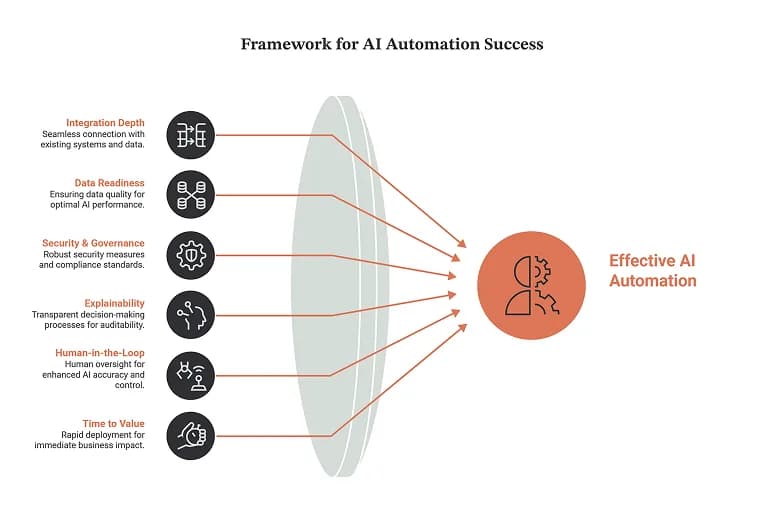
- Integration depth. Not "does it have a connector for Salesforce" but "can it read custom objects, respect field level permissions, and write back without breaking our validation rules?" Ask for a live test against your sandbox.
- Data readiness dependency. What does the system need from your data to work effectively with practical AI? A vendor who says "nothing, it just works" hasn't deployed at your scale. Poor data quality is the most common cause of stalled AI automation programmes.
- Security and governance posture. SOC 2 Type II, ISO 27001, data residency options, zero retention configuration, encryption in transit and at rest, and critically role based permissions that constrain what an agent can do on behalf of which user.
- Explainability and audit trail. Can you reconstruct why the system took an action six months later? In regulated contexts this is not optional.
- Human in the loop design is a critical aspect of the future of AI automation, ensuring that human oversight is integrated into the process. Confidence thresholds, approval gates, and a clean escalation path. Systems without these fail loudly and expensively.
- Time to first value. How long until one real process is live in production using AI and automation technologies? If the honest answer exceeds a quarter, momentum and budget both die.
- Scalability of pricing. Model per task, per seat, per agent, and consumption costs at 10x volume. Ask specifically how LLM token costs are billed.
- Change management support. Adoption is a people problem. Enablement material, admin training, and a named implementation contact matter more than a feature checkbox.
- Exit path. Can you export workflows, data, and logic? What happens to your automations if you leave?
AI automation use cases by department
Use this as a starting shortlist. Pick processes that are high volume, rules adjacent but exception prone, and measurable those three attributes together predict success better than anything else.
IT and internal support
- Password resets, access provisioning, software licence requests
- Ticket triage, categorisation, and routing
- Automated resolution of tier 1 requests inside Slack or Teams is a prime example of modern ai in action.
- Incident summarisation and post incident report drafting
HR and people operations
- Onboarding: account creation, equipment ordering, day one scheduling
- Policy Q&A grounded in your actual handbook
- Leave requests, benefits queries, payroll issue triage
- CV screening against structured criteria with a human decision maker retained
Finance and accounting
- Invoice ingestion, coding, and three way matching
- Expense policy checking and exception flagging
- Collections outreach sequencing and dunning
- Month end reconciliation and variance narrative drafting
Sales and revenue operations
- CRM hygiene: enrichment, deduplication, automatic activity logging, and implementing AI automation tools combine to streamline processes.
- Lead scoring and routing on behaviour, not just firmographics
- Call transcription into structured next steps and CRM fields
- Proposal and follow up drafting from opportunity context
Marketing
- Brief to draft content pipelines with human editorial control
- Campaign performance summarisation and anomaly alerts
- Audience segmentation and personalised sequencing
- Asset localisation and channel specific variant generation
Customer service
- Intent classification and priority routing
- Deflection through grounded self service answers is an essential component of modern AI automation.
- Draft replies surfaced to agents rather than sent autonomously
- Automated post resolution QA sampling and CSAT analysis
Operations and supply chain
- Purchase order matching and supplier onboarding checks are essential components of enterprise automation.
- Demand signal monitoring and exception alerting
- Document extraction from bills of lading, customs forms, contracts
- Compliance evidence collection and audit pack assembly
What AI automation solutions cost in 2026
Pricing varies enormously by category, so budget by band rather than by vendor.
Category | Typical commercial model | Indicative annual range | Hidden cost to watch |
|---|---|---|---|
Orchestration platform | Per task/operation + seats | Low four figures to mid five figures | Task inflation from agentic loops can undermine the effectiveness of ai automation technology. |
Agentic assistant | Per employee per year | Mid five to high six figures is often needed for serious investment in ai automation technology. | Knowledge base remediation work |
The enterprise suite integrates various AI and machine learning features to optimize workflows and improve efficiency. | Per case/user + platform fee | Six to seven figures | Implementation and CoE headcount are crucial for successful AI governance. |
Custom build (project) | Fixed scope, milestone billed | Mid five figures per workflow set | Change requests and integration surprises |
Custom build (retainer) for implementing ai automation services can be beneficial. | Monthly capacity planning is crucial for managing repetitive tasks effectively within the AI automation framework. | Four to five figures per month | Minimum term commitments |
Readiness assessment | One off | Low four to low five figures | Assessment that only recommends the vendor's own service |
Three costs consistently get missed at budgeting stage:
- LLM inference is a key component of traditional and generative AI. Metered separately by many platforms, and highly variable with prompt design. A poorly optimised agent can cost 5–10x a well optimised one for identical output.
- Integration and middleware. Frequently the largest line item in year one, especially where legacy systems are involved.
- Ongoing maintenance of the AI automation tool is critical for sustained performance and ensuring ai readiness. Automations decay. APIs change, processes shift, prompts drift. Assume 15–25% of build cost annually to keep things working.
Build vs. buy vs. partner
Buy a platform | Build an automation team in house. | Partner led build | |
|---|---|---|---|
Speed to value | Fastest | Slowest | Fast |
Fit the AI capabilities to your process for optimal efficiency, as ai readiness is essential. | Constrained by product | Exact | Near exact |
Upfront cost | Low–medium | High | Medium–high |
Ongoing cost | The recurring license for the AI automation platform ensures ongoing access to the latest updates and features. | Engineering headcount | Retainer or internal handover |
Lock in risk | High | None | Medium depends on contract |
Talent requirement | Admin/ops | ML + platform engineers | Product owner only |
Best when | Process is common | Process is your moat in the realm of AI automation requires continuous improvement. | Common problem, uncommon stack in automation capabilities. |
The honest heuristic: buy for commodity processes, build or partner for differentiating ones. Your invoice matching is not a competitive advantage buy it; task automation is key. The proprietary underwriting logic that determines your loss ratio probably is don't hand it to a rules template.
A hybrid pattern is now the norm: license a platform for the connectivity and governance layer, then have a partner build the custom agents and integrations on top of it. That keeps you off a bespoke island while still fitting your process.
How to calculate ROI before you sign
Do this on one page, before procurement, for each candidate process.
Step 1 Baseline the current process. Volume per month × average handling time × fully loaded hourly cost is crucial for evaluating ai automation technology. Add rework cost: error rate × cost per error.
Step 2 Estimate realistic automation coverage. Not 100%. Assume the system handles the routine share and escalates the rest. For a first deployment, 40–60% full automation with human review on the remainder is a defensible planning figure; anything above 80% in year one should be treated as a vendor claim requiring evidence.
Step 3 Subtract the true cost of implementing the best AI automation solution. Licence + implementation + integration + inference + 20% annual maintenance + internal time (which is real money, even though it doesn't hit the same budget line) is crucial for understanding the total cost of enterprise AI.
Step 4 Add the second order effects, but keep them separate. Faster cycle times, higher throughput without headcount growth, reduced compliance exposure, better employee retention in roles that were previously drudgery. Report these alongside the hard number, not folded into it credibility with your CFO depends on the distinction.
Step 5 Set the measurement plan before go live. Define the metric, the baseline value, the target, the measurement method, and the review date. Programmes without this cannot prove value and quietly lose funding at renewal, especially when AI automation combines artificial intelligence.
A sanity check: if the payback period exceeds 12 months on your first process, choose a different first process. Early wins fund the programme and demonstrate the value of AI automation in streamlining business processes.
A 90 day implementation roadmap
Days 1–15: Diagnose
Map candidate processes with the people who actually run them, not just their managers. Score each on volume, variability, measurability, and data availability. Use process mining if you have it. Output: a ranked opportunity list with estimated ROI per item.
Days 16–30: Scope and select
Pick exactly one process for the pilot the one with the best ratio of impact to integration complexity in the context of AI tool implementation. Shortlist two or three vendors. Run a proof of concept against your real data in your sandbox, not their demo environment, to validate your AI safely. Define success numerically before you start.
Days 31–60: Build
Integrate, configure, and test every AI solution to maximize efficiency. Set confidence thresholds conservatively at first you can loosen them once you have evidence from the AI and automation metrics. Build the escalation path and the audit logging on day one, not as a phase two. Run in shadow mode against live traffic where possible: the system proposes, humans decide, and you compare results to improve automation workflow.
Days 61–75: Pilot in production
Release to a limited user group. Instrument everything to ensure established automation is effective. Hold a weekly review of exceptions the exception log is the most valuable artefact of the entire pilot, because it tells you exactly where the model's understanding and your process reality diverge.
Days 76–90: Measure, decide, and sequence
Compare results against your pre defined success criteria. Publish the numbers internally, including what didn't work in your AI and machine learning initiatives. Then choose the next two processes, prioritising ones that reuse the integrations you just built reuse is where the compounding returns in automation actually come from.
Governance, security, and the failure modes nobody warns you about
Design governance in from day one. Retrofitting it is significantly more expensive and, in regulated environments, sometimes impossible without rebuilding the AI models and capabilities. At minimum you need: a named owner per automation, documented permissions defining what each agent can access and act on, an audit trail of decisions and actions, a defined human escalation path, and a kill switch that a non engineer can operate.
The five failure modes that kill deployments:
- Automating a broken process. Automation makes bad processes fail faster and at greater volume. Fix the process first, then automate it.
- Poor data quality. The most under diagnosed cause of stalled programmes is the lack of effective agentic automation strategies. If your knowledge base is out of date, the assistant will confidently give wrong answers at scale, which is a challenge for successful AI automation.
- No adoption plan. Employees route around tools they don't trust. Involve them in design, be explicit about what the automation does and doesn't decide, and never surprise a team with a system that changes their job.
- Unbounded agent scope. Agents with vague goals and broad permissions produce unpredictable behavior, complicating RPA and AI integration. Narrow scope, explicit tools, and tight permissions beat "let it figure it out" in every production setting we've seen described publicly.
- No measurement of the effectiveness of the AI automation tool can lead to poor decision making in automation capabilities. If nobody baselined the before state, the after state is unprovable and unprovable programmes lose their budget in the next planning cycle.
On regulation: the EU AI Act's obligations phase in through 2026 and 2027, with requirements varying by risk classification. If your automation touches hiring, credit, insurance pricing, or other decisions affecting individuals, treat classification as a legal question and get an answer before you deploy, not after. Verify current obligations with counsel this area is moving quickly.