The Shared AI Workspace
The Shared AI Workspace
Automate LinkedIn outreach by working through a queue of profiles, sending personalized connection requests, and verifying each one actually goes through — without breaching LinkedIn's invite limits.
Category
SalesTags
Overview
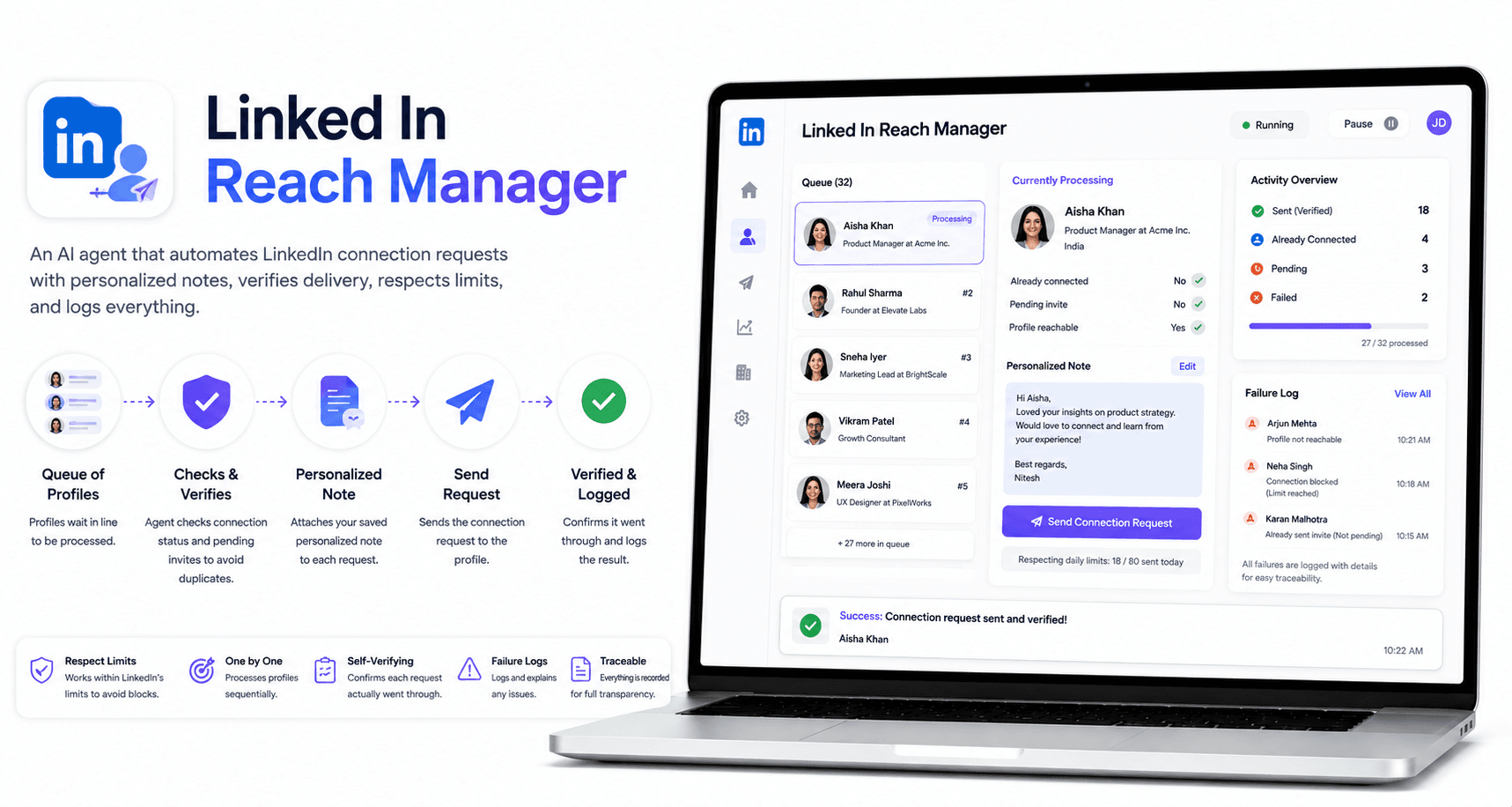
Linked In Reach Manager automates outreach on LinkedIn by working through a queue of profiles and sending connection requests on the user's behalf. It confirms LinkedIn is logged in, skips profiles that are already connections or have a pending invite, and asks once for a note to include with requests — reusing it automatically on every future profile until told to change it. The agent verifies each request actually went through, rather than being silently blocked by LinkedIn's weekly invite limit, and logs full page state whenever it can't find an expected button, so failures are diagnosable instead of disappearing silently.
Business Problem
Manually sending LinkedIn connection requests one profile at a time is slow and repetitive.
Outreach without personalization lowers acceptance rates.
LinkedIn's weekly invite and note limits are easy to hit without realizing it, causing requests to fail silently.
Sales and outreach teams struggle to track which profiles have already been contacted or are already pending.
Failed connection attempts are hard to diagnose without visibility into what actually happened on the page.
Workflow
Agent confirms LinkedIn is logged in
↓
Agent pulls the next profile from the queue
↓
Agent checks if the profile is already a connection or has a pending invite
↓
Agent asks once for a connection note and saves it for reuse
↓
Agent clicks Connect and sends the note (or sends without one once today's note limit is hit)
↓
Agent verifies the request actually went through, not silently blocked by the weekly invite limit
↓
Agent logs full page state for any button it can't find
Key Features
Works through a queue of LinkedIn profiles automatically.
Confirms LinkedIn login status before starting.
Skips profiles that are already connections or have a pending invite.
Asks once for a connection note and reuses it on every future profile until changed.
Falls back to sending without a note once the daily note limit is reached.
Verifies each request actually went through, catching LinkedIn's weekly invite limit silently blocking sends.
Logs full page state when an expected button can't be found, for easy diagnosis.
Business Benefits
Save hours of manual, repetitive outreach work.
Increase connection acceptance rates with consistent, personalized notes.
Avoid wasted effort from requests silently blocked by LinkedIn limits.
Scale LinkedIn networking and lead generation without added headcount.
Reduce troubleshooting time with detailed failure logs.