The Shared AI Workspace
The Shared AI Workspace
Automates invoice processing by extracting invoice details from emails, preventing duplicates, uploading files to Google Drive, and logging records into Google Sheets.
Integrations
Category
FinanceTags
Logging every incoming invoice manually is slow, repetitive, and prone to errors. Invoice Processing Agent automates the entire accounts payable process by monitoring your inbox for unread invoice emails, identifying genuine invoices, extracting key invoice details, uploading invoice files to Google Drive, and logging exactly one row per invoice into a Google Sheet.
Instead of manually reviewing emails, copying invoice information, organizing invoice files, and checking for duplicates, your finance team receives a centralized invoice register with linked documents. This ensures every invoice is processed accurately while remaining safe to run repeatedly without creating duplicate records.
Finance teams often spend valuable time reviewing invoice emails, extracting invoice details, uploading supporting documents, and maintaining spreadsheets. This manual process is time-consuming, error-prone, and increases the risk of duplicate entries, incorrect amounts, missing invoice records, and disorganized files, making it difficult to maintain an accurate and reliable accounts payable system.
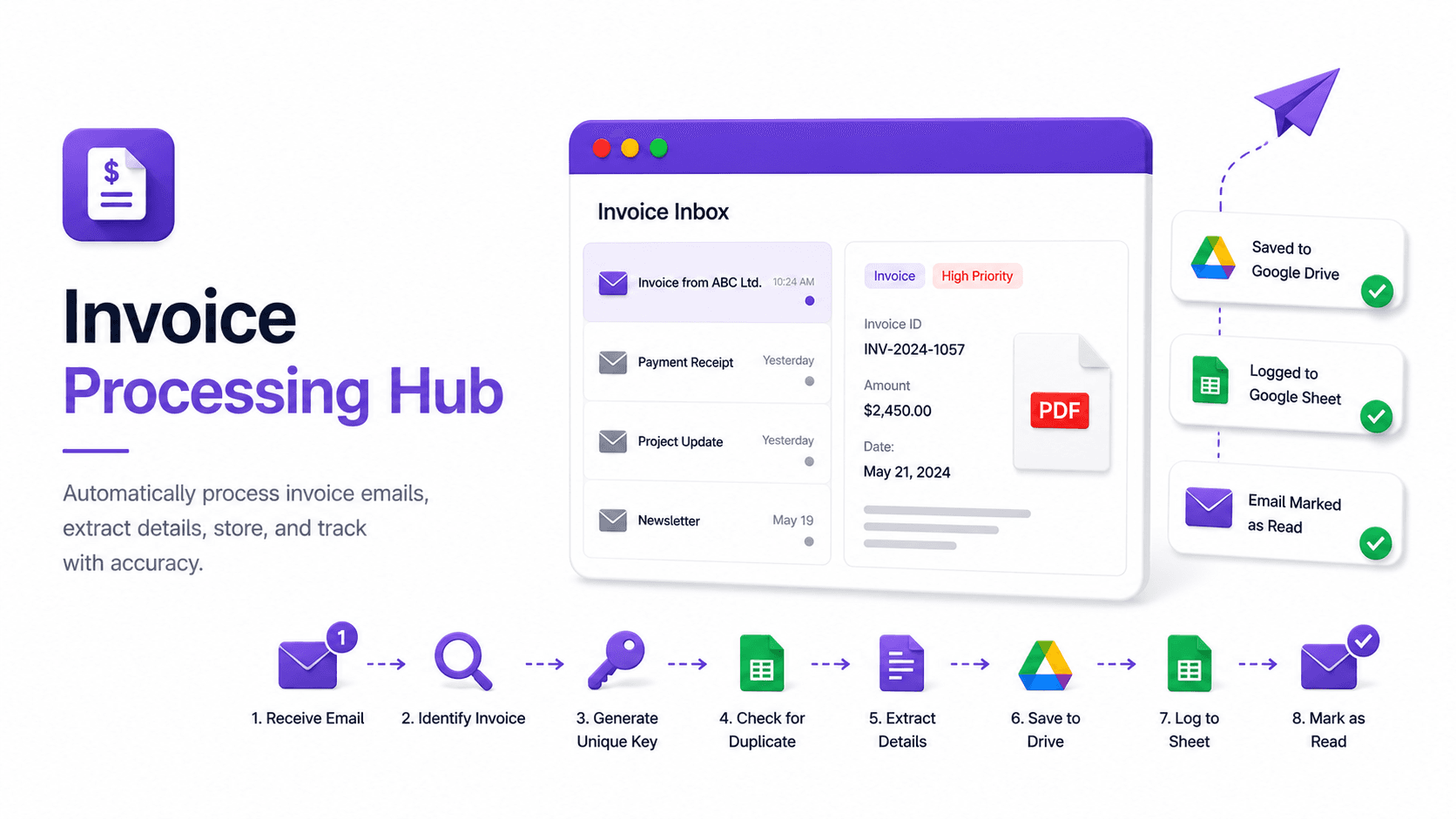
Unread invoice email received
↓
Identify invoice or non-invoice
↓
Generate Invoice Unique Key
↓
Check Google Sheet for duplicate invoice
↓
Extract invoice details
↓
Upload invoice file to Google Drive
↓
Append invoice record to Google Sheet
↓
Mark email as read
• Automatically monitors your inbox for unread emails containing invoice attachments.
• Supports PDF, DOC, DOCX, XLS, XLSX, JPG, JPEG, PNG, and HTML-based invoices.
• Accurately distinguishes invoices from receipts, quotations, purchase orders, proforma invoices, newsletters, promotions, and other non-invoice documents.
• Extracts vendor name, sender email, invoice number, invoice date, due date, payable amount, currency, and tax directly from the invoice without guessing missing values.
• Generates a unique invoice key for every invoice and performs duplicate detection before uploading files or logging records.
• Processes multiple invoices within a single email independently, creating one spreadsheet row for each invoice.
• Normalizes all dates into YYYY-MM-DD format and stores monetary values as clean numeric amounts.
• Uploads invoice files to a dedicated Google Drive "Invoices" folder while preserving original filenames whenever possible.
• Reuses existing Google Drive files when the same invoice has already been uploaded.
• Flags invoices with incomplete, unclear, or unreadable information as Needs Review instead of skipping or inventing data.
• Logs invoices successfully before marking emails as read, preventing accidental data loss.
• Returns a complete processing summary showing processed invoices, duplicates, non-invoices, review items, and failures after every execution.
• Eliminate repetitive manual invoice data entry.
• Prevent duplicate invoice processing automatically.
• Improve the accuracy of invoice records and financial data.
• Maintain a centralized and searchable invoice register.
• Keep all invoice documents securely organized in Google Drive.
• Reduce manual effort involved in invoice validation and record keeping.
• Safely run the workflow multiple times without creating duplicate entries.
• Allow finance teams to focus on payment processing and financial operations instead of administrative tasks.